Download LYF Jio F320B Flash File to install KAIOS OS on your phone.
- LYF-F320B-002-02-58-140422 (latest)
- LYF-F320B-002-02-56-250322
- LYF-F320B-002-02-49-301121
- LYF-F320B-002-02-37-130921
- LYF-F320B-002-01-83-131020
- QFlash Tool

Boot Key: ‘*’
Note: Steps to Enable Diag Port in Jio Phones
How to Flash LYF Jio F320B:
1- Download LYF Jio F320B Flash file which consists of File, tool & Driver.
2- Install Driver
3- Connect Phone holding Boot key: * mode to cross-check driver installation. It will make port named “Qualcomm HS-USB Diagnostics 9008”.
4- It means the driver has been installed successfully.
5- Install Flash Tool, which will install a shortcut on Desktop named Qflash_Tool_9.1.7.
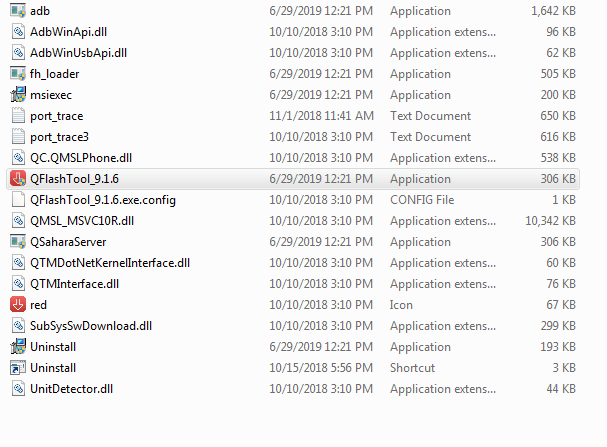
6- Connect phone (Press * as Boot key)& Click on Load Content and from Flash File Folder select Content.xml
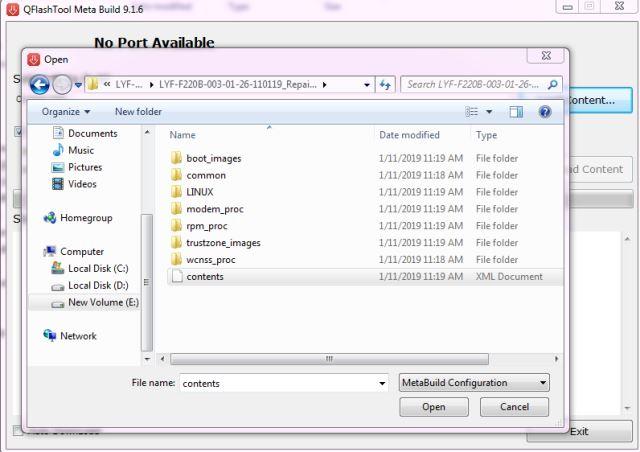
7- It will show Port in tool.
8- Click on Download Content to start Upgrading.
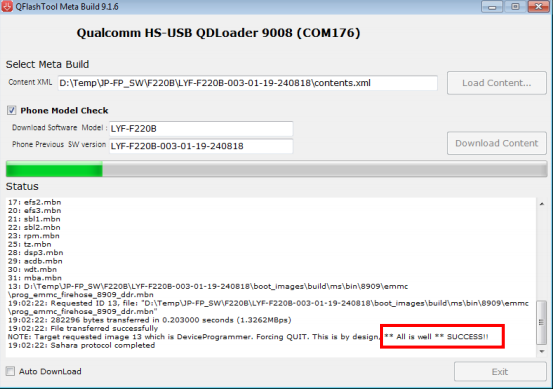
9- Wait till done appears.
10- After upgradation, device will shift to download mode.
11- Disconnect Phone & reinsert battery.
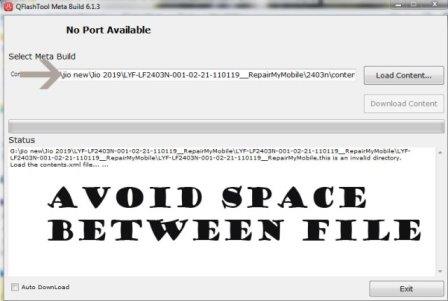
If flashing Fails or does not start, then there must be a gap between the words while choosing flash file. Rename the folder.
As in Qualcomm Flashing, there must be no gap in between the words.
jio new should be replaced by jio_new or jionew.