
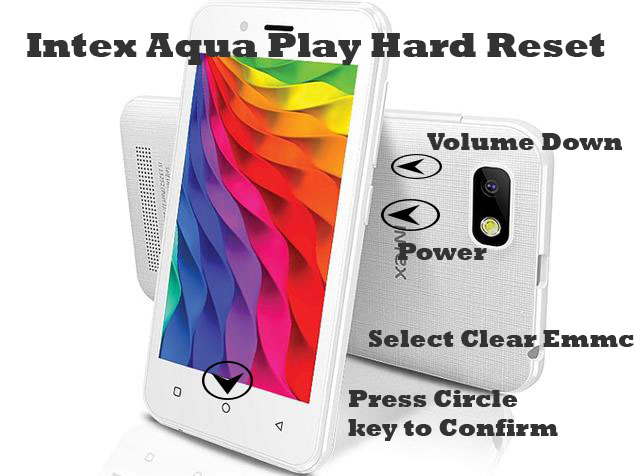
1- Charge Intex Aqua Play upto 70 percent.
2- Switch off device.
3- Press & Hold Power and Volume down key.
4- As soon as Intex logo appears, release power key and hold Volume down key only.
5- Select Clear Emmc using Volume down Key.
6- Press Circle Key at the center to confirm.
7- Phone will restart with password reset to default.
Intex Aqua Play Pattern Unlock
Intex Cloud Flash Stock Rom (Firmware)
Download Intex Cloud Flash File:
How to Flash Intex Cloud:
Install MTK Driver.
1- Download the package & Extract SP Flash tool.
2- Out of the icon appearing, Double click on Flash_tool.exe
3- it will launch the tool on your PC, Click on Scatter-Loading appearing on the Right side of the tool.
4- Now, assign the firmware which will be in form “Android_scatter.txt”.
5- Click on Download to start flashing.
6- Switch off your Mobile and Connect it to PC by pressing Volume down or Volume up key.
7- It will lead you to Successful Flashing
Micromax Q349 Stock Rom / Flash File (Firmware)
Download Micromax Q349 Flash File:
How to Flash Micromax Q349:
Install MTK Driver.
1- Download the package & Extract SP Flash tool.
2- Out of the icon appearing, Double click on Flash_tool.exe
3- it will launch the tool on your PC, Click on Scatter-Loading appearing on the Right side of the tool.
4- Now, assign the firmware which will be in form “Android_scatter.txt”.
5- Click on Download to start flashing.
6- Switch off your Mobile and Connect it to PC by pressing Volume down or Volume up key.
7- It will lead you to Successful Flashing
use SP Flash tool For FRP Unlock in MTK
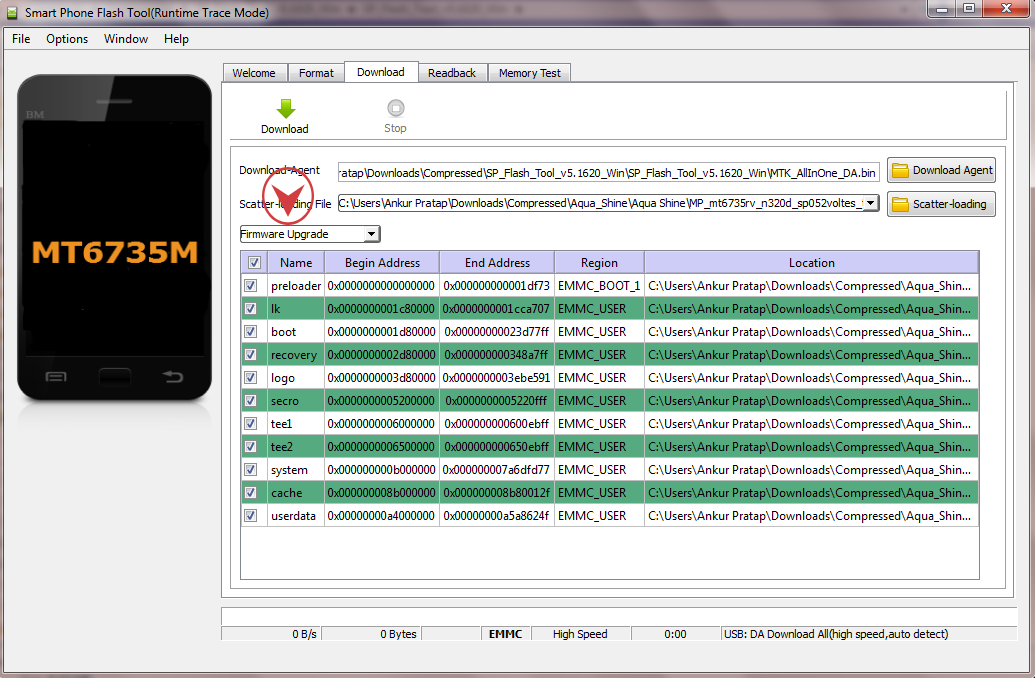
This process only work on MTK Chipset.
1- Install MTK Driver.
2- Download SP Flash tool.
3- Download MTK Firmware.
4- Run SP Flash tool.
5- Click on Scatter-Loading and assign the path of stock rom.
6- Select Firmware Upgrade as shown in image
7- Click on download.
8- As soon as Flashing is completed, Restart the phone.
9- Gmail Lock has been reset.
Spice Xlife M5Q Plus Flash file (Stock ROM)
Download Spice Xlife M5Q Plus Flash File:
How to Flash Spice Xlife M5Q Plus:
Install SPD Driver
1- Download the package & Extract Flash tool.
2- Out of the icon appearing, Double click on UpgradeDownload.exe.
3- It will Launch the tool on PC.
4- Click on Load Packed button & Select the Firmware with extension .pac at end.
5- Click on Downloading button which is at third position.
6- Switch off your Mobile & connect it to PC using Volume down key.
7- It will lead you to Successful flashing.
Spice Xlife 425 3G Stock ROM Firmware (Flash File)
Download Spice Xlife 425 3G Flash File:
How to Flash Spice Xlife 425 3G:
Install MTK Driver.
1- Download the package & Extract SP Flash tool.
2- Out of the icon appearing, Double click on Flash_tool.exe
3- it will launch the tool on your PC, Click on Scatter-Loading appearing on the Right side of the tool.
4- Now, assign the firmware which will be in form “Android_scatter.txt”.
5- Click on Download to start flashing.
6- Switch off your Mobile and Connect it to PC by pressing Volume down or Volume up key.
7- It will lead you to Successful Flashing
