Download the Firmware and place it into root folder of MicroSD card.
1- Your Oppo Phone must be 30-40 percent charge to perform flashing.
2- Switch off Phone.
3- Press & Hold Power + Volume down until Oppo logo appears.
4- Select Language using touch.
5- Now, Out of the option. Choose, Wipe Data & Cache.
6- Select Install from memory card.
7- Select the zip file.
8- Upload starts and when completed reboot the phone.
| Oppo Phones | Flash File |
| Oppo F3 | Download |
| Oppo X9009 | Download |
| Oppo A37 | Download |
| Oppo R831 | Download |
| Oppo N1 | Download |
| Oppo Find 7 | Download |
| Oppo F1F | Download |
| Oppo N3 N5206 | Download |
| F1 Plus | Download |
| F1 | Download |
| R7 Plus | Download |
| R7 Lite | Download |
| N3 | Download |
| Joy | Download |
| Yoyo | Download |
| Neo 5 | Download |
| Oppo R7 Plus F | Download |
| Oppo R7kf Lite | Download |
| Oppo R5 | Download |
| Oppo F1s | Download |
| Oppo Mirror 5 | Download |
| Oppo N1 Mini | Download |
| Oppo Neo 7 A33f | Download |
| Oppo Mirror 3 | Download |
| R5 | Download |
| N1 | Download |
| N1 Mini | Download |
| Find 7 | Download |
| Find 7A | Download |
| Joy Plus | Download |
| Joy 3 | Download |
| R1011 (SP Flash tool) | Download |
| Find F5 Mini | Download |
| Oppo R827 (4GB & 8GB) | Download |
| Oppo R815 | Download |
| Oppo R819 | Download |
| Oppo R2001 | Download |
| Oppo R1001 | Download |
| Oppo R821 | Download |
| Oppo Joy 3 | Download |
| Oppo Neo 3 | Download |
| Oppo Neo 5 | Download |
| Neo 7 | Download |
| R1 | Download |
| Mirror 5 | Download |
| Mirror 3 | Download |
| Neo 3 | Download |
| Neo | Download |
Qmobile Firmware Download (Flash File)
Download Qmobile Firmware to Flash.
Every Firmware contains Flash tool & driver required for Flashing.
Flashing helps to overcome:
1- Software issue.
2- White Screen.
3- Stuck at Logo.
4- Hard Reset Fails.
5- Automatic App. installation
| Qmobile | Firmware |
| X30i | Download |
| QTab V6 v1.03 | Download |
| A9 v1 | Download |
| A2 Classic | Download |
| A2 v2 | Download |
| A15 v1.19 | Download |
| A120 v2 | Download |
| M82i | Download |
| Z9 Lollipop | Download |
| M88 | Download |
| S5 v1 Lollipop | Download |
| X950 Lollipop | Download |
| Z8 v06 Lollipop | Download |
| M82 v2.11 | Download |
| I6 v1.6 | Download |
| I6I v2 Lollipop | Download |
| i7 v2.11 | Download |
| LT700 | Download |
| Z12 Lollipop | Download |
| Z10 | Download |
| Z6 v2.10 | Download |
| A500 v1.2 | Download |
| X90 | Download |
| X550 | Download |
| X400 v2.10 | Download |
| X37 v1 | Download |
| X2 | Download |
| A30 | Download |
| A51 | Download |
| A550 v1.6 | Download |
| A63 | Download |
| i5i Classic | Download |
| S1 v1 | Download |
| S6 Marshmallow | Download |
| M9T | Download |
| QTab Q100 | Download |
| QTab Q50 | Download |
| X1 | Download |
| X100 v2.10 | Download |
| X200 | Download |
| X25 | Download |
| X30 v1 | Download |
| X35 12122014 | Download |
| X35 20140829 | Download |
| X5 Scatter | Download |
| X5 Bin | Download |
| X800 v2 | Download |
| Z7 v7484 | Download |
| i8 Lollipop | Download |
| L15 v1 Lollipop | Download |
| LT150 | Download |
| i10 v2.11 | Download |
| S2 | Download |
| X70 | Download |
| X250 L106 | Download |
| QTab V8 | Download |
| M90 v2.10 | Download |
| i5i v2.10 | Download |
| A75 | Download |
| i9 v1.6 | Download |
| X6 | Download |
| QTab Q850 | Download |
| A700 v1 | Download |
| A70 | Download |
| A650 v1.2 | Download |
| A65 | Download |
| S3 v2 | Download |
| LT250 Kitkat | Download |
| L10 (OTA) | Download |
| I7I | Download |
| I4 | Download |
| A115 | Download |
| A12 | Download |
| A3 SE | Download |
| A300 | Download |
| A34 | Download |
| A5 Classic | Download |
| QTab Q400 | Download |
| QTab Q1100 | Download |
| QSmart S19 | Download |
| QSmart QS16 | Download |
| Noire Quatro Z4 | Download |
| Noir A11 | Download |
| A10 v10 | Download |
| M350 Lollipop | Download |
| A6 v2.3 | Download |
| A55 MT6572 | Download |
| A55 MT6572 v1 | Download |
| A290 v1 | Download |
| A600 v1 | Download |
| A900i v1.6 | Download |
| A900i Jellybean | Download |
| A2 Lite v2.3 | Download |
| A4 Lite | Download |
| X600 v2 | Download |
| S29 v4 | Download |
| S29 v6 | Download |
| i12 v2.10 | Download |
| A950 v1 | Download |
| A910 v1.6 | Download |
Celkon Glory Q5 Hard Reset
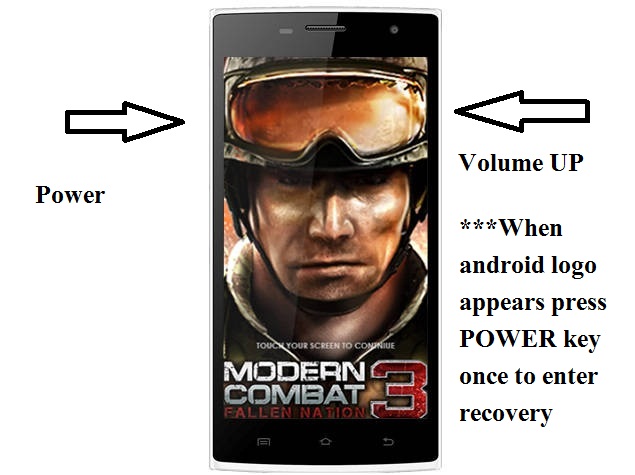
If you had forget the password/pattern of Celkon Glory Q5 or it has been stuck/hang on logo or White screen appears on booting. Then with the help of combination of keys you can Hard Reset your android device. Follow the steps:
1- Charge your device upto 70 percent.
2- Switch off device.
3- Press & Hold Power + Volume UP until Android logo with red exclamation mark appears.
4- To enter Recovery mode press Power key once
5- Now, using Volume down key. Select Wipe Data/Factory reset
6- Press Volume up key to confirm.
7- Now, using Volume down key. Select Yes-delete all user data.
8- Press Volume up key to confirm.
9- Formatting Data starts
10- When Formatting data is completed, Select Reboot System now using Volume up key.
11- Now, Pattern has been reset and phone is free from lock.
Spice Mi 348e Pattern unlock (Hard Reset)
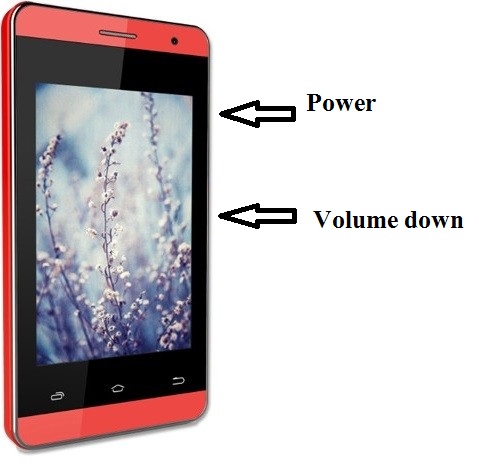
If you had forget the password/pattern of Spice Mi 348e or it has been stuck/hang on logo or White screen appears on booting. Then with the help of combination of keys you can Hard Reset your android device. Follow the steps:
1- Charge your device upto 70 percent.
2- Switch off device.
3- Press & Hold Power + Volume down until Boot Mode appears.
4- Using Volume down key, select Enter recovery.
5- Press Power key to confirm.
6- Using Volume down key, select Wipe Data/Factory reset.
7- To confirm Press Power key.
8- Using Volume down key, select Yes-delete all user data.
9- To confirm Press Power key.
10- Data will be wiped then press Power key to reboot system.
11- Pattern has been reset and phone is free from lock.
Intex Aqua A1 Hard Reset/Pattern unlock
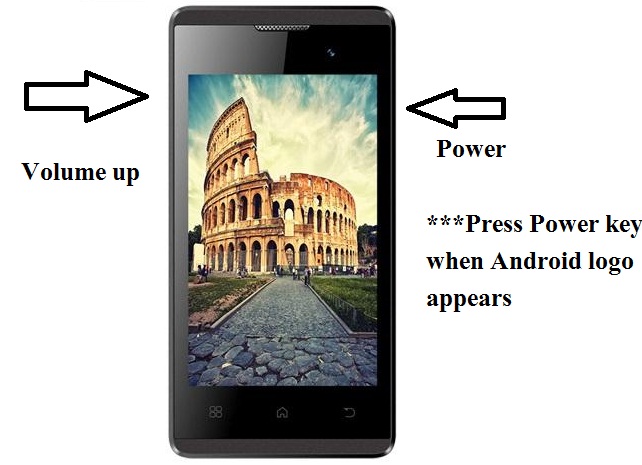
If you had forget the password/pattern lock of Intex Aqua A1 or it has been stuck/hang on logo or White screen appears on booting. Then with the help of combination of keys you can Hard Reset your android device. Follow the steps:
1- Charge your device upto 70 percent.
2- Switch off device.
3- Press & Hold Power + Volume up until Android logo with red exclamation mark appears
4- Press Power key once to Enter recovery mode.
5- Using Volume down key, select Wipe Data/Factory reset.
6- To confirm Press Volume up key.
8- Using Volume down key, select Yes-delete all user data.
9- To confirm Press Volume up key.
10- Data will be wiped then press Volume up key to reboot system.
11- Pattern has been reset and phone is free from lock.
Micromax Q339 Flash File/Firmware (Stock ROM)
Download Micromax Q339 Flash File:
How to Flash Micromax Q339:
Install SPD Driver
1- Download the package & Extract Flash tool.
2- Out of the icon appearing, Double click on UpgradeDownload.exe.
3- It will Launch the tool on PC.
4- Click on Load Packed button & Select the Firmware with extension .pac at end.
5- Click on Downloading button which is at third position.
6- Switch off your Mobile & connect it to PC using Volume down key.
7- It will lead you to Successful flashing.