• Skip to primary navigation
  • Skip to main content
  • Skip to primary sidebar
RMM logo 2
Get All Flash File
Menu
  • Home
  • Training
    • Offline Training
      • Kolkata
      • Kolhapur
      • Patna
    • L1: Basic Software & Hardware
    • L2: Advanced Software & Hardware
    • L3: Super Advanced UFS
    • iPhone Training
  • Solution
    • Flash File
    • Flash Tool
    • Driver
    • Combination
    • FRP
    • Root
    • Hard Reset
    • Hardware
  • Premium Flash File
    • Premium Flash File
    • Fast Download Server
    • Android Dump Files
  • Log In
  • Home
  • Training
    • Offline Training
      • Kolkata
      • Kolhapur
      • Patna
    • L1: Basic Software & Hardware
    • L2: Advanced Software & Hardware
    • L3: Super Advanced UFS
    • iPhone Training
  • Solution
    • Flash File
    • Flash Tool
    • Driver
    • Combination
    • FRP
    • Root
    • Hard Reset
    • Hardware
  • Premium Flash File
    • Premium Flash File
    • Fast Download Server
    • Android Dump Files
  • Log In

How to Flash Combination Files using Odin

How to Flash Combination Files using Odin

November 1, 2018

Samsung FRP lock can’t be unlocked in any of the Professional Software boxes directly. Some models can be directly unlocked which accounts 5-10 percent of all samsung android phones.

1- What is combination files?

Samsung Combination files are raw program which is used for testing purpose for Services & to get more info of the device.

2- Why Combination files are required to unlock FRP?

To unlock FRP in Samsung phones, USB debugging has to be enable. Earlier, with Android OS 6.0 & 7.0 Talkback method was used to enable USB debugging. But with higher android version talkback method fails to enable USB Debugging.

By Flashing combination files, USB debugging get enabled and the display shows the Factory mode.
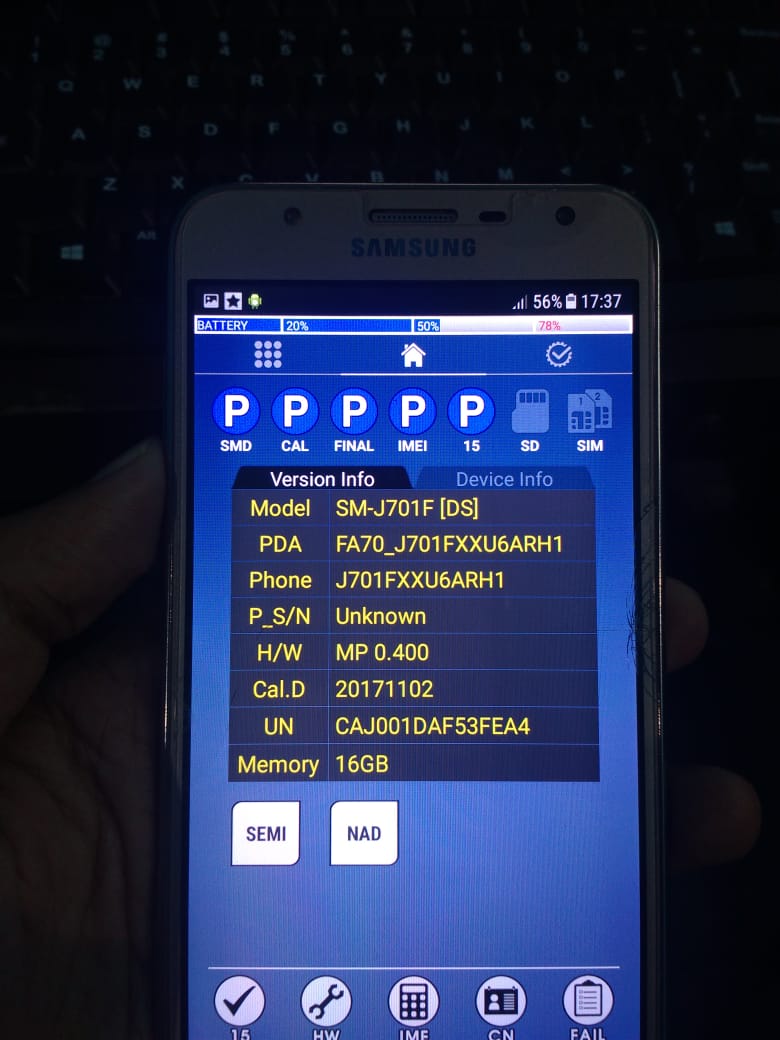
Note: If in developer mode there is OEM, it also has to be enabled.

3- How to Flash Combination Files?

Samsung combination files can be flashed using Odin tool. The file has to be selected in AP/PDA section of odin tool and phone has to connected in Download mode using Power + Volume Down + Menu and in some phones by holding both volume keys and connecting USB cable like in SM-J600g.

Steps to Unlock FRP using Combination Files:

1- Download Odin tool & Install Samsung kies.

2- Download Samsung combination files, if you model no is not in the list. Let us know in the comment.

2- Run odin tool.

3- Select Combination Files in AP/PDA.

4- Switch off your Samsung Phone. Switch on the mobile by pressing (Power+Volume down+Menu). Phone will boot in Download mode.

5- Press Volume UP to enter in Download mode. Then connect it to PC using USB Cable.

6- Click on Start to flash.

7- After Flashing phone will be in factory mode. Make sure to enable USB Debugging and if there is OEM Lock then enable it also.

If there is any Professional Box like UMT, Miracle etc. Then unlock FRP using ADB mode.

Note: Phone should be connected in ON mode to unlock FRP using Umt or Miracle.

After FRP Lock has been unlocked. Now, its time to Flash the phone with stock Firmware.

Samsung Flashing using Odin:

1- Download Samsung Stock ROM. You can also use Custom search of RepairMyMobile.

2- Connect phone in Download mode.

3- Select Files in Odin tool & then flash.

Note: After FRP has been locked. Make sure to do a Factory Data Reset in Setting.

Filed Under: Android Flash File Database

10.or G Flash File (Stock ROM)

October 31, 2018

Download Tenor 10.or G Flash File:

  • 10or_G_V1_0_70

How to Flash 10.or G:

1- Download 10.or G Flash file
2- Download tool.
3- Install Qualcomm driver & Connect phone by shorting test point.
4- Run Ets.Startrun tool.
5- Click on SET, it will display Config & Setting. Click on Change Path & assign path of firmware.
6- Click on USB & Check Port no which has Qualcomm 9008 port.
7- Click again on SET & under port setting Select Port No.
8- Click on Start All to start flashing.

Filed Under: Android Flash File Database

10.or E Flash File (Stock ROM)

October 31, 2018

Download Tenor 10.or E Flash File:

  • 10or_E_V1_0_99
  • 10or_E_V1_0_82

How to Flash 10.or E:

1- Download 10.or E Flash file
2- Download tool.
3- Install Qualcomm driver & Connect phone by shorting test point.
4- Run Ets.Startrun tool.
5- Click on SET, it will display Config & Setting. Click on Change Path & assign path of firmware.
6- Click on USB & Check Port no which has Qualcomm 9008 port.
7- Click again on SET & under port setting Select Port No.
8- Click on Start All to start flashing.

Filed Under: Android Flash File Database

Lephone Flash File (Stock ROM)

October 31, 2018

Download LePhone Official Flash File with Flashing instruction. All firmware can be used to flash and all are official Stock ROM.

In Case, if your lephone brand is missing. Let us know in the comment.

Lephone Flash File (Stock ROM): 


LePhone Flash File
LePhone W8 Download
LePhone TD8208 Download
LePhone W7 Download
LePhone W2 Download
LePhone C01 Download
LePhone 2918 Download
LePhone C05 Download
LePhone TD9268 Download
LePhone W5 Download
LePhone W12 Download
LePhone W11 Download
LePhone W9 Download
LePhone W10 Download
LePhone W15 Download
LePhone W21 Download

Filed Under: Android Flash File Database

Samsung SM-J730GM Touch & Volte Not Working: Solved

October 31, 2018

Download Samsung SM-J730GM Touch Not Working Flash File:

  • Binary 6 Touch File Solution: Download 

How to flash Binary 6 Flash File:

  1. Use OTG mouse to unlock oem.
  2. Switch to download mode and make sure everything is aligned same as in the text  “oem=off,frp=:off & kg status=checking.“
  3. flash the binary file in odin under AP.
  4. Switch to recovery mode TWRP show.
  5. format (type yes) then factory reset the device.
  6. reboot to system (don’t install twrp)
  7. Again oem unlock then reboot.


  • Samsung SM-J730GM Touch Not Working File | Mirror

If after FRP or Updating SM-J730GM touch fails to respond, then flashing with File listed at RepairMyMobile will solve the touch issue.

After Flash with this file, you had to Hard reset the phone.

When Phone get on, touch will start to respond but Volte would be missing.

  • J730GM_Volte_package_after_touch_fix 

To enable Volte in SM-J730GM Flash this file using odin. It will enable Volte features.

  • Odin tool
  • Samsung Kies

How to Flash Samsung SM-J730GM:

Make sure your device is atleast 30 percent charged to perform flashing.
• Switch off the mobile
• Press the Power + volume down + home button
• Android symbol will appear, now press volume up to enter into the download mode
• Now open the Odin flash tool and follow the steps as shown in the video
• Select Samsung SM-J730GM
• Select the Odin tool and open it
• Click AP or PDA then select AP File
• After selection mobile will get detected automatically
• Now click start on system & installation is in process
• After installation mobile switch ON of its own.

Filed Under: Android Flash File Database

Oppo Realme C1 RMX1811 Flash File (Stock ROM)

October 30, 2018

Download Oppo Realme C1 RMX1811 Flash File:

  • RMX1811EX_11_A.71_201120
  • RMX1811EX_11_A.69_200722
  • RMX1811EX_11_A.68_200521

How to Flash Oppo Realme C1 RMX1811:

Download Oppo Realme C1 RMX1811 Flash file
1- Download the Firmware package & run Flash tool.
2- Out of the icon appearing, Double click on MSM Download Tool.
3- it will launch the tool on your PC, Click on Start All.
4- Then it will verify for PC Memory Checksum.
5- Switch off your Mobile and Connect it to PC by pressing Volume down and Volume up key.
6- It will lead you to Successful Flashing.

Filed Under: Android Flash File Database

  • « Go to Previous Page
  • Page 1
  • Interim pages omitted …
  • Page 699
  • Page 700
  • Page 701
  • Page 702
  • Page 703
  • Interim pages omitted …
  • Page 924
  • Go to Next Page »

Primary Sidebar

Join Free Demo Classes!!!

Free demo classes
demo group

Recent Posts

  • Sasmung M05 SM-M055F Flash File (Stock ROM)
  • Samsung M14 5G SM-M146B UFS Dump File
  • Samsung A14 5G SM-A146B UFS Dump File
  • Sasmung Galaxy F05 SM-E055F Flash File (Stock ROM)
  • Samsung Galaxy M55s SM-M558B Flash File (Stock ROM)

RMM Other website & App

training.repairmymobile.co

RMM Android App

Join Telegram Group

Repair My Mobile

Our Services

Privacy Policy

Term & Condition

Contact us

About us

Sitemap

Join Our Community

Facebook Youtube Instagram Linkedin Twitter Whatsapp

Contact

sidhartha@repairmymobile.co

+91-9060 2999 19

Mon-Sat:10:00am to 6.00pm

Official QR Code

Official Payment no.

Course: 8935939022

Call/WhatsApp: 91-893-593-9022

Paypal: vijaytech89@gmail.com


Note: Repair My Mobile
Official Payment no.

Bakarganj, Patna, Bihar 800004

Payment Partner

Copyright © 2025 RMM. Designed by RMM All rights reserved.

Click to Chat