• Skip to primary navigation
  • Skip to main content
  • Skip to primary sidebar
RMM logo 2
Get All Flash File
Menu
  • Home
  • Training
    • Offline Training
      • Kolkata
      • Kolhapur
      • Patna
    • L1: Basic Software & Hardware
    • L2: Advanced Software & Hardware
    • L3: Super Advanced UFS
    • iPhone Training
  • Solution
    • Flash File
    • Flash Tool
    • Driver
    • Combination
    • FRP
    • Root
    • Hard Reset
    • Hardware
  • Premium Flash File
    • Premium Flash File
    • Fast Download Server
    • Android Dump Files
  • Log In
  • Home
  • Training
    • Offline Training
      • Kolkata
      • Kolhapur
      • Patna
    • L1: Basic Software & Hardware
    • L2: Advanced Software & Hardware
    • L3: Super Advanced UFS
    • iPhone Training
  • Solution
    • Flash File
    • Flash Tool
    • Driver
    • Combination
    • FRP
    • Root
    • Hard Reset
    • Hardware
  • Premium Flash File
    • Premium Flash File
    • Fast Download Server
    • Android Dump Files
  • Log In

Karbonn Vista 4G dead recover by reballing EMMC

Karbonn Vista 4G dead recover by reballing EMMC

January 21, 2020

Karbonn Vista 4G was working fine but all of sudden phone fails to boot.

Using Multimeter I had checked the supply, which was 1.4v and then dropping to 0.

Solution: We had reball Emmc then reprogrammed with UFI then by Miracle we had flashed the phone.

  • Remove the backside cover and open the board.
  • First, you have to check where emmc exist on the PCB. Then remove it carefully.
  • You have to clean the board carefully (Use thinner or chemical that do not harm your PCB).

[Read more…] about Karbonn Vista 4G dead recover by reballing EMMC
Filed Under: Hardware

Infinix X650D Flash File (Stock ROM)

January 13, 2020

Download Infinix X650D Flash File:

  • X650D-H6113KLN-P-210716V168
  • X650D-H6113KLN-P-191228V126
  • X650D-H6113KL-P-191125V120
  • X650D-H6113KL-P-191106V115
  • SP Flash Tool
  • Tecno Flash Tool
  • MTK Driver

How to Flash Infinix X650D:

Install MTK Driver.
1- Download the package & Extract SP Flash tool.
2- Out of the icon appearing, Double click on Flash_tool.exe
3- it will launch the tool on your PC, Click on Scatter-Loading appearing on the Right side of the tool.
4- Now, assign the firmware which will be in form “Android_scatter.txt”.
5- Click on Download to start flashing.
6- Switch off your Mobile and Connect it to PC by pressing Volume down or Volume up key.
7- It will lead you to Successful Flashing

Filed Under: Android Flash File Database

Tecno CC7 Flash File (Stock ROM)

January 13, 2020

Download Tecno CC7 Flash File:

  • CC7-H626ABC-P-210719V427
  • CC7-H626ABC-P-191216V230
  • SP Flash Tool
  • Tecno Flash Tool
  • MTK Driver

How to Flash Tecno CC7:

Install MTK Driver.
1- Download the package & Extract SP Flash tool.
2- Out of the icon appearing, Double click on Flash_tool.exe
3- it will launch the tool on your PC, Click on Scatter-Loading appearing on the Right side of the tool.
4- Now, assign the firmware which will be in form “Android_scatter.txt”.
5- Click on Download to start flashing.
6- Switch off your Mobile and Connect it to PC by pressing Volume down or Volume up key.
7- It will lead you to Successful Flashing

Filed Under: Android Flash File Database

Redmi 6 Pro Mi account Unlock through ISP

January 10, 2020

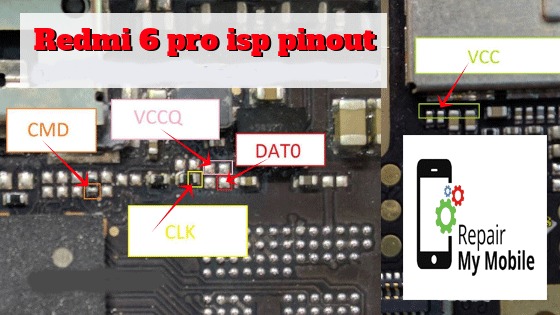
In this post, we had used Easy jtag box to unlock Mi account of Redmi 6 Pro using ISP Pinout.

It can be unlocked online through Authenticated id or using Credit of any professional box like UFI, Umt etc.

The following steps to you do follow and learn them:-

  • Open backside cover of the Redmi 6 pro & make jumper as in the image.

Redmi 6 pro isp Pinout [Read more…] about Redmi 6 Pro Mi account Unlock through ISP

Filed Under: Hardware

LYF Jio F90m Dead Solution

January 7, 2020

Here we will provide a solution to recover LYF Jio f90m from dead state.

Fault Finding: Easy steps to find fault is to charge up the phone & whatever component is getting heated. That component has to be replaced.

Note: You can buy Jio Battery with 3 Month Warranty at Minimum price as compared to the Market or Online rate.

This can work in some of the cases.

Situation 1: LYF F90m dead By Drop Down. 

In this case, mobile has been dropped down to the surface & fails to boot.

we had tried out Reballing of emmc & the mobile has come back to life.

[Read more…] about LYF Jio F90m Dead Solution

Filed Under: Hardware

Infinix X653c Flash File (Stock ROM)

January 3, 2020

Download Infinix Smart 4 X653c Flash File:

  • X653C-H6114GH-PGo-Fix File 
  • X653C-H6114GH-PGo-210831V271
  • X653C-H6114GH-PGo-191119V207
  • SP Flash Tool
  • Tecno Flash Tool
  • MTK Driver

How to Flash Infinix Smart 4 X653c:

Install MTK Driver.
1- Download the package & Extract SP Flash tool.
2- Out of the icon appearing, Double click on Flash_tool.exe
3- it will launch the tool on your PC, Click on Scatter-Loading appearing on the Right side of the tool.
4- Now, assign the firmware which will be in form “Android_scatter.txt”.
5- Click on Download to start flashing.
6- Switch off your Mobile and Connect it to PC by pressing Volume down or Volume up key.
7- It will lead you to Successful Flashing

Filed Under: Android Flash File Database

  • « Go to Previous Page
  • Page 1
  • Interim pages omitted …
  • Page 559
  • Page 560
  • Page 561
  • Page 562
  • Page 563
  • Interim pages omitted …
  • Page 923
  • Go to Next Page »

Primary Sidebar

Join Free Demo Classes!!!

Free demo classes
demo group

Recent Posts

  • Infinix Hot 30i X669D Flash File (Stock ROM)
  • Samsung A16 5G SM-A166P Flash File (Stock ROM)
  • Samsung M36 5G SM-M366B Flash File (Stock ROM)
  • Samsung M06 5G SM-M066B Flash File (Stock ROM)
  • Samsung F36 5G SM-E366B Flash File (Stock ROM)

RMM Other website & App

training.repairmymobile.co

RMM Android App

Join Telegram Group

Repair My Mobile

Our Services

Privacy Policy

Term & Condition

Contact us

About us

Sitemap

Join Our Community

Facebook Youtube Instagram Linkedin Twitter Whatsapp

Contact

sidhartha@repairmymobile.co

+91-9060 2999 19

Mon-Sat:10:00am to 6.00pm

Official QR Code

Official Payment no.

Course: 8935939022

Call/WhatsApp: 91-893-593-9022

Paypal: vijaytech89@gmail.com


Note: Repair My Mobile
Official Payment no.

Bakarganj, Patna, Bihar 800004

Payment Partner

Copyright © 2025 RMM. Designed by RMM All rights reserved.

Click to Chat