• Skip to primary navigation
  • Skip to main content
  • Skip to primary sidebar
RMM logo 2
Get All Flash File
Menu
  • Home
  • Training
    • Offline Training
      • Kolkata
      • Kolhapur
      • Patna
    • L1: Basic Software & Hardware
    • L2: Advanced Software & Hardware
    • L3: Super Advanced UFS
    • iPhone Training
  • Solution
    • Flash File
    • Flash Tool
    • Driver
    • Combination
    • FRP
    • Root
    • Hard Reset
    • Hardware
  • Premium Flash File
    • Premium Flash File
    • Fast Download Server
    • Android Dump Files
  • Log In
  • Home
  • Training
    • Offline Training
      • Kolkata
      • Kolhapur
      • Patna
    • L1: Basic Software & Hardware
    • L2: Advanced Software & Hardware
    • L3: Super Advanced UFS
    • iPhone Training
  • Solution
    • Flash File
    • Flash Tool
    • Driver
    • Combination
    • FRP
    • Root
    • Hard Reset
    • Hardware
  • Premium Flash File
    • Premium Flash File
    • Fast Download Server
    • Android Dump Files
  • Log In

iPhone Flash Tool Download (3 Tools)

iPhone Flash Tool Download (3 Tools)

February 27, 2020

iPhone can be flashed using official tool i.e iTunes.

Apple releases its devices firmware at regular interval and to use the new features within the phone. New Firmware has to be installed.

It can be installed using the phone itself through Software Update. Usually, whenever updates are rolled out. Notification will prompt in the phone.

iPhone can be flashed using three different tools:

  • iTunes (Official tool)
  • iMyPhone Fixppo
  • 3uTools

In all of the tool listed, Phone has to be connected in DFU or Recovery mode.

How to turn iPhone into DFU or Recovery mode:

1- Turn off your iPhone.

2- Connect it to PC through USB Cable.

3- Hold Power & Home Button for 10 sec.

4- After 10 sec, release Power key & Hold Home button.
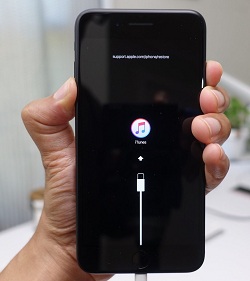
Demo of DFU or Recovery mode

If the device enters DFU or Recovery mode, tools will proceed to the next step simultaneously.

If it Fails, then follow up the steps from no 2.

How to use iTunes:

1- Install iTunes & Connect phone in DFU or Recovery mode.

2- If you own a High-speed internet then you can click on Restore Firmware as it takes time.

Another approach is to download file into the System and press Shift on Keyboard and Hit Restore Firmware on the iTunes.

Now, you have to assign the path of the Firmware & Click on Open.

It will prompt a message either to Restore or Cancel.

Click on Restore to start Flashing.

Note: If in a case iTunes not worked, then you had to adjust system files.

Open the File, as illustrated in the pic below.

C:\Windows\System32\drivers\etc
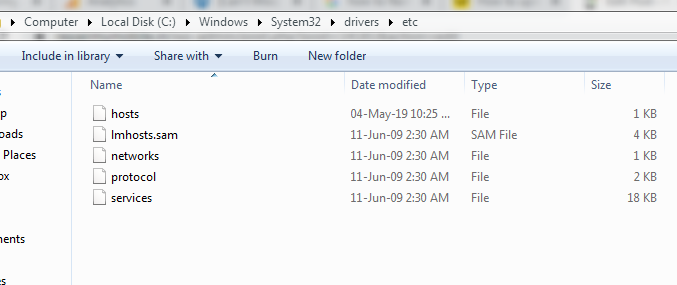
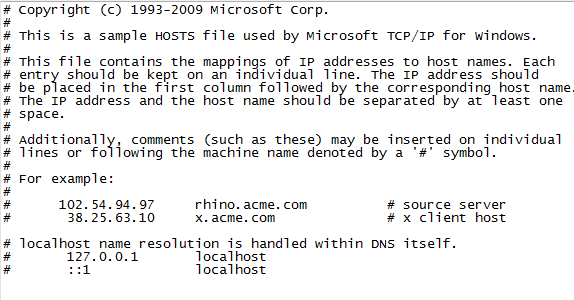
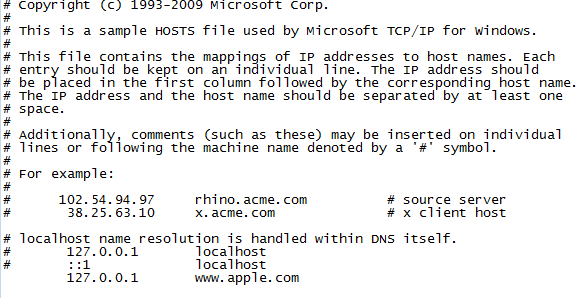
Open hosts with Notepad, and a new line has to be added at the end.

Earlier the hosts file was like:
Later on, the host file becomes:

Line to be Added: 127.0.0.1 www.apple.com
How to Use iMyPhone Fixppo:

1- Install iMyPhone Fixppo tool and then choose Standard mode.

2- Connect phone in recovery mode.

3- Now the tool will give you an option to download firmware. Select Device model & Firmware version which you wish to install.

4- When download finished. Click on Start to initialize flashing.

How to Use 3uTools:

1- Connect phone in DFU or Recovery mode.

2- After connecting in DFU mode, Open Flash/JailBreak menu which is at the top of the tool.

3- Download the file or you can use existing file downloaded into the pc using the Import button.

4- then the tool will check the file.

5- If you do not like to erase Userdata within the phone then highlight it under tool which will be at the bottom.

6- Then, click on flash.
Filed Under: Android Flash File Database

Micromax Q345 Flash File (Stock ROM)

February 26, 2020

Download Micromax Q345 Flash File:

  • MMX_Q345_SW_V15_HW_V1.0_04082015
  • SP Flash Tool
  • MTK Driver

How to Flash Micromax Q345:

Install MTK Driver.
1- Download the package & Extract SP Flash tool.
2- Out of the icon appearing, Double click on Flash_tool.exe
3- it will launch the tool on your PC, Click on Scatter-Loading appearing on the Right Side of the tool.
4- Now, assign the firmware which will be in form “Android_scatter.txt”.
5- Click on Download to start flashing.
6- Switch off your Mobile and Connect it to PC by pressing Volume down or Volume up key.
7- It will lead you to Successful Flashing

Filed Under: Android Flash File Database

Infinix Hot 9 Pro X655F Flash File (Stock ROM)

February 26, 2020

Download Infinix X655F Flash File:

  • X655F-H6211E-Q-AS-220215V288
  • X655F-H6211E-Q-AS-211022V280
  • X655F-H6211E-Q-200102V108
  • SP Flash Tool
  • Tecno Flash Tool
  • MTK Driver

How to Flash Infinix X655F:

Install MTK Driver.
1- Download the package & Extract SP Flash tool.
2- Out of the icon appearing, Double click on Flash_tool.exe
3- it will launch the tool on your PC, Click on Scatter-Loading appearing on the Right side of the tool.
4- Now, assign the firmware which will be in form “Android_scatter.txt”.
5- Click on Download to start flashing.
6- Switch off your Mobile and Connect it to PC by pressing Volume down or Volume up key.
7- It will lead you to Successful Flashing

Filed Under: Android Flash File Database

Poco X2 Flash File (Stock ROM)

February 26, 2020

Download Poco X2 Flash File:

  • phoenixin_in_global_images_V11.0.7.0.QGHINXM_20200408.0000.00_10.0_in
  • phoenixin_in_global_images_V11.0.4.0.QGHINXM_20200122.0000.00_10.0_in | Miui 11 Indian
  • Xiaomi Flash tool

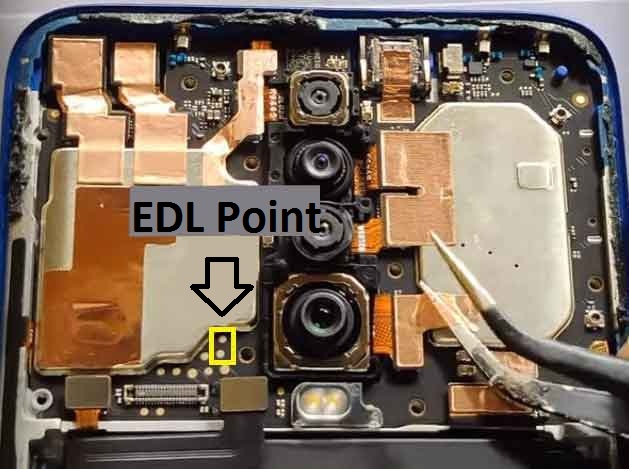
Poco-X2-edl-Point

How to Flash Poco X2:

Download Poco X2 Flash File
1- Connect phone through USB cable to PC and unplug battery.
2- Short Test Point and connect battery.
3- Under Device Manger, port of Qualcomm HS USB QLoader 9008 port will appear.
4- Download & run MI Flash Tool
5- Place the Flash File on Desktop.
6- Assign the Folder path.
7- Click on refresh & then tap Flash button.

Filed Under: Android Flash File Database

How to Enable Diag mode in Jio Phone

February 26, 2020

If you are looking to enable Diag. port in Jio Qualcomm Keypad phones by flashing the latest flash file.

Then this process no longer works.

Earlier by flashing, Diag. port get enabled.

Note: You can buy Jio Battery with 3 Month Warranty at Minimum price as compared to the Market or Online rate.

We will guide you throughout the process which must be used to enable Diag. port in the latest Qualcomm Keypad Phones.

We had used F220b as an example which is powered by a Qualcomm processor.

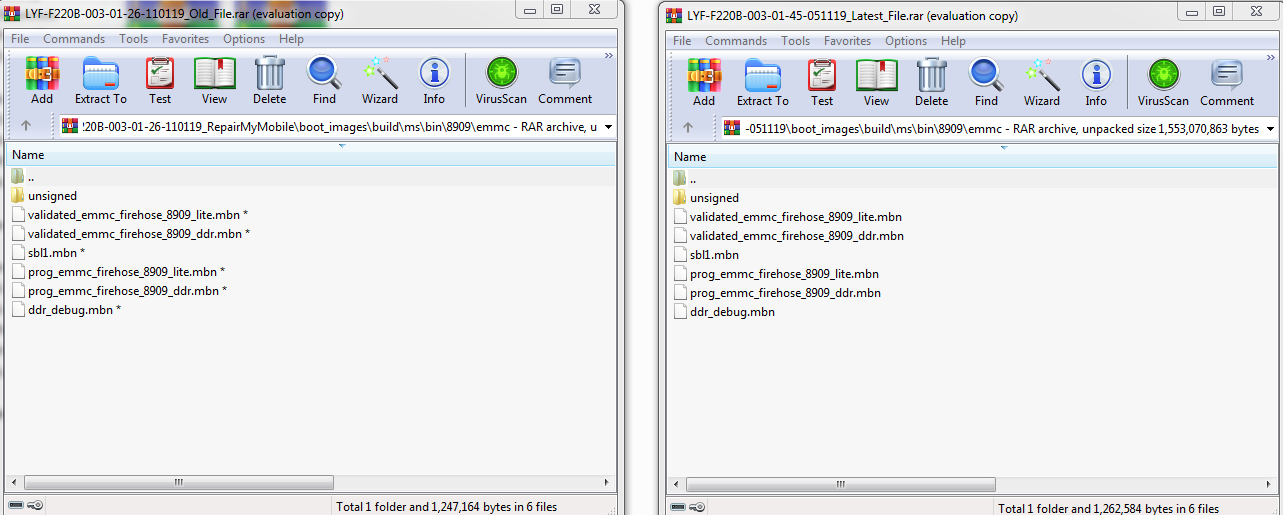
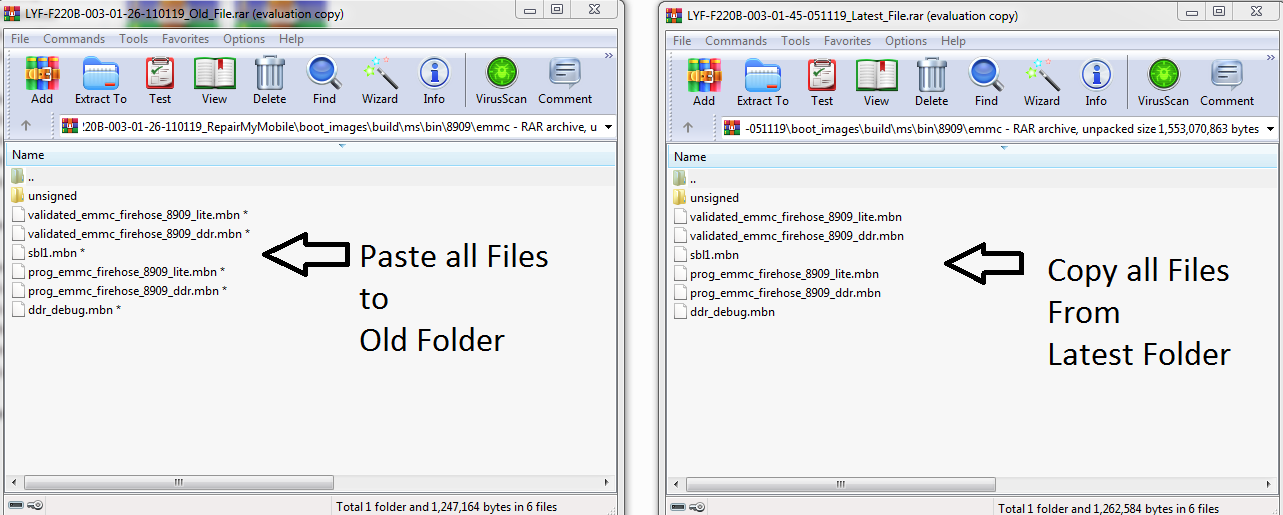
1- First, replace the Loader file of new File to the old File.

2- Loader File for Jio F220b is under folder Boot_images > Build > ms > bin > 8909 > emmc

3- Copy all files from EMMC of the Latest File to the Old File.


Then use, the Old file to flash Jio F220b.

F220b can be flashed using either Qfil or Qflash.

All Jio Keypad File can be Found at RepairMyMobile.

Process of flashing will be the same. It will enable Diag. port in the phone.

Filed Under: Android Flash File Database

Tecno CD8 Flash File (Stock ROM)

February 21, 2020

Download Tecno CD8 Flash File:

  • CD8-H655BCD-Q-GL-210720V454
  • CD8-H655BCD-Q-GL-210315V397
  • CD8-H655BCD-Q-200114V219
  • SP Flash Tool
  • Tecno Flash Tool
  • MTK Driver

How to Flash Tecno CD8:

Install MTK Driver.
1- Download the package & Extract SP Flash tool.
2- Out of the icon appearing, Double click on Flash_tool.exe
3- it will launch the tool on your PC, Click on Scatter-Loading appearing on the Right side of the tool.
4- Now, assign the firmware which will be in form “Android_scatter.txt”.
5- Click on Download to start flashing.
6- Switch off your Mobile and Connect it to PC by pressing Volume down or Volume up key.
7- It will lead you to Successful Flashing

Filed Under: Android Flash File Database

  • « Go to Previous Page
  • Page 1
  • Interim pages omitted …
  • Page 555
  • Page 556
  • Page 557
  • Page 558
  • Page 559
  • Interim pages omitted …
  • Page 923
  • Go to Next Page »

Primary Sidebar

Join Free Demo Classes!!!

Free demo classes
demo group

Recent Posts

  • Infinix Hot 30i X669D Flash File (Stock ROM)
  • Samsung A16 5G SM-A166P Flash File (Stock ROM)
  • Samsung M36 5G SM-M366B Flash File (Stock ROM)
  • Samsung M06 5G SM-M066B Flash File (Stock ROM)
  • Samsung F36 5G SM-E366B Flash File (Stock ROM)

RMM Other website & App

training.repairmymobile.co

RMM Android App

Join Telegram Group

Repair My Mobile

Our Services

Privacy Policy

Term & Condition

Contact us

About us

Sitemap

Join Our Community

Facebook Youtube Instagram Linkedin Twitter Whatsapp

Contact

sidhartha@repairmymobile.co

+91-9060 2999 19

Mon-Sat:10:00am to 6.00pm

Official QR Code

Official Payment no.

Course: 8935939022

Call/WhatsApp: 91-893-593-9022

Paypal: vijaytech89@gmail.com


Note: Repair My Mobile
Official Payment no.

Bakarganj, Patna, Bihar 800004

Payment Partner

Copyright © 2025 RMM. Designed by RMM All rights reserved.

Click to Chat