• Skip to primary navigation
  • Skip to main content
  • Skip to primary sidebar
RMM logo 2
Get All Flash File
Menu
  • Home
  • Training
    • Offline Training
      • Kolkata
      • Kolhapur
      • Patna
    • L1: Basic Software & Hardware
    • L2: Advanced Software & Hardware
    • L3: Super Advanced UFS
    • iPhone Training
  • Solution
    • Flash File
    • Flash Tool
    • Driver
    • Combination
    • FRP
    • Root
    • Hard Reset
    • Hardware
  • Premium Flash File
    • Premium Flash File
    • Fast Download Server
    • Android Dump Files
  • Log In
  • Home
  • Training
    • Offline Training
      • Kolkata
      • Kolhapur
      • Patna
    • L1: Basic Software & Hardware
    • L2: Advanced Software & Hardware
    • L3: Super Advanced UFS
    • iPhone Training
  • Solution
    • Flash File
    • Flash Tool
    • Driver
    • Combination
    • FRP
    • Root
    • Hard Reset
    • Hardware
  • Premium Flash File
    • Premium Flash File
    • Fast Download Server
    • Android Dump Files
  • Log In

Lava LZG402 FRP File

Lava LZG402 FRP File

August 2, 2022 Leave a Comment

Download Lava LZG402 FRP File:

  • LAVA_LZG402_FRP_FILE
  • UPGRADE DOWNLOAD

How to Flash Lava LZG402 FRP File:

Install SPD Driver
1- Download the package & Extract Flash tool.
2- Out of the icon appearing, Double click on UpgradeDownload.exe.
3- It will Launch the tool on PC.
4- Click on Load Packed button & Select the Firmware with extension .pac at end.
5- Click on Downloading button which is at third position.
6- Switch off your Mobile & connect it to PC using Volume down key.
7- It will lead you to Successful flashing.

Filed Under: Android Flash File Database

Infinix Hot 10i X658E Flash File (Stock ROM)

July 30, 2022 Leave a Comment

Infinix Hot 10i X658E Flash File:

  • X658E-H6219N-RGo-OP-230417V303
  • X658E-H6219N-RGo-OP-230201V292
  • X658E-H6219N-RGo-OP-221028V285
  • X658E-H6219N-RGo-OP-220614V270
  • X658E-H6219N-RGo-OP-211207V249
  • X658E-H6219N-RGo-OP-211115V238
  • X658E-H6219N-RGo-OP-210721V194
  • SP Flash Tool
  • Tecno Flash Tool
  • MTK Driver

How to Flash Infinix Hot 10i X658E:

Install MTK Driver.
1- Download the package & Extract SP Flash tool.
2- Out of the icon appearing, Double click on Flash_tool.exe
3- it will launch the tool on your PC, Click on Scatter-Loading appearing on the Right side of the tool.
4- Now, assign the firmware which will be in form “Android_scatter.txt”.
5- Click on Download to start flashing.
6- Switch off your Mobile and Connect it to PC by pressing Volume down or Volume up key.
7- It will lead you to Successful Flashing

Filed Under: Android Flash File Database

Redmi Note 5 Eng File

July 30, 2022


This content is for Premium Files Membership Plan: 1 Year; Unlock Tool & FRP Training and Fast Download Server: 1 Month members only.

Filed Under: Android Dump Files, Android Flash File Database

Redmi 4X Eng File

July 30, 2022


This content is for Premium Files Membership Plan: 1 Year; Unlock Tool & FRP Training and Fast Download Server: 1 Month members only.

Filed Under: Android Dump Files, Android Flash File Database

Redmi 10A Flash File (Stock ROM)

July 26, 2022


This content is for Premium Files Membership Plan: 1 Month , Premium Files Membership Plan: 6 Month , Premium Files Membership Plan: 1 Year; Unlock Tool & FRP Training, and Fast Download Server: 1 Month members only.

Filed Under: Android Flash File Database, Fast Download Server

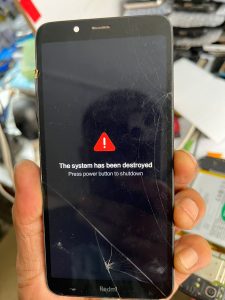
Xiaomi Error: The system has been destroyed

July 23, 2022 Leave a Comment

The system has  been destroyed error getting always on Redmi A-Series model like (Redmi 7A, Redmi 6A, Redmi 9A, POCO M2 etc.).

How to fixed The System has been destroyed:


      Lets see the step by step process that is mentioned below :

Step  1 : If you are getting the error mentioned above on xiaomi model, which is “The system has been destroted”  firstly, You have to try to flash with Eng. file or EMMC change file that you can download it  from our website
Eng file or EMMC change file

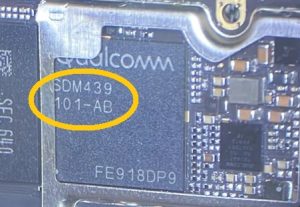
Step 2: If  you are still  facing the  same issue after flashing, open back panel of the phone and check CPU number which would be mentioned like this SDM439-AB

Step 3: Now, you need to replace the CPU but  SDM 439 number should be  same but alphabet letter need to be differ for example : if there is  AB mentioned we need  AA 

Step 4: If you don’t know about the  CPU,  so you need to search on google or can  take help from schematic diagram.

Step 5: After you replaced the CPU of the phone ,it will automatically start.
 congratulations your problem is solved sucessfully.
Now, you can use it.

If you need more help watch this video mentioned below :


Filed Under: Android Flash File Database

  • « Go to Previous Page
  • Page 1
  • Interim pages omitted …
  • Page 390
  • Page 391
  • Page 392
  • Page 393
  • Page 394
  • Interim pages omitted …
  • Page 937
  • Go to Next Page »

Primary Sidebar

Join Free Demo Classes!!!

Free demo classes
demo group

Recent Posts

  • OnePlus 12 5G CPH2583 Flash File (Stock ROM)
  • OnePlus 10T 5G CPH2417 Flash File (Stock ROM)
  • Vivo Y400 5G PD2469F Dump File
  • Tecno Spark 20C BG7n Dead Boot Repair File
  • Tecno Megapad Pro T1201 Flash File (Stock ROM)

RMM Other website & App

training.repairmymobile.co

RMM Android App

Join Telegram Group

Repair My Mobile

Our Services

Privacy Policy

Term & Condition

Contact us

About us

Sitemap

Join Our Community

Facebook Youtube Instagram Linkedin Twitter Whatsapp

Contact

sidhartha@repairmymobile.co

+91-9060 2999 19

Mon-Sat:10:00am to 6.00pm

Official QR Code

Official Payment no.

Course: 8935939022

Call/WhatsApp: 91-893-593-9022

Paypal: vijaytech89@gmail.com


Note: Repair My Mobile
Official Payment no.

Bakarganj, Patna, Bihar 800004

Payment Partner

Copyright © 2025 RMM. Designed by RMM All rights reserved.

Click to Chat