• Skip to primary navigation
  • Skip to main content
  • Skip to primary sidebar
RMM logo 2
Get All Flash File
Menu
  • Home
  • Training
    • Offline Training
      • Kolkata
      • Kolhapur
      • Patna
    • L1: Basic Software & Hardware
    • L2: Advanced Software & Hardware
    • L3: Super Advanced UFS
    • iPhone Training
  • Solution
    • Flash File
    • Flash Tool
    • Driver
    • Combination
    • FRP
    • Root
    • Hard Reset
    • Hardware
  • Premium Flash File
    • Premium Flash File
    • Fast Download Server
    • Android Dump Files
  • Log In
  • Home
  • Training
    • Offline Training
      • Kolkata
      • Kolhapur
      • Patna
    • L1: Basic Software & Hardware
    • L2: Advanced Software & Hardware
    • L3: Super Advanced UFS
    • iPhone Training
  • Solution
    • Flash File
    • Flash Tool
    • Driver
    • Combination
    • FRP
    • Root
    • Hard Reset
    • Hardware
  • Premium Flash File
    • Premium Flash File
    • Fast Download Server
    • Android Dump Files
  • Log In

Infinix Hot 20 X6826 Flash File (Stock ROM)

Infinix Hot 20 X6826 Flash File (Stock ROM)

April 27, 2024


This content is for Premium Files Membership Plan: 1 Month , Premium Files Membership Plan: 6 Month , Premium Files Membership Plan: 1 Year; Unlock Tool & FRP Training, and Fast Download Server: 1 Month members only.

Filed Under: Android Flash File Database, Fast Download Server, Premium Flash Files

Tecno Spark 20 KJ5 Flash File (Stock ROM)

April 25, 2024 Leave a Comment

All files are in premium section, purchase premium first (सभी फ़ाइलें प्रीमियम अनुभाग में हैं, पहले प्रीमियम खरीदें)

Download Tecno Spark 20 KJ5 Flash File:

  • KJ5-H6931DEF-T-IN-251215V2108
  • KJ5-H6931ABCDEFGHI-T-OP-250908V2083
  • KJ5-H6931DEF-T-IN-240910V1435-Flash-File-RMM
  • KJ5-H6931ABCDEFGHI-T-OP-250722V2072-Flash-File-RMM
  • KJ5-H6931ABCDEFGHI-T-OP-250311V2036-Flash-File-RMM
  • KJ5-H6931DEF-T-IN-240411V1188-Flash-File-RMM
  • KJ5-H6931ABCDEFGHI-T-OP-240411V1183-Flash-File-RMM
  • KJ5-H6931ABCDEFGHI-T-OP-240113V952
  • SP Flash Tool
  • Tecno Flash Tool
  • MTK Driver

How to Flash Tecno Spark 20 KJ5:

Install MTK Driver.
1- Download the package & Extract SP Flash tool.
2- Out of the icon appearing, Double click on Flash_tool.exe
3- it will launch the tool on your PC, Click on Scatter-Loading appearing on the Right side of the tool.
4- Now, assign the firmware which will be in form “Android_scatter.txt”.
5- Click on Download to start flashing.
6- Switch off your Mobile and Connect it to PC by pressing Volume down or Volume up key.
7- It will lead you to Successful Flashing.

Filed Under: Android Flash File Database

Infinix Hot 30 X6831 Flash File (Stock ROM)

April 25, 2024 Leave a Comment

All files are in premium section, purchase premium first (सभी फ़ाइलें प्रीमियम अनुभाग में हैं, पहले प्रीमियम खरीदें)

Download Infinix Hot 30 X6831 Flash File:

  • X6831-V7510AABCDEFJ-T-OP-250218V2850-Flash-File-RMM
  • X6831-V7510AABCDEFJ-T-OP-240814V2771-Flash-File-RMM
  • X6831-V7510AEFJ-T-EU-240223V2560
  • SP Flash Tool
  • Tecno Flash Tool
  • MTK Driver

How to Flash Infinix Hot 30 X6831:

Install MTK Driver.
1- Download the package & Extract SP Flash tool.
2- Out of the icon appearing, Double click on Flash_tool.exe
3- it will launch the tool on your PC, Click on Scatter-Loading appearing on the Right side of the tool.
4- Now, assign the firmware which will be in form “Android_scatter.txt”.
5- Click on Download to start flashing.
6- Switch off your Mobile and Connect it to PC by pressing Volume down or Volume up key.
7- It will lead you to Successful Flashing.

Filed Under: Android Flash File Database

Infinix Hot 20S X6827 Flash File (Stock ROM)

April 25, 2024


This content is for Premium Files Membership Plan: 1 Month , Premium Files Membership Plan: 6 Month , Premium Files Membership Plan: 1 Year; Unlock Tool & FRP Training, and Fast Download Server: 1 Month members only.

Filed Under: Android Flash File Database, Fast Download Server, Premium Flash Files

Xiaomi 13T Pro Flash File (Stock ROM)

April 23, 2024 Leave a Comment

All files are in premium section, purchase premium first (सभी फ़ाइलें प्रीमियम अनुभाग में हैं, पहले प्रीमियम खरीदें)

Download Xiaomi 13T Pro Flash File:

  • corot_global_images_OS2.0.204.0.VMLMIXM_20251028.0000.00_15.0_global
  • corot_global_images_OS2.0.203.0.VMLMIXM_20251018.0000.00_15.0_global
  • corot_global_images_OS2.0.202.0.VMLMIXM_20250918.0000.00_15.0_global_RMM
  • corot_global_images_OS2.0.200.0.VMLMIXM_20250623.0000.00_15.0_global_RMM
  • corot_global_images_OS2.0.102.0.VMLMIXM_20250313.0000.00_15.0_global_RMM
  • corot_global_images_OS2.0.6.0.VMLMIXM_20241224.0000.00_15.0_global_RMM (Android-15)
  • corot_global_images_OS1.0.10.0.UMLMIXM_20241208.0000.00_14.0_global_RMM
  • corot_global_images_OS1.0.4.0.UMLMIXM_20240617.0000.00_14.0_global
  • corot_global_images_OS1.0.3.0.UMLMIXM_20240312.0000.00_14.0_global
  • corot_global_images_OS1.0.1.0.UMLMIXM_20231227.0000.00_14.0_global (Android-14)
  • corot_global_images_V14.0.12.0.TMLMIXM_20231123.0000.00_13.0_global
  • corot_global_images_V14.0.8.0.TMLMIXM_20230919.0000.00_13.0_global
  • corot_global_images_V14.0.6.0.TMLMIXM_20230828.0000.00_13.0_global
  • SP Flash Tool

WhatsApp for Mi Account: 893-593-9022

Note: You will need Authorized tool to Flash and Remove Mi Account from Redmi Pad.

How to Flash Xiaomi 13T Pro:

Install MTK Driver.
1- Download the package & Extract SP Flash tool.
2- Out of the icon appearing, Double click on Flash_tool.exe
3- it will launch the tool on your PC, Click on Scatter-Loading appearing on the Right side of the tool.
4- Now, assign the firmware which will be in form “Android_scatter.txt”.
5- Select Authentication file in SP Flash Tool.
6- Click on Download to start flashing.
7- Switch off your Mobile and Connect it to PC by pressing Volume down or Volume up key.
8- It will lead you to Successful Flashing.
Filed Under: Android Flash File Database

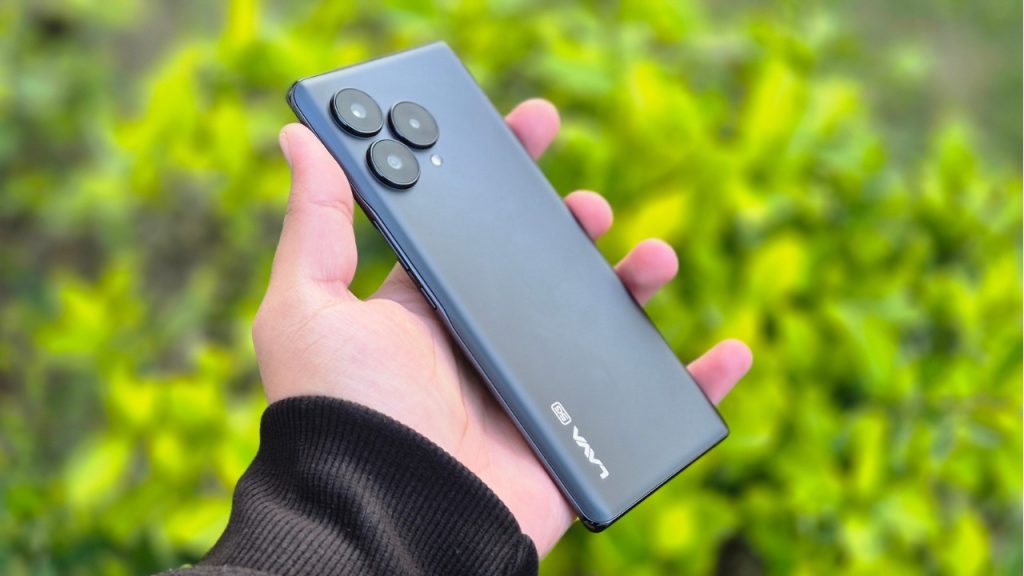
Lava Phone Hang Solution

April 23, 2024 Leave a Comment

lava phone hang solution

If you are using a Lava smartphone for a long period of time. Things which are quite obvious are phones getting hanged and performance starts to degrade. 

Possible Reasons: 

Running too many apps at the same time: We use many Apps on the phone in one go. After switching to another App, earlier Apps run in the background. As a result, much of the resources or RAM is being used and in turn it slows down the phone. 

Leaving apps running in the background: Always make sure to close all apps running in the background. As, it gets stored and executed by RAM and if your phone has RAM of up to 4GB. Much of its resources are being used by OS & Opened Apps. 

Internal Storage Full: Always try to have 20 percent of internal storage free. In today’s world, almost every lava smartphone user has messaging apps like WhatsApp and it stores media files. Over a period of time, it can account for most of the internal storage space resulting in slow performance and hanging. 

Software Updates: it is recommended to install official updates for lava smartphones. As it improves performance, stability and security of the device. Ignoring software updates can lead to hanging, as new updates are bug free.

Using Phone during charging: can lead to heat up device & hang. 

Malware or Virus: if you are downloading movies or cracked software from the internet. It usually leads to malware and viruses and can degrade the performance. 

Hardware issue: can be repaired only by repairing or replacing the faulty parts. For example if you are not using the official charger to charge the phone. Then, over the period of time the battery will degrade and the charging port can be damaged. 

Overheating: if a device is getting heated then it’s appropriate to not use the device as it will shut down on its own to protect its components. 

Possible Solution: 

Restart the Phone: A simple restart frees up ram as it kills all apps in the background. After getting started, all of the resources are free to use. 

Internal Storage: make sure to keep 25% of internal storage free as it ensures smooth functioning of the phone. 

Unused Apps: Uninstall unused apps. It will increase storage which is free to be used. 

Disable Background Apps: Disabling or closing background apps free up resources. It ensures smooth functioning of the lava smartphones. 

Update OS & Apps: if any official update are released for your device then make sure to install it as the new patch has been designed for stability, increasing performance & security of the device. 

Factory Reset: is the process of restoring the phone to its original state. It deletes all of the data within the phone. 

Check for Malware or Virus: It is always good to perform a scan of your lava phones using reputable Malware or virus scanner. One quick tip to identify malware, ads will popup of its own. 

Flashing: is the ultimate solution to get rid of any software issue, malware and viruses from the device. It reinstall Android OS on the device and the device gets reset to its original state. 

Clear cache: can free up space, improve performance and fix app problems. In order to clear the cache, you have to open the App from settings. Then, open the app and then clear the cache.

Filed Under: How To

  • « Go to Previous Page
  • Page 1
  • Interim pages omitted …
  • Page 300
  • Page 301
  • Page 302
  • Page 303
  • Page 304
  • Interim pages omitted …
  • Page 946
  • Go to Next Page »

Primary Sidebar

Join Free Demo Classes!!!

Free demo classes
demo group

Recent Posts

  • Realme 9i 5G RMX3612 UnlockTool UFS Dump File
  • Vivo T4x PD2445F UFS Dump File
  • Redmi Note 9 (10x 4G) Merlin EMMC Dump File
  • Oppo A3x 5G CPH2641 Flash File (Stock ROM)
  • Moto G96 5G XT2531-2 UFS Dump File

RMM Other website & App

training.repairmymobile.co

RMM Android App

Join Telegram Group

Repair My Mobile

Our Services

Privacy Policy

Term & Condition

Contact us

About us

Sitemap

Join Our Community

Facebook Youtube Instagram Linkedin Twitter Whatsapp

Contact

sidhartha@repairmymobile.co

+91-9060 2999 19

Mon-Sat:10:00am to 6.00pm

Official QR Code

Official Payment no.

Course: 8935939022

Call/WhatsApp: 91-893-593-9022

Paypal: vijaytech89@gmail.com


Note: Repair My Mobile
Official Payment no.

Bakarganj, Patna, Bihar 800004

Payment Partner

Copyright © 2025 RMM. Designed by RMM All rights reserved.

Click to Chat