• Skip to primary navigation
  • Skip to main content
  • Skip to primary sidebar
RMM logo 2
Get All Flash File
Menu
  • Home
  • Training
    • Offline Training
      • Kolkata
      • Kolhapur
      • Patna
    • L1: Basic Software & Hardware
    • L2: Advanced Software & Hardware
    • L3: Super Advanced UFS
    • iPhone Training
  • Solution
    • Flash File
    • Flash Tool
    • Driver
    • Combination
    • FRP
    • Root
    • Hard Reset
    • Hardware
  • Premium Flash File
    • Premium Flash File
    • Android Dump Files
  • Membership Account
  • Log In
  • Home
  • Training
    • Offline Training
      • Kolkata
      • Kolhapur
      • Patna
    • L1: Basic Software & Hardware
    • L2: Advanced Software & Hardware
    • L3: Super Advanced UFS
    • iPhone Training
  • Solution
    • Flash File
    • Flash Tool
    • Driver
    • Combination
    • FRP
    • Root
    • Hard Reset
    • Hardware
  • Premium Flash File
    • Premium Flash File
    • Android Dump Files
  • Membership Account
  • Log In
You are here: Home / Archives for Android Flash File Database

Android Flash File Database

PocoPhone C3 Flash File (Stock ROM)

September 8, 2020


This content is for Premium Files Membership Plan: 1 Month , Premium Files Membership Plan: 6 Month , and Premium Files Membership Plan: 1 Year; Unlock Tool & FRP Training members only.

Filed Under: Android Flash File Database, Fast Download Server

LYF Jio LF-2406 Flash File (Stock ROM)

September 8, 2020

Download LYF JIO LF2406s Flash File to install KAIOS OS on your phone.

  • LYF-LF2406S-000-02-05-260220
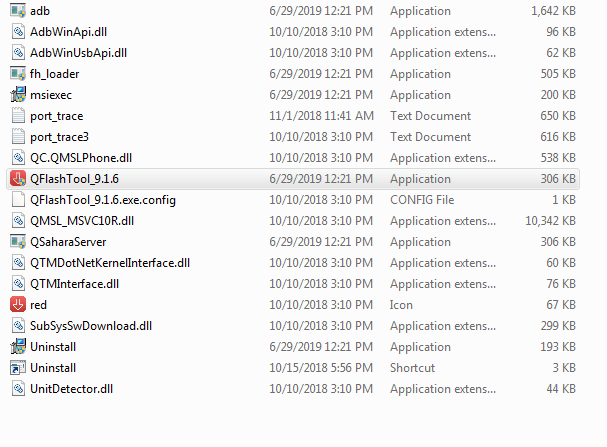
  • QFil Tool

Note: Steps to Enable Diag Port in Jio Phones

Boot key: “None” Connect Phone in OFF mode

How to Flash LYF Jio LF2406:

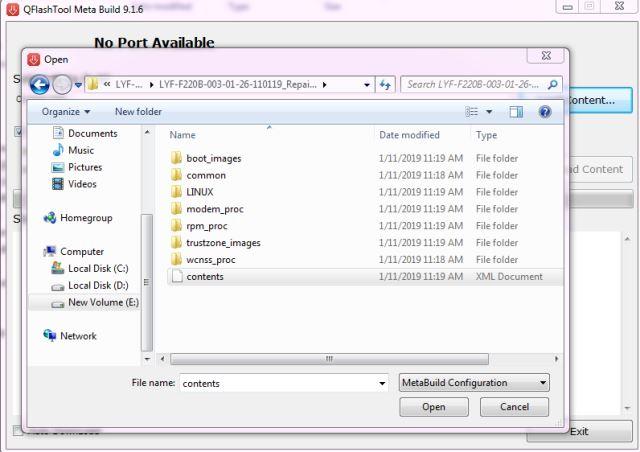
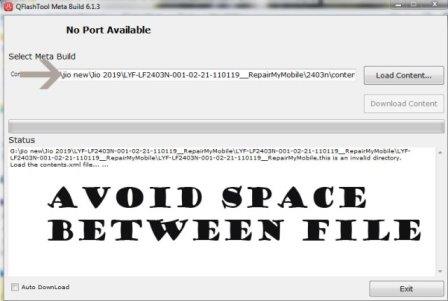
***Make sure no space is there in File Path.

1- Download LYF LF2406 Flash file
2- Download QPST tool.
3- Install Qualcomm driver.
4- Run QPST tool.


5- Add new port. Connect phone holding boot key.  (Check device manager)
6- Click browse & select Stock ROM file.
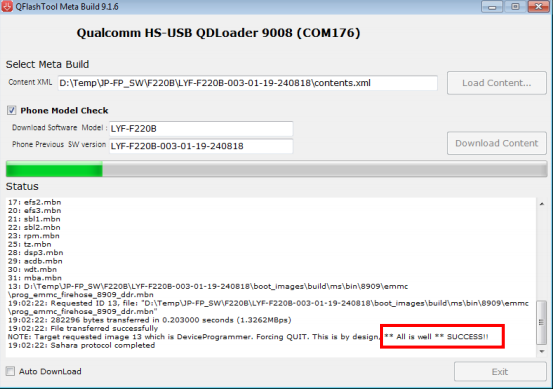
7- Select Download and wait for the flashing to finish.

If flashing Fails or does not start, then there must be a gap between the words while choosing flash file. Rename the folder.

As in Qualcomm Flashing, there must be no gap in between the words.

jio new should be replaced by jio_new or jionew.
Filed Under: Android Flash File Database

Moto G5 XT1677 Flash File (Stock ROM)

September 7, 2020

Download Moto G5 XT1677 Flash File:

  • CEDRIC_AMZIN_OPPS28.85-19-2_cid50
  • Moto Xt1677 Tool & Driver
  • Moto XT1677 Bat File

How to Flash Moto G5 XT1677:

1- Download Moto G5 XT1677 Flash File & Extract, Place Moto G5 XT1677 Bat file in Firmware folder.

2- Install Moto Adb Tool.

Moto ADB Tool

3- Now, Cut the file From Firmware Folder & Place it in Moto ADB Tool.

4- Switch off Phone & Hold Power + Volume Down. Then, connect phone to PC using USB cable, it will make Android Port in device manager.

5- Now, Double Click on XT1677_RepairMyMobile bat file to start flashing.


Filed Under: Android Flash File Database

Vivo V11 PD1813F Flash File (Stock ROM)

September 5, 2020

Download Vivo V11 PD1813F Flash File:

  • PD1813F_EX_A_8.70.19
  • PD1813F_EX_A_6.13.8
  • SP Flash Tool
  • MTK Driver

How to Flash Vivo V11 PD1813F:

Install MTK Driver.
1- Download the package & Extract SP Flash tool.
2- Out of the icon appearing, Double click on Flash_tool.exe
3- it will launch the tool on your PC, Click on Scatter-Loading appearing on the Right side of the tool.
4- Now, assign the firmware which will be in form “Android_scatter.txt”.
5- Click on Download to start flashing.
6- Switch off your Mobile and Connect it to PC by pressing Volume down or Volume up key.
7- It will lead you to Successful Flashing

Filed Under: Android Flash File Database

Lava A1200 Flash File (Stock ROM)

September 1, 2020

Download Lava A1200 Flash File:

  • A1200_032_024_V2_0_M008_20191226_ENG_IN
  • Flash Tool
  • MTK Driver

How to Flash Lava A1200:

Install MTK Driver.
1- Download the package & Extract SP Flash tool.
2- Out of the icon appearing, Double click on Flash_tool.exe
3- it will launch the tool on your PC, Click on Scatter-Loading appearing on the Right side of the tool.
4- Now, assign the firmware which will be in form “Android_scatter.txt”.
5- Click on Download to start flashing.
6- Switch off your Mobile and Connect it to PC by pressing Volume down & Volume up keys if it fails then connect without pressing any key in off mode.
7- It will lead you to Successful Flashing

Filed Under: Android Flash File Database

Lava Pulse Flash File (Stock ROM)

September 1, 2020

Download Lava Pulse Flash File:

  • LAVA_PULSE_24M_32M_V1.0_M006_20200722
  • Flash Tool
  • MTK Driver

How to Flash Lava Pulse:

Install MTK Driver.
1- Download the package & Extract SP Flash tool.
2- Out of the icon appearing, Double click on Flash_tool.exe
3- it will launch the tool on your PC, Click on Scatter-Loading appearing on the Right side of the tool.
4- Now, assign the firmware which will be in form “Android_scatter.txt”.
5- Click on Download to start flashing.
6- Switch off your Mobile and Connect it to PC by pressing Volume down & Volume up keys if it fails then connect without pressing any key in off mode.
7- It will lead you to Successful Flashing

Filed Under: Android Flash File Database

  • « Go to Previous Page
  • Page 1
  • Interim pages omitted …
  • Page 298
  • Page 299
  • Page 300
  • Page 301
  • Page 302
  • Interim pages omitted …
  • Page 608
  • Go to Next Page »

Primary Sidebar

Membership

Advance Software & Hardware Training

Free demo classes
Membership
Support

Recent Posts

  • Moto G34 5G XT2363-8 Flash File (Stock ROM)
  • Moto Edge 50 Fusion 5G XT2429-4 Flash File (Stock ROM)
  • Nothing Phone 3a Lite Flash File (Stock ROM)
  • Lava Yuva Star 3 LZG412 Flash File (Stock ROM)
  • Moto Edge 50 Pro 5G XT2403-6 Dump File

RMM Other website & App

training.repairmymobile.co

RMM Android App

Join Telegram Group

Repair My Mobile

Our Services

Privacy Policy

Term & Condition

Contact us

About us

Sitemap

Join Our Community

Facebook Youtube Instagram Linkedin Twitter Whatsapp

Contact

[email protected]

+91-9060 2999 19

Mon-Sat:10:00am to 6.00pm

Official QR Code

Official Payment no.

Course: 8935939022

Call/WhatsApp: 91-893-593-9022

Paypal: [email protected]


Note: Repair My Mobile
Official Payment no.

Bakarganj, Patna, Bihar 800004

Payment Partner

Copyright © 2025 RMM. Designed by RMM All rights reserved.

    Join UFS Training: super advanced course


      UFI, Easy Jtag और हार्डवेयर: Advance Android Training


        Join L1 Software: ऑनलाइन ट्रेनिंग