
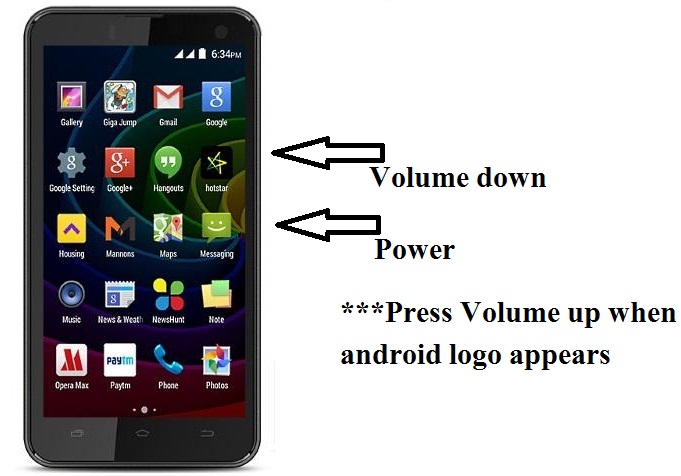
If you had forget the password/pattern of Micromax Q335 or it has been stuck/hang on logo or White screen appears on booting. Then with the help of combination of keys you can Hard Reset your android device. Follow the steps:
1- Charge your device upto 70 percent.
2- Switch off device.
3- Press & hold Power + volume down until Android Logo appears.
4- Press Volume up key to enter Recovery mode.
5- Select Wipe Data/Factory reset using Volume keys and Power button for OK.
6- Using the set of keys as stated earlier in step 5, Select Yes-delete all user data.
7- Now, Mobile will be reset and After the reset has completed. Select Reboot System now.
8- Now, your mobile is free from pattern.
Micromax Q335 Hard Reset Solution
UCT box Online Training
Steps to install UCT Box:
Training Verticals:
The UCT Box is most powerful, easier to operate, and more necessary tool for repairing Chinese Smartphone and tablets.
Courses covered:
1. Setup and installation
2. Mobile driver installation
3. Mobile format
4. Flash
5. Password unlock
6. Read file : Network (NV ) Read, flash file read, password read
Mobile and tablet that can be repaired:
• Intex
• Lava
• Micromax
• Karbonn
• Chinese Java and Android mobile
About Box:
Used for Setup installation,Mobile Drive installation. Mobile Format and the likes.
Weight – 0.5 Kg
Shipping – 2-3 working days
Free tutorial CD worth Rs.999
Course Duration :1 Week
Time Duration :1 Hour
Training Cost :Rs. 2000
Whatsapp @ 91- 773-946-9263
Micromax Q336 Hard Reset Solution
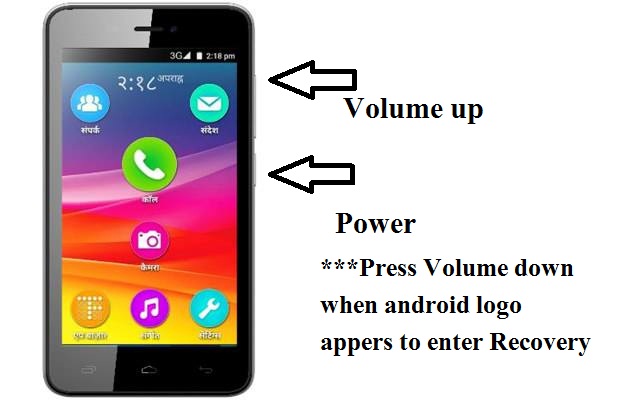
If you had forget the password/pattern of Micromax Q336 or it has been stuck/hang on logo or White screen appears on booting. Then with the help of combination of keys you can Hard Reset your android device. Follow the steps:
1- Charge your device upto 70 percent.
2- Switch off device.
3- Press & hold Power + volume UP until Android Logo appears.
4- Press Volume down key to enter Recovery mode.
5- Select Wipe Data/Factory reset using Volume keys and Power button for OK.
6- Using the set of keys as stated earlier in step 5, Select Yes-delete all user data.
7- Now, Mobile will be reset and After the reset has completed. Select Reboot System now.
8- Now, your mobile is free from pattern.
Micromax Bolt D303 Hard Reset
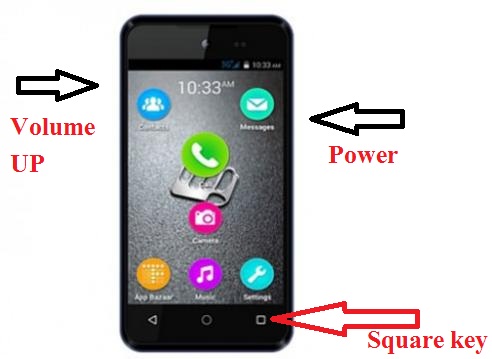
If you had forget the password/pattern of Micromax Bolt D303 or it has been stuck/hang on logo or White screen appears on booting. Then with the help of combination of keys you can Hard Reset your android device. Follow the steps:
1- Charge your device upto 70 percent.
2- Switch off device.
3- Press & Hold Power + Volume up until menu appears.
4- Now, Press Volume up to enter Recover mode.
5- Android Logo with Red exclamation mark appears.
6- Now, Press Power + volume up for a while, to enter Recover mode.
7- Using Volume key select Wipe Data/Factory reset.
8- Swipe Square key on the bottom right side of screen to confirm.
9- Using Volume keys select Yes-delete all user data and to confirm swipe square key on the bottom right side of screen.
10- Wiping Data starts.
11- Reboot system now using Square key.
12- Formatting has been done and phone is free from pattern lock.
Micromax Bolt D321 Hard Reset
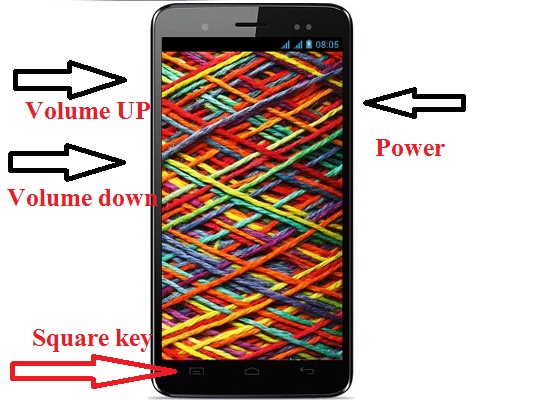
If you had forget the password/pattern of Micromax Bolt D321 or it has been stuck/hang on logo or White screen appears on booting. Then with the help of combination of keys you can Hard Reset your android device. Follow the steps:
1- Charge your device upto 70 percent.
2- Switch off device.
3- Press & Hold Power + Volume up + Volume down until menu appears.
4- Now, Press Volume up to enter Recover mode.
5- Android Logo with Red exclamation mark appears.
6- Now, Press Power key for a while, to enter Recover mode.
7- Using Volume key select Wipe Data/Factory reset.
8- Swipe Square key on the bottom left side of screen to confirm.
9- Using Volume keys select Yes-delete all user data and to confirm swipe square key on the bottom left side of screen.
10- Wiping Data starts.
11- Reboot system now using Square key.
12- Formatting has been done and phone is free from pattern lock.
Micromax Bolt Q331 Hard Reset
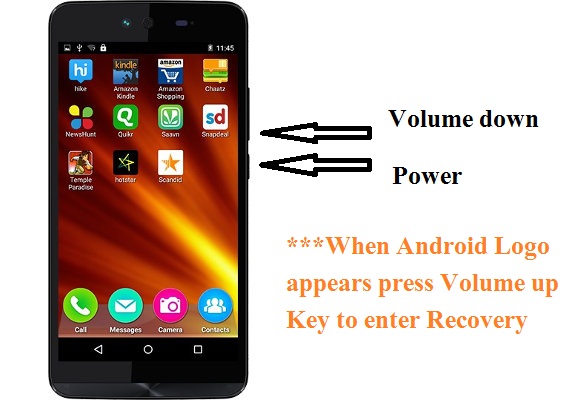
If you had forget the password/pattern of Micromax Bolt Q331 or it has been stuck/hang on logo or White screen appears on booting. Then with the help of combination of keys you can Hard Reset your android device. Follow the steps:
1- Charge your device upto 70 percent.
2- Switch off device.
3- Press & Hold Power + Volume down until menu appears.
4- Android Logo with Red exclamation mark appears.
5- Now, Press Volume UP key for a while, to enter Recover mode.
6- Using Volume key select Wipe Data/Factory reset and Power key to confirm
7- Using Volume keys select Yes-delete all user data and Power key for OK.
8- Wiping Data starts.
9- Reboot system now using Power key.
10- Formatting has been done and phone is free from pattern lock.
