MRT Dongle supports Vivo, Mi, Huawei, Oppo, Asus FRP, Meizu etc.
We had listed all latest setup available for MRT Dongle.
MRT Tool V6.0.0: Download | Mirror (latest for 1 year free)
Summary:
- MRT Tool V6.0.0: Download | Mirror (latest for 1 year free)
- MRT Main Setup
- MrtOkey Setup
- Mrt AE Tool Setup
- Mrt Vivo tool Setup
- Mrt Huawei tool Setup
- Mrt Common Error Setup
MRT new update v5.52 consists of All Setup for MRT Dongle.
MRT Main Setup:
- MRT Tool V6.0.0: Download | Mirror (latest for 1 year free)
- MRT_V3.95: Download | Mirror
- MRT_v3.93: Download | Mirror
- MRT_v3.82: Download |Mirror
- MRT Latest Setup: Download | Mediafire (v2.60)
MRTOKey Setup:
- MRT Tool V6.0.0: Download | Mirror (latest for 1 year free)
- MRT_v5.52 : Download
- MRT_v5.43 : Download
- MRT_v5.37 : Download
- MRT_v5.35 : Download | Mirror (Working Setup)
MRT AE Tool Setup:
MRT Vivo Tool Setup:
- MRT_Vivo_v1.3: Download
MRT Huawei Tool Setup:
MRT Common error Setup:
- HW_Tool_V8: Download (For Latest Huawei FRP)
- Mrt_emmc_v2: Download (v2)
- MRT_Key_error009_fix002: Download
***Place this file in MRT v2.60 and then run this MRT_Key_error009_fix002 file.
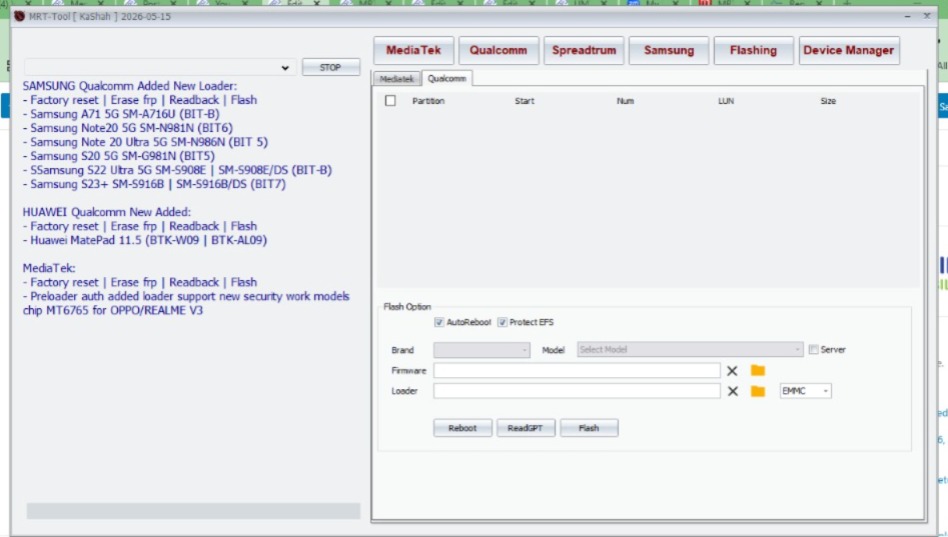
MRT Tool Version 6.0.0 Added:
SAMSUNG Qualcomm Added New Loader:
– Factory reset | Erase frp | Readback | Flash
– Samsung A71 5G SM-A716U (BIT-B)
– Samsung Note20 5G SM-N981N (BIT6)
– Samsung Note 20 Ultra 5G SM-N986N (BIT 5)
– Samsung S20 5G SM-G981N (BIT5)
– Samsung S22 Ultra 5G SM-S908E | SM-S908E/DS (BIT-B)
– Samsung S23+ SM-S916B | SM-S916B/DS (BIT7)
HUAWEI Qualcomm New Added:
– Factory reset | Erase frp | Readback | Flash
– Huawei MatePad 11.5 (BTK-W09 | BTK-AL09)
MediaTek:
– Factory reset | Erase frp | Readback | Flash
– Preloader auth added loader support new security work models chip MT6765 for OPPO/REALME V3
MRT Version 3.69 Added:
Add VIVO V19 Factory Reset
Add VIVO Y1s Factory Reset
Add VIVO S7_5G Factory Reset
Add VIVO X50 Factory Reset
Add VIVO X50pro Factory Reset
Add VIVO X50pro+ Factory Reset
Add VIVO Z6 Factory Reset
Add VIVO IQOOZ1X Factory Reset
Add VIVO iqoou1 Factory Reset
Add VIVO IQOOU1X Factory Reset
Add VIVO IQOO3 Factory Reset
Add VIVO IQOO5 Factory Reset
Add VIVO IQOO5PRO Factory Reset
Add VIVO IQOONEO3 Factory Reset
Add VIVO Y30 Factory Reset
Add VIVO NEX3S Factory Reset
MRT Version 3.36 Added:
New Version add Huawei emui 10 write flash
New version add vivo Y12 format and frp support
New version add vivo Y19 format and frp support
MRT Version 2.60 WORLD FIRST UPDATE !!!
New Update Support OPPO A7X MTK 6771 CPU
New Update Xiaomi Tool add 6X/Note5 Pro Erase Frp and Persist<account>
New Update MTK Tools Vivo only X21i boot support all the VIVO MTK Unlock Account and Password
QC_TOOL Support Xioami S2\Y2 Write Flash
MRT Version 2.59 WORLD FIRST UPDATE !!!
New Update add MTK 6771 new flash IC
ex with this you can Format\Flash\Read Flash…with OPPO F9 Plus<128GB> Mobile Phone
New Update MTK Tools Format Support VIVO X21i Erase VIVO Account and lost mode
New Update VIVO QC Add Vivo Z1 and Z1i Support
Xiaomi<MI Tool> add S2 erase account(this is a beta update)
Xiaomi<MI tool> add S2 erase FRP
Features Added in v1.58:
* Added Asus Mobile Phone Frp Unlock Function ( Worlds First )
* In Meizu Tab , added on Meilan M6 and Meilan M6t ( Unlock Password and Flyme account ) – Worlds First
* In MTK Tools , Support VIVO X21i ( Worlds First )
* Fixed Some Bugs in Previous Version