Lava Z61 Pro Flash File (Stock ROM)
Redmi 9A Miui 12 Flash File (Stock ROM)
Download Redmi 9A (9T) Flash File:
- dandelion_global_images_V12.5.7.0.RCDMIXM_20221107.0000.00_11.0_global
- dandelion_in_global_images_V12.5.9.0.RCDINXM_20220915.0000.00_11.0_in (Fast Download)
- dandelion_global_images_V12.5.6.0.RCDMIXM_20220727.0000.00_11.0_global
- dandelion_in_global_images_V12.5.7.0.RCDINXM_20220704.0000.00_11.0_in (Android 11)
- dandelion_global_images_V12.0.22.0.QCDMIXM_20230315.0000.00_10.0_global_RMM
- dandelion_in_global_images_V12.0.26.0.QCDINXM_20230209.0000.00_10.0_in
- dandelion_in_global_images_V12.0.25.0.QCDINXM_20220823.0000.00_10.0_in (Android 10)
- dandelion_in_global_images_V12.0.24.0.QCDINXM_20220610.0000.00_10.0_in
- dandelion_in_global_images_V12.5.5.0.RCDINXM_20220523.0000.00_11.0_in
- dandelion_global_images_V12.0.20.0.QCDMIXM_20220514.0000.00_10.0_global
- dandelion_global_images_V12.5.4.0.RCDMIXM_20220421.0000.00_11.0_global
- dandelion_in_global_images_V12.0.23.0.QCDINXM_20220408.0000.00_10.0_in
- dandelion_global_images_V12.0.19.0.QCDMIXM_20220304.0000.00_10.0_global
- dandelion_in_global_images_V12.0.22.0.QCDINXM_20220211.0000.00_10.0_in
- dandelion_global_images_V12.0.22.0.QCDMIXM_20230315.0000.00_10.0_global
- dandelion_in_global_images_V12.0.21.0.QCDINXM_20220120.0000.00_10.0_in
- dandelion_global_images_V12.0.18.0.QCDMIXM_20220117.0000.00_10.0_global
- dandelion_global_images_V12.0.17.0.QCDMIXM_20211112.0000.00_10.0_global
- dandelion_in_global_images_V12.0.19.0.QCDINXM_20211109.0000.00_10.0_in
- dandelion_global_images_V12.0.16.0.QCDMIXM_20210821.0000.00_10.0_global
- dandelion_global_images_V12.0.15.0.QCDMIXM_20210701.0000.00_10.0_global
- dandelion_in_global_images_V12.0.16.0.QCDINXM_20210524.0000.00_10.0_in
- dandelion_in_global_images_V12.0.13.0.QCDINXM_20210427.0000.00_10.0_in
- dandelion_global_images_V12.0.14.0.QCDMIXM_20210604.0000.00_10.0_global
- dandelion_global_images_V12.0.12.0.QCDMIXM_20210410.0000.00_10.0_global
- dandelion_in_global_images_V12.0.11.0.QCDINXM_20210305.0000.00_10.0_in
- dandelion_global_images_V12.0.11.0.QCDMIXM_20210223.0000.00_10.0_global
- dandelion_global_images_V12.0.10.0.QCDMIXM_20210101.0000.00_10.0_global
- dandelion_in_global_images_V12.0.9.0.QCDINXM_20210110.0000.00_10.0_in
- dandelion_in_global_images_V12.0.8.0.QCDINXM_20201221.0000.00_10.0_in
- dandelion_in_global_images_V12.0.7.0.QCDINXM_20201125.0000.00_10.0_in
- dandelion_global_images_V12.0.8.0.QCDMIXM_20201124.0000.00_10.0_global
- dandelion_global_images_V12.0.7.0.QCDMIXM_20201028.0000.00_10.0_global
- dandelion_in_global_images_V12.0.6.0.QCDINXM_20201024.0000.00_10.0_in
- dandelion_global_images_V12.0.6.0.QCDMIXM_20201001.0000.00_10.0_global
- dandelion_in_global_images_V12.0.4.0.QCDINXM_20200912.0000.00_10.0_in
- dandelion_in_global_images_V12.0.3.0.QCDINXM_20200827.0000.00_10.0_in
- dandelion_global_images_V12.0.5.0.QCDMIXM_20200815.0000.00_10.0_global
- dandelion_global_images_V12.0.3.0.QCDMIXM_20200714.0000.00_10.0_global
- SP Flash Tool
- MTK Driver
WhatsApp for Mi Account: 893-593-9022
How to Flash Xiaomi Redmi 9A (9T) using SP Flash Tool:
Install MTK Driver.
1- Download the package & Extract SP Flash tool.
2- Out of the icon appearing, Double click on Flash_tool.exe
3- it will launch the tool on your PC, Click on Scatter-Loading appearing on the Right side of the tool.
4- Now, assign the firmware which will be in form “Android_scatter.txt”.
5- Select Authentication file in SP Flash Tool.
6- Click on Download to start flashing.
7- Switch off your Mobile and Connect it to PC by pressing Volume down or Volume up key.
8- It will lead you to Successful Flashing.
PocoPhone M2 Pro Flash File (Stock ROM)
Download PocoPhone M2 Pro Flash File:
- gram_in_global_images_V14.0.5.0.SJPINXM_20230619.0000.00_12.0_in
- gram_in_global_images_V14.0.3.0.SJPINXM_20230410.0000.00_12.0_in
- gram_in_global_images_V13.0.2.0.SJPINXM_20221109.0000.00_12.0_in (Android-12)
- gram_in_global_images_V13.0.1.0.SJPINXM_20220829.0000.00_12.0_in
- gram_in_global_images_V12.5.6.0.RJPINXM_20220505.0000.00_11.0_in
- gram_in_global_images_V12.5.3.0.RJPINXM_20220120.0000.00_11.0_in
- gram_in_global_images_V12.5.2.0.RJPINXM_20211028.0000.00_11.0_in
- gram_in_global_images_V12.0.4.0.QJPINXM_20210514.0000.00_10.0_in
- gram_in_global_images_V12.0.3.0.QJPINXM_20210204.0000.00_10.0_in
- gram_in_global_images_V12.0.2.0.QJPINXM_20201213.0000.00_10.0_in
- gram_in_global_images_V12.0.1.0.QJPINXM_20200922.0000.00_10.0_in
- gram_in_global_images_V11.0.3.0.QJPINXM_20200707.0000.00_10.0_in
- Xiaomi Flash tool
WhatsApp for Mi Account: 893-593-9022
How to Flash PocoPhone M2 Pro:
Download PocoPhone M2 Pro Flash File
1- Connect phone through USB cable to PC and unplug battery.
2- Short Test Point and connect battery.
3- Under Device Manger, port of Qualcomm HS USB QDLoader 9008 port will appear.
4- Download & run MI Flash Tool
5- Place the Flash File on Desktop.
6- Assign the Folder path.
7- Click on refresh & then tap Flash button.
Samsung SM-J600GF Touch not Working: solved
Download Samsung SM-J600GF Touch not Working After Update, the issue with the phone is the Copy Folder which has been used to replace the original broken folder:
Note: FRP & OEM must be off.
- J600GFDDU4BTA5 (Binary 4)
How to Flash Samsung SM-J600GF:
Make sure your device is atleast 30 percent charged to perform flashing.
• Switch off the mobile
• Press the Power + volume down + home button
• Android symbol will appear, now press volume up to enter into the download mode
• Now open the Odin flash tool and follow the steps as shown in the video
• Select Samsung SM-J600GF
• Select the Odin tool and open it
• Select BL file
• Click AP or PDA then select AP File
• Click CP and select Modem File.
• Click CSC and select CSC File.
• After selection mobile will get detected automatically
• Now click start on system & installation is in process
• After installation mobile switch ON of its own.
After Flashing, Open Recovery & Wipe Data/Clear cache.
Lenovo K10 Plus L39051 Flash File (Stock ROM)
Download Lenovo K10 Plus L39051 Flash File:
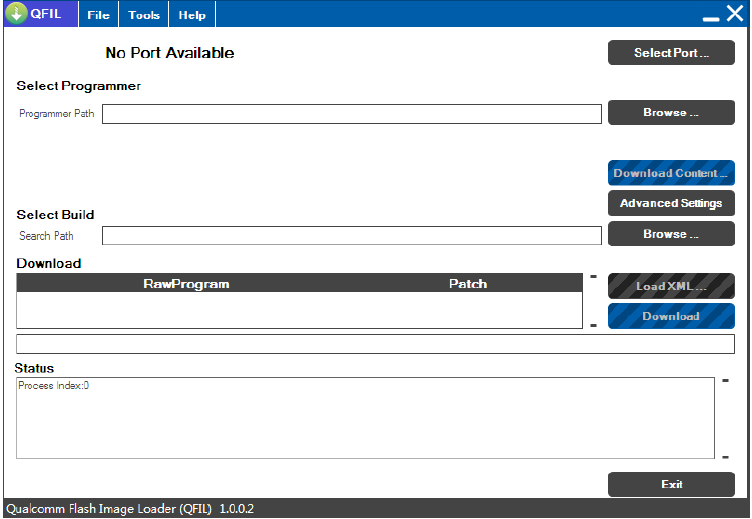
How to Flash Lenovo K10 Plus L39051:
1- Download Lenovo K10 Plus L39051 Flash file
2- Download QPST tool.
3- Install Qualcomm driver.
4- Run QPST tool.
5- Add new port (Check device manager)
6- Click Load XML and browse for rawprogram_unsparse.xml in Stock ROM file.
7- Click Load Patch and browse for patch0.xml in Stock ROM file folder.
8- Select the firmware by clicking in Browser of Search Path.
9- Select Download and wait for the flashing to be finish.
Micromax Q353 Flash File (Stock ROM)
Download Micromax Q353 Flash File:
***Try Firmware Upgrade or Untick Preloader Then Flash
How to Flash Micromax Q353:
Install MTK Driver.
1- Download the package & Extract SP Flash tool.
2- Out of the icon appearing, Double click on Flash_tool.exe
3- it will launch the tool on your PC, Click on Scatter-Loading appearing on the Right side of the tool.
4- Now, assign the firmware which will be in form “Android_scatter.txt”.
5- Click on Download to start flashing.
6- Switch off your Mobile and Connect it to PC by pressing Volume down or Volume up key.
7- It will lead you to Successful Flashing

