• Skip to primary navigation
  • Skip to main content
  • Skip to primary sidebar
RMM logo 2
Get All Flash File
Menu
  • Home
  • Training
    • Offline Training
      • Kolkata
      • Kolhapur
      • Patna
    • L1: Basic Software & Hardware
    • L2: Advanced Software & Hardware
    • L3: Super Advanced UFS
    • iPhone Training
  • Solution
    • Flash File
    • Flash Tool
    • Driver
    • Combination
    • FRP
    • Root
    • Hard Reset
    • Hardware
  • Premium Flash File
    • Premium Flash File
    • Fast Download Server
    • Android Dump Files
  • Log In
  • Home
  • Training
    • Offline Training
      • Kolkata
      • Kolhapur
      • Patna
    • L1: Basic Software & Hardware
    • L2: Advanced Software & Hardware
    • L3: Super Advanced UFS
    • iPhone Training
  • Solution
    • Flash File
    • Flash Tool
    • Driver
    • Combination
    • FRP
    • Root
    • Hard Reset
    • Hardware
  • Premium Flash File
    • Premium Flash File
    • Fast Download Server
    • Android Dump Files
  • Log In

Oppo Find X2 CPH2023 Flash File (Stock ROM)

Oppo Find X2 CPH2023 Flash File (Stock ROM)

March 6, 2021

Download Oppo Find X2 CPH2023 Flash File

  • CPH2023_11_F.19_20220714
  • CPH2023_11_F.16_20220424
  • CPH2023_11_C.73
  • CPH2023_11_C.67
  • CPH2023EU_11_A.42_200918
  • Oppo MTK Driver

Boot Key: Volume UP + Down

Note: Flash Tool requires Login credential.

How to Flash Oppo Find X2 CPH2023:

Download Oppo Find X2 CPH2023 Flash file
1- Download the Firmware package & run Flash tool.
2- Out of the icon appearing, Double click on MSM Download Tool.
3- it will launch the tool on your PC, Click on Start All.
4- Then it will verify for PC Memory Checksum.
5- Switch off your Mobile and Connect it to PC by pressing Volume down and Volume up key.
6- It will lead you to Successful Flashing.

Filed Under: Android Flash File Database

Jio Flash File Password

February 25, 2021


This content is for Premium Files Membership Plan: 1 Month , Premium Files Membership Plan: 6 Month , Premium Files Membership Plan: 1 Year; Unlock Tool & FRP Training, and Fast Download Server: 1 Month members only.

Filed Under: Premium Flash Files

Samsung SM-A102u Flash File (Stock ROM)

February 24, 2021

Download Samsung SM-A102u Flash File and use Odin tool to flash:

  • A102USQU6ATE5
  • Odin tool
  • Samsung Kies

How to Flash Samsung SM-A102u:

Make sure your device is atleast 30 percent charged to perform flashing.

  • Install Samsung kies to make connectivity between Phone & Odin flash tool.
  • Switch off the mobile.
  • Press the Power + volume down + home button.
  • Android symbol will appear, now press volume up to enter into the download mode.
  • Unzip the Samsung SM-A102u.
  • Now open the Odin flash tool.
  • Select flash file in PDA or AP.
  • After selection mobile will get detected automatically and will display a message Added.
  • Now click start on system & installation is in process.
  • After installation mobile restart of its own.

Filed Under: Android Flash File Database

Easy JTag Plus Setup Download: Emmc Plus v2.1.0.0, Classic Suit v3.8.0.14-eSim

February 22, 2021

All files are in premium section, purchase premium first (सभी फ़ाइलें प्रीमियम अनुभाग में हैं, पहले प्रीमियम खरीदें)

Easy JTag Plus Setup:

  • EasyJtag Classic Suit v3.8.0.14: Download | Mirror
  • EasyJtag Classic Suit v3.8.0.10: Download | Mirror
  • Easy JTag Classic Suit v3.7.0.23: Download
  • Easy JTag Plus_Emmc_Plus_Setup_v2.1.0.0: Download | Mirror | Mirror1
  • Easy JTag Plus_Emmc_Plus_Setup_v2.0.2.0: Download | Mirror
  • Easy JTag Plus_Emmc_Plus_Setup_v1.6.6.0: Download | Mirror
  • Z3X_Emmc_Manager__Z3X_EFM_1.32: Download
  • Z3X_Emmc_Manager__Z3X_EFM_1.25: Download
  • Z3X_Emmc_Manager__Z3X_EFM_1.18: Download

Setup has been released recently. Setup get updated on the page, whenever new version is released by EasyJtag Official Team.

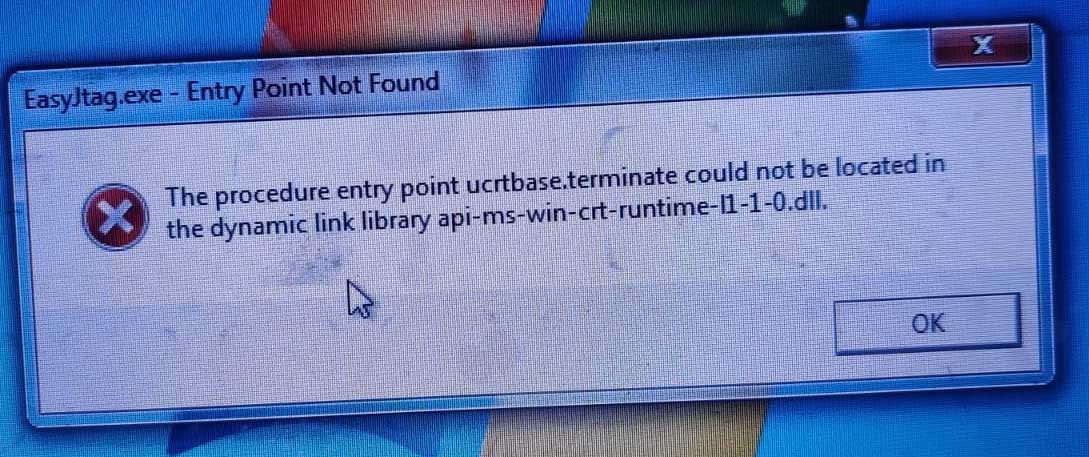
***If After installing latest EasyJtag plus, it yields an error:

Install RunTime Software: Download 

EasyJTAG Plus Update – Version 2.1.0.0 (01.12.2025)

UPDATE SUMMARY


✨ This EasyJTAG update significantly extends UFS service capabilities,
SoC coverage, and firmware handling tools for professional labs.✨


New vendors and SoC support

Added vendor flashing for MTK (MediaTek) devices.
Added vendor flashing for Spreadtrum / Unisoc platforms.
Added vendor flashing for Nvidia Tegra based devices.


⚙️ Advanced UFS functions

UFS unlock configuration for a UFS of chips, supporting unlock commands.
UFS smart-report for selected ICs to quickly read health, configuration, and key diagnostic data.
UFS DataProtect removal for compatible models, allowing safe clearing of protection when hardware/firmware permits.


Filesystem and explorer improvements

Updated Explorer with support for EXT, FAT, NTFS, EROFS, and F2FS, allowing direct work with typical Android and embedded partitions.


EasyJTAG boxes eSIM firmware and activation

Added support for devices/boxes with eSIM handling (LX9 boxes activated after 09/2025).
Added firmware v14 for LX9 boxes


Qualcomm boot slot control

Active slot (A/B) switching for Qualcomm-based devices to simplify recovery, testing, and boot slot repair.


Partition table and ROM handling

Manual partition table scan for a selected ROM/LUN, helping to locate and map partitions on damaged or non-standard layouts.


Xiaomi and authorization handling

Improved authorization bypass logic for some Xiaomi models within current security limitations.
Fixed Xiaomi Mi Account–related patch routines, increasing reliability on supported firmwares.


Parsers and firmware unpackers

Corrected and improved Preloader parser for better stability on various MTK images.
Updated firmware unpacking tools:
OFP unpacker (Oppo/Realme-style packages).
PAC unpacker (Spreadtrum/Unisoc firmware).
NB0 unpacker (NB0-format images).
LG firmware unpacker for compatible LG package types.

Always use the correct tools and follow proper procedures!


Classic Suite 3.8.0.4
Easy Jtag Classic Suite 3.8.0.4 Official Update
We have new options in the UFS Lash .
Set RefClk .
RPMB Key Check .
Check Config / Unlock Config / Lock Config.
Unlock OTP
We can also find Clock RefClK speed change in UFS memories for different CPU architectures
UFS Micron Support

Gui/Core Changes: Added ability to create new partitions at Partitions tab.
New Easy JTAG Plus 2.53 Firmware changes:
Added: New eMMC ISP core for best signal level detection.
Added: New eMMC VIO levels for fine tuning ISP connection.

Filed Under: Android Flash File Database

Micromax IN 1B E6523 Flash File (Stock ROM)

February 18, 2021

Download Micromax IN 1B E6523 (2 GB RAM) Flash File:

  • MMX_E7533_SW_V05_HW_V2.0
  • SP Flash Tool
  • MTK Driver

***Try Firmware Upgrade or Untick Preloader Then Flash

How to Flash Micromax IN 1B E6523:

Install MTK Driver.
1- Download the package & Extract SP Flash tool.
2- Out of the icon appearing, Double click on Flash_tool.exe
3- it will launch the tool on your PC, Click on Scatter-Loading appearing on the Right side of the tool.
4- Now, assign the firmware which will be in form “Android_scatter.txt”.
5- Click on Download to start flashing.
6- Switch off your Mobile and Connect it to PC by pressing Volume down or Volume up key.
7- It will lead you to Successful Flashing

Filed Under: Android Flash File Database

Micromax IN 1B E7533 Flash File (Stock ROM)

February 18, 2021

Download Micromax IN 1B E7533 (4 GB RAM) Flash File:

  • MMX_E7533_SW_V05_HW_V2.0
  • SP Flash Tool
  • MTK Driver

***Try Firmware Upgrade or Untick Preloader Then Flash

How to Flash Micromax IN 1B E7533:

Install MTK Driver.
1- Download the package & Extract SP Flash tool.
2- Out of the icon appearing, Double click on Flash_tool.exe
3- it will launch the tool on your PC, Click on Scatter-Loading appearing on the Right side of the tool.
4- Now, assign the firmware which will be in form “Android_scatter.txt”.
5- Click on Download to start flashing.
6- Switch off your Mobile and Connect it to PC by pressing Volume down or Volume up key.
7- It will lead you to Successful Flashing

Filed Under: Android Flash File Database

  • « Go to Previous Page
  • Page 1
  • Interim pages omitted …
  • Page 521
  • Page 522
  • Page 523
  • Page 524
  • Page 525
  • Interim pages omitted …
  • Page 925
  • Go to Next Page »

Primary Sidebar

Join Free Demo Classes!!!

Free demo classes
demo group

Recent Posts

  • Oppo Reno 13 5G CPH2689 Dump File
  • Redmi Note 12 Pro 5G UFS Dump File
  • Poco C61 Umt Dump File
  • Redmi A3 UMT Dump File
  • Infinix Note 50X 5G X6857B Flash File (Stock ROM)

RMM Other website & App

training.repairmymobile.co

RMM Android App

Join Telegram Group

Repair My Mobile

Our Services

Privacy Policy

Term & Condition

Contact us

About us

Sitemap

Join Our Community

Facebook Youtube Instagram Linkedin Twitter Whatsapp

Contact

sidhartha@repairmymobile.co

+91-9060 2999 19

Mon-Sat:10:00am to 6.00pm

Official QR Code

Official Payment no.

Course: 8935939022

Call/WhatsApp: 91-893-593-9022

Paypal: vijaytech89@gmail.com


Note: Repair My Mobile
Official Payment no.

Bakarganj, Patna, Bihar 800004

Payment Partner

Copyright © 2025 RMM. Designed by RMM All rights reserved.

Click to Chat