
• Skip to primary navigation
  • Skip to main content
  • Skip to primary sidebar
RMM logo 2
Get All Flash File
Menu
  • Home
  • Training
    • Offline Training
      • Kolkata
      • Kolhapur
      • Patna
    • L1: Basic Software & Hardware
    • L2: Advanced Software & Hardware
    • L3: Super Advanced UFS
    • iPhone Training
  • Solution
    • Flash File
    • Flash Tool
    • Driver
    • Combination
    • FRP
    • Root
    • Hard Reset
    • Hardware
  • Premium Flash File
    • Premium Flash File
    • Fast Download Server
    • Android Dump Files
  • Log In
  • Home
  • Training
    • Offline Training
      • Kolkata
      • Kolhapur
      • Patna
    • L1: Basic Software & Hardware
    • L2: Advanced Software & Hardware
    • L3: Super Advanced UFS
    • iPhone Training
  • Solution
    • Flash File
    • Flash Tool
    • Driver
    • Combination
    • FRP
    • Root
    • Hard Reset
    • Hardware
  • Premium Flash File
    • Premium Flash File
    • Fast Download Server
    • Android Dump Files
  • Log In

Oppo F17 Pro CPH2119PU Flash File ( STOCK ROM )

Oppo F17 Pro CPH2119PU Flash File ( STOCK ROM )

May 12, 2021

Download Oppo F17 Pro CPH2119PU Flash File:

  • CPH2119_11_F.44_20221129
  • CPH2119_11_F.41_20220620
  • CPH2119_11_F.05_20220331
  • CPH2119PU_11_A.25_201013
  • CPH2119PU_11_A.19_200929
  • Oppo MTK Driver

Boot Key: Volume UP + Down

Note: Flash Tool requires Login credential.

How to Flash Oppo F17 Pro CPH2119PU:

Download Oppo F17 Pro CPH2119PU Flash File
1- Download the Firmware package & run Flash tool.
2- Out of the icon appearing, Double click on MSM Download Tool.
3- it will launch the tool on your PC, Click on Start All.
4- Then it will verify for PC Memory Checksum.
5- Switch off your Mobile and Connect it to PC by pressing Volume down and Volume up key.
6- It will lead you to Successful Flashing.

Filed Under: Android Flash File Database

Join Basic to Chip level ऑनलाइन ट्रेनिंग

May 11, 2021

  • 5000+ प्रशिक्षित छात्र
  • 8 विशेषज्ञ प्रशिक्षक
  • लाइफटाइम ट्रेनिंग वीडियो के रिकॉर्डिंग

L1 to L3 Training: Rs. 14,990.

    Join Mobile Repair Training:


    Language:

    Join Training

    Full Video:

    Syllabus:

    L1 Software Android Training:

    • Software: लैपटॉप में सभी मोबाइल Drivers के Installation, सभी Flash tool का उपयोग, Flash tool में आए समस्याओं का निवारण, Flash File: कैसे सही File चुने, मोबाइल को कैसे Connect करे for Flashing & Unlocking, UMT Dongle, MRT Dongle, Miracle Thunder, Box में आए समस्याओं का Solution.

    L2 Advance Level Android Training:

    • UFI & JTag: सभी मॉडल और ब्रांड अकाउंट अनलॉक, एफआरपी, फ्लैश, डेटा रिकवरी (Oppo, Vivo, Reliance, Samsung), EMMC पहचान, BGA पहचान, Lock Read EMMC कंडीशन, स्वास्थ्य और अन्य Tab जानकारी, EMMC परिवर्तन Method, Firmware अपडेट Method, EMMC स्वास्थ्य, Bad Sector, 90% समस्या की मरम्मत, Repairable और non-repairable योग्य IC की पहचान करें, Dump पढ़ें, लिखें और बनाएं, Partition Important, कैसे पहचानें कि मेरा CPU सही है और EMMC ठीक नहीं है, EMMC RPMB क्लीन मेथड.
    • Basic Hardware: Multimeter का उपयोग कैसे करें, सभी Hardware कॉम्पोनेन्ट का detail, सभी IC और सेक्शन, प्रत्येक IC का कार्य, Charging और Network, Mic और Speaker.
    • Advanced Hardware: PM और PMI IC वर्क, CPU और EMMC को ठीक करें, रीबॉलिंग, टूटी हुई Balls फिक्स, काला या सफेद Pasted IC, Schematic Reading, Fault निकालना, DC पावर सप्लाई और Short Killer का उपयोग कैसे करें.

    L3 Super Advance Level Android Training:

    • UFS Training: UFS Unlocking, CPU Drill, Micro Jumper , UV Masking, EMMC Balls making, CPU Reball , Double Decker and Q & A Session.

      Join Mobile Repair Training:


      Language:

      Join Training

      हमारे Trainers:

      हमारे पास 15 से अधिक वर्षों के अनुभव वाले मोबाइल प्रशिक्षकों की एक टीम है और हमारे Online और Offline Training Centre के माध्यम से 5000 से अधिक छात्रों को प्रशिक्षित किया गया है।

      हमारे छात्रों का हमारे प्रशिक्षण क़े बारे में क्या कहना है!!
      प्रशिक्षित छात्रों क़े अनुभव:

      [smartslider3 slider=”2″]

      Top-performing students of the month:​

      RepairMyMobile Journey:

      Filed Under: Training

      Laptop & Desktop: Chip Level Training

      May 6, 2021

      What you will learn:

      • Software
      • Card Level
      • Advance Chip Level
      WhatsApp for Training Details
      • Fees: Rs.1200
      • Support: 1 Month
      • Video Access: 1 Month
      • Users have to renew their subscription to access Training Videos & Support after 1 Month.
      Join Now: Rs. 1200

      Course Details:

      Software: 

      • Windows Installation.
      • Driver Installation.
      • BIOS Setting.
      • Admin Password Reset.
      • Bootable Pendrive.
      • How to Create ISO File.

      Card Level: 

      • Laptop: Assembling & Disassembling.
      • Desktop: Assembling & Disassembling.
      • Soldering Iron & SMD Machine use.
      • All Practical tools info.
      • All Parts info- RAM, Hard Disk, SMPS etc.

      Advanced Chip Level: 

      • All Components Tracing & Testing.
      • Schematic Diagram.
      • Block Diagram.
      • Identification of All IC.
      • Graphics Setting.
      • VRM Section
      • RAM Section
      • Charging Section.
      • USB Section
      • LAN Section
      • Fault Finding
      • Shorting Remove
      • How to use Debug Card
      • BGA machine information & its usage.

      Our Trainers:

      We have a team of Mobile Trainers with over 15 years of Experience and trained more than 2000 students through our Online & Offline Training Centre.  

      What our Students have to say about us!
      Customer Reviews:

      Chunnu-kumar-v1
      Gurpreet-Singh-v1
      MUKESH-KUMAR-v1
      MUNNA-KUMAR-v1

      RepairMyMobile Journey:

      Filed Under: Training

      Basic Software & Hardware: Online Training for Android Phones

      May 3, 2021

      Basic Software & Hardware: Online Training for Android Phones

      • 3000+ Students Trained
      • 8 Expert Trainers
      • Lifetime Video Access

      What you will learn (Syllabus):

      Software Training

      • All Drivers installation
      • All Flash tool usage
      • Flash tool troubleshooting
      • Selection of Flash File 
      • Mobile Connectivity for Flashing & Unlocking 
      • UMT Dongle 
      • MRT Dongle 
      • Miracle Thunder
      • Box troubleshooting
      • Doubt Clearing 

      Hardware Training

      • How to use Multimeter
      • All Component details 
      • All IC & section 
      • Working of each IC
      • Charging & Network 
      • Mic & Speaker
      • Doubt Clearing 
      WhatsApp for Payment Details
      Pay now: Rs.1200
      • Fees: Rs.1200
      • Support: 1 Month
      • Video Access: Lifetime
      • Users have to renew their subscription to access Support after 1 Month.

      Our Trainers:

      We have a team of Mobile Trainers with over 15 years of Experience and trained more than 3000+ students through our Online & Offline Training Centre.  

      What our Students have to say about us!
      Students Review:

      MUNNA KUMAR
      MUNNA KUMAR
      MUKESH KUMAR
      MUKESH KUMAR
      Gurpreet Singh
      Gurpreet Singh

      RepairMyMobile Journey:

      Filed Under: Training

      Samsung SM-J530F Flash File (Stock ROM)

      April 28, 2021

      Download Samsung SM-J530F Flash File and use Odin tool to flash:

      • J530FXXS9CUE6
      • J530FXXS8CUE4
      • J530FXXS7CTF1 (Binary 7 Touch & Flash File)
      • Odin tool
      • Samsung Kies

      How to Flash Samsung SM-J530F:

      Make sure your device is atleast 30 percent charged to perform flashing.

      • Install Samsung kies to make connectivity between Phone & Odin flash tool.
      • Switch off the mobile.
      • Press the Power + volume down + home button.
      • Android symbol will appear, now press volume up to enter into the download mode.
      • Unzip the Samsung SM-J530F.
      • Now open the Odin flash tool.
      • Select flash file in PDA or AP.
      • After selection mobile will get detected automatically and will display a message Added.
      • Now click start on system & installation is in process.
      • After installation mobile restart of its own.

      Filed Under: Android Flash File Database

      Infinix Hot 9 X655 Flash File (Stock ROM)

      April 24, 2021

      Download Infinix Hot 9 Flash File:

      • X655-H6210ABFG-Q-OP-220110V493
      • X655-H6210ABFG-Q-OP-211103V463
      • X655-H6210ABFG-Q-OP-210707V396
      • X655D-H6211M-Q-AS-210322V264
      • SP Flash Tool
      • Tecno Flash Tool
      • MTK Driver

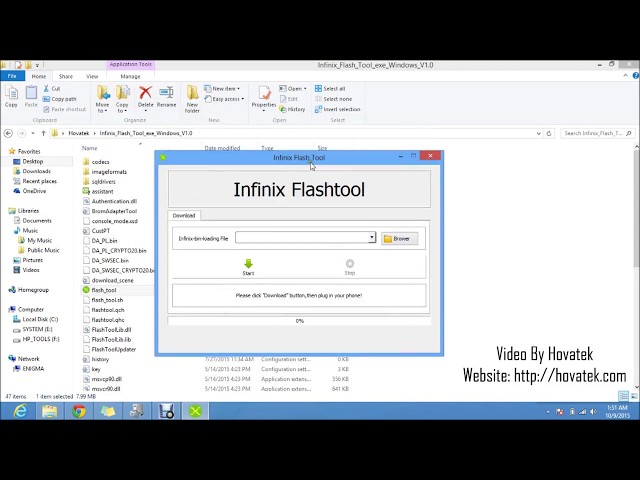
      How to Flash Infinix Hot 9:

      Install MTK Driver.
      1- Download the package & Extract SP Flash tool.
      2- Out of the icon appearing, Double click on Flash_tool.exe
      3- it will launch the tool on your PC, Click on Scatter-Loading appearing on the Right side of the tool.
      4- Now, assign the firmware which will be in form “Android_scatter.txt”.
      5- Click on Download to start flashing.
      6- Switch off your Mobile and Connect it to PC by pressing Volume down or Volume up key.
      7- It will lead you to Successful Flashing
      Filed Under: Android Flash File Database

      • « Go to Previous Page
      • Page 1
      • Interim pages omitted …
      • Page 519
      • Page 520
      • Page 521
      • Page 522
      • Page 523
      • Interim pages omitted …
      • Page 937
      • Go to Next Page »

      Primary Sidebar

      Join Free Demo Classes!!!

      Free demo classes
      demo group

      Recent Posts

      • Vivo Y400 5G PD2469F Dump File
      • Tecno Spark 20C BG7n Dead Boot Repair File
      • Tecno Megapad Pro T1201 Flash File (Stock ROM)
      • Tecno Megapad 11 T1101 Flash File (Stock ROM)
      • HMD Aura TA-1631 Flash File (Stock ROM)

      RMM Other website & App

      training.repairmymobile.co

      RMM Android App

      Join Telegram Group

      Repair My Mobile

      Our Services

      Privacy Policy

      Term & Condition

      Contact us

      About us

      Sitemap

      Join Our Community

      Facebook Youtube Instagram Linkedin Twitter Whatsapp

      Contact

      sidhartha@repairmymobile.co

      +91-9060 2999 19

      Mon-Sat:10:00am to 6.00pm

      Official QR Code

      Official Payment no.

      Course: 8935939022

      Call/WhatsApp: 91-893-593-9022

      Paypal: vijaytech89@gmail.com


      Note: Repair My Mobile
      Official Payment no.

      Bakarganj, Patna, Bihar 800004

      Payment Partner

      Copyright © 2025 RMM. Designed by RMM All rights reserved.

      Click to Chat
