• Skip to primary navigation
  • Skip to main content
  • Skip to primary sidebar
RMM logo 2
Get All Flash File
Menu
  • Home
  • Training
    • Offline Training
      • Kolkata
      • Kolhapur
      • Patna
    • L1: Basic Software & Hardware
    • L2: Advanced Software & Hardware
    • L3: Super Advanced UFS
    • iPhone Training
  • Solution
    • Flash File
    • Flash Tool
    • Driver
    • Combination
    • FRP
    • Root
    • Hard Reset
    • Hardware
  • Premium Flash File
    • Premium Flash File
    • Fast Download Server
    • Android Dump Files
  • Log In
  • Home
  • Training
    • Offline Training
      • Kolkata
      • Kolhapur
      • Patna
    • L1: Basic Software & Hardware
    • L2: Advanced Software & Hardware
    • L3: Super Advanced UFS
    • iPhone Training
  • Solution
    • Flash File
    • Flash Tool
    • Driver
    • Combination
    • FRP
    • Root
    • Hard Reset
    • Hardware
  • Premium Flash File
    • Premium Flash File
    • Fast Download Server
    • Android Dump Files
  • Log In

Download Latest Infinix Flash Tool (all Versions)

Download Latest Infinix Flash Tool (all Versions)

August 12, 2021

Download Infinix Flash Tool Latest Version:

  • INFINIX_FlashTool_V5.2108.02.9 : Download

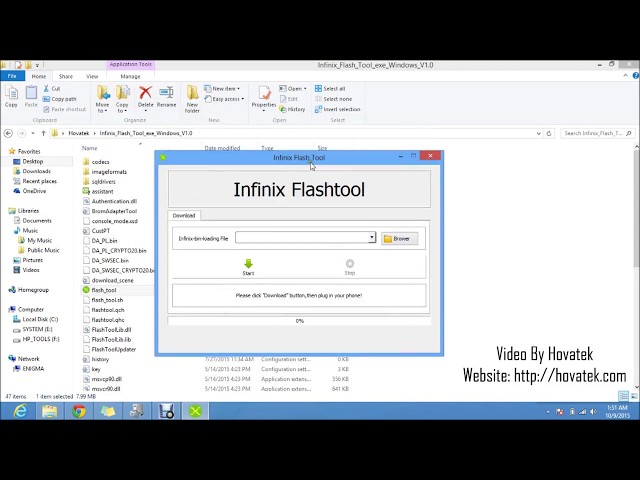
Flash Stock firware in Infinix phone via latest Infinix Flash Tool. Download all the updated and latest Infinix Flash Tools here

You have to use Infinix Flash Tools to flash stock firmware in Infinix mobile phones to update, unbrick or fix it. If phone is bricked or dead then you require Latest Infinix Flash Tool to fix your Infinix mobile phone. These issues can easily be solves on Infinix phones, if you have latest Infinix Flash Tools. You don’t need to go to service centers for these issues.

Steps to show how you can use Infinix Flash tool:

Follow below mentioned steps to flash a firmware with Infinix flash tool

  1. Download the Infinix Flash Tool

  2. Now extract the STOCK ROM and the Infinix Flash tool that you have to flash[Image: how-to-use-infinix-flash-tool-1.jpg]
  3. Right click and select run Infinix Flash Tool as Administrator [Image: how-to-use-infinix-flash-tool-2.jpg]
  4. You can now see the tool’s Dashboard like this[Image: how-to-use-infinix-flash-tool-3.jpg]
  5. Click on the Brower (having folder icon)[Image: how-to-use-infinix-flash-tool-4.jpg]
  6. A window will popup, go to the STOCK ROM folder, and then select the Android scatter file and click on the Open button below[Image: how-to-use-infinix-flash-tool-5.jpg]
  7. You can see file path in front of the Infinix-bin-loading-file.[Image: how-to-use-infinix-flash-tool-5b.jpg]
  8. Click on the Start Button

9. You can see Start Button will be grayed and Stop Button will be green in color.[Image: how-to-use-infinix-flash-tool-7.jpg]

10. Now switch off the mobile phone and connect it to the Laptop/PC via US cable ( having battery inside the phone); Flashing must begin. Don’t interrupt in between the flashing

[Image: how-to-use-infinix-flash-tool-8.jpg]

11. A right symbol in green color will appear once the flashing is completed.[Image: how-to-use-infinix-flash-tool-9.jpg]

12. Disconnect your phone from the Laptop/PC and then boot it. If your phone is not moving forward after LOGO ( and assuming you have Flashed the correct ROM) then remove the battery of your phone and put it back again. If batter is inbuilt then do the factory reset in the recovery mode.


Filed Under: Android Flash File Database

Tecno Spark 7 KF6 Flash File (STOCK ROM)

August 9, 2021

Download Tecno Spark 7 KF6 Flash File:

  • KF6-H6219DI-RGo-GL-220721V410
  • KF6-H6219DI-RGo-GL-220510V400
  • KF6-H6219DI-RGo-GL-220110V387
  • KF6-H6219DI-RGo-GL-211119V377
  • SP Flash Tool
  • MTK Driver
  • Tecno Flash Tool

Note: In Case if SP Flash Tool yields out an error, Tecno Flash Tool can be used for Flashing.

How to Flash Tecno Spark 7 KF6:

Install MTK Driver.
1- Download the package & Extract SP Flash tool.
2- Out of the icon appearing, Double click on Flash_tool.exe
3- it will launch the tool on your PC, Click on Scatter-Loading appearing on the Right side of the tool.
4- Now, assign the firmware which will be in form “Android_scatter.txt”.
5- Click on Download to start flashing.
6- Switch off your Mobile and Connect it to PC by pressing Volume down or Volume up key.
7- It will lead you to Successful Flashing.

Filed Under: Android Flash File Database

Vivo V19 PD1969F Flash File (STOCK ROM)

August 6, 2021

Download Vivo V19 PD1969F Flash File:

  • PD1969F_EX_A_6.72.3
  • PD1969F_EX_A_6.9.3
  • QPST tool.
  • AF Tool

How to Flash Vivo V19 PD1969F:

1- Download Vivo V19 PD1969F Flash File
2- Download QPST tool.
3- Install Qualcomm driver.
4- Run QPST tool.
5- Add new port (Check device manager), Short test point then connect.
6- Click Load XML and browse for rawprogram_unsparse.xml in Stock ROM file.
7- Click Load Patch and browse for patch0.xml in Stock ROM file folder.
8- Select the firmware by clicking in Browser of Search Path.
9- Select Download and wait for the flashing to finish.

Filed Under: Android Flash File Database

REPAIR MY MOBILE – Delhi Branch

August 5, 2021

  • Call / WhatsApp : +91-8935939022

Repair My Mobile – Delhi Shop

Contact : +91-8935939022

Address :

12/10 wea Karol Bagh first floor,In Front Of Satsang Bhawan, Delhi, Pin -10005

Expertise Area :

Online Training Tool Shop | Parts Delivery | Laptop And Desktop Training

Call Now
Message Now

Address : 12/10 wea Karol Bagh first floor, In Front Of Satsang Bhawan, Delhi, Pin -110005
Expertise Area : Online Training Tool Shop | Parts Delivery | Laptop And Desktop Training

Repair My Mobile Online Shop

Expertise Area : Repair | Tools | Laptop & Desktop Training | Online Shop

Address : Bakarganj Patna 800001

+91-9472112783

Call
Message

Filed Under: Training

Vivo V17 PD1948F Flash File (Stock ROM)

August 5, 2021

All files are in premium section, purchase premium first (सभी फ़ाइलें प्रीमियम अनुभाग में हैं, पहले प्रीमियम खरीदें)

Download Vivo V17 PD1948F Flash File:

  • PD1948F_EX_A_9.1.23_vivo_20210903_qcom_Flash_File_RMM
  • PD1948F_EX_A_8.75.20
  • PD1948F_EX_A_8.8.15
  • QPST tool.
  • AF Tool

How to Flash Vivo V17 PD1948F:

1- Download Vivo V17 PD1948F Flash File
2- Download QPST tool.
3- Install Qualcomm driver.
4- Run QPST tool.
5- Add new port (Check device manager), Short test point then connect.
6- Click Load XML and browse for rawprogram_unsparse.xml in Stock ROM file.
7- Click Load Patch and browse for patch0.xml in Stock ROM file folder.
8- Select the firmware by clicking in Browser of Search Path.
9- Select Download and wait for the flashing to finish.

Filed Under: Android Flash File Database

Samsung SM-A715F Flash File (STOCK ROM)

August 4, 2021

Download Samsung SM-A715F Flash File:

  • A715FXXUADWH4
  • A715FXXS9DWD1
  • A715FXXU8DVK5
  • A715FXXS8BUL1
  • A715FXXS7BUJ1
  • A715FXXU6BUI2
  • A715FXXU6BUH1
  • A715FXXU5BUG1
  • Odin tool
  • Samsung Kies

How to Flash Samsung SM-A715F:

Make sure your device is atleast 30 percent charged to perform flashing.
• Switch off the mobile
• Press the Power + Volume UP. Recovery mode will appear then using Volume key select Reboot to Bootloader, phone will shift to Download Mode.
• Now open the Odin flash tool and follow the steps as shown in the video
• Select the Odin tool and open it
• Select BL file
• Click AP or PDA then select AP File
• Click CP and select Modem File.
• Click CSC and select CSC File.
• After selection mobile will get detected automatically
• Now click start on system & installation is in process
• After installation mobile switch ON of its own.

Filed Under: Android Flash File Database

  • « Go to Previous Page
  • Page 1
  • Interim pages omitted …
  • Page 498
  • Page 499
  • Page 500
  • Page 501
  • Page 502
  • Interim pages omitted …
  • Page 925
  • Go to Next Page »

Primary Sidebar

Join Free Demo Classes!!!

Free demo classes
demo group

Recent Posts

  • Oppo Reno 13 5G CPH2689 Dump File
  • Redmi Note 12 Pro 5G UFS Dump File
  • Poco C61 Umt Dump File
  • Redmi A3 UMT Dump File
  • Infinix Note 50X 5G X6857B Flash File (Stock ROM)

RMM Other website & App

training.repairmymobile.co

RMM Android App

Join Telegram Group

Repair My Mobile

Our Services

Privacy Policy

Term & Condition

Contact us

About us

Sitemap

Join Our Community

Facebook Youtube Instagram Linkedin Twitter Whatsapp

Contact

sidhartha@repairmymobile.co

+91-9060 2999 19

Mon-Sat:10:00am to 6.00pm

Official QR Code

Official Payment no.

Course: 8935939022

Call/WhatsApp: 91-893-593-9022

Paypal: vijaytech89@gmail.com


Note: Repair My Mobile
Official Payment no.

Bakarganj, Patna, Bihar 800004

Payment Partner

Copyright © 2025 RMM. Designed by RMM All rights reserved.

Click to Chat