Lava Blaze 2 Pro LZX406 Flash File (Stock ROM)
Xiaomi 13T Flash File (Stock ROM)
Download Xiaomi 13T Flash File:
- aristotle_global_images_OS2.0.211.0.VMFMIXM_20251118.0000.00_15.0_global_RMM
- aristotle_global_images_OS2.0.210.0.VMFMIXM_20251016.0000.00_15.0_global
- aristotle_global_images_OS2.0.208.0.VMFMIXM_20250814.0000.00_15.0_global_RMM
- aristotle_global_images_OS2.0.203.0.VMFMIXM_20250618.0000.00_15.0_global_RMM
- aristotle_global_images_OS2.0.103.0.VMFMIXM_20250409.0000.00_15.0_global_RMM
- aristotle_global_images_OS2.0.3.0.VMFMIXM_20250210.0000.00_15.0_global_RMM (Android-15)
- aristotle_global_images_OS1.0.10.0.UMFMIXM_20241015.0000.00_14.0_global_RMM
- aristotle_global_images_OS1.0.9.0.UMFMIXM_20240909.0000.00_14.0_global_RMM
- aristotle_global_images_OS1.0.6.0.UMFMIXM_20240722.0000.00_14.0_global
- aristotle_global_images_OS1.0.5.0.UMFMIXM_20240618.0000.00_14.0_global
- aristotle_global_images_OS1.0.4.0.UMFMIXM_20240412.0000.00_14.0_global
- aristotle_global_images_OS1.0.3.0.UMFMIXM_20240226.0000.00_14.0 (Android-14)
- aristotle_global_images_V14.0.6.0.TMFMIXM_20231016.0000.00_13.0_global (Android-13)
- aristotle_global_images_V14.0.5.0.TMFMIXM_20230913.0000.00_13.0_global
- SP Flash Tool
WhatsApp for Mi Account: 893-593-9022
Note: You will need Authorized tool to Flash and Remove Mi Account from Redmi Pad.
How to Flash Xiaomi 13T:
Install MTK Driver.
1- Download the package & Extract SP Flash tool.
2- Out of the icon appearing, Double click on Flash_tool.exe
3- it will launch the tool on your PC, Click on Scatter-Loading appearing on the Right side of the tool.
4- Now, assign the firmware which will be in form “Android_scatter.txt”.
5- Select Authentication file in SP Flash Tool.
6- Click on Download to start flashing.
7- Switch off your Mobile and Connect it to PC by pressing Volume down or Volume up key.
8- It will lead you to Successful Flashing.
Lava Agni 5G LXX501 Flash File (Stock ROM)
Lava Agni 5G LXX501 FRP File
Download Lava Agni 5G LXX501 FRP File :
How to Flash Lava Agni 5G LXX501 FRP File :
Install MTK Driver.
1- Download & Extract the Lava Agni 5G LXX501 FRP file, MTK bypasstool and SP Flash tool.
2- Out of the icon appearing, Double click on Flash_tool.exe
3- it will launch the tool on your PC, Click on Scatter-Loading appearing on the Right side of the tool.
4- Now, assign the firmware which will be in form “Android_scatter.txt”.
5- If ask Auth Security then you need the Android utility tool or MTK Bypass tool to bypass MTK auth Security.
6- Lauch the Android utility or MTK bypass tool v7 click auth disable and connect phone,
when it done now next
7- Click on Download to start flashing.
8- Switch off your Mobile and Connect it to PC by pressing Volume down and Volume up key.
9- It will lead you to Successful Flashing
Redmi K60 Ultra Flash File (Stock ROM)
Download Redmi K60 Ultra Flash File:
- corot_global_images_OS2.0.204.0.VMLMIXM_20251028.0000.00_15.0_global
- corot_global_images_OS2.0.203.0.VMLMIXM_20251018.0000.00_15.0_global
- corot_global_images_OS2.0.202.0.VMLMIXM_20250918.0000.00_15.0_global_RMM
- corot_global_images_OS2.0.200.0.VMLMIXM_20250623.0000.00_15.0_global_RMM
- corot_global_images_OS2.0.102.0.VMLMIXM_20250313.0000.00_15.0_global_RMM
- corot_global_images_OS2.0.6.0.VMLMIXM_20241224.0000.00_15.0_global_RMM (Android-15)
- corot_global_images_OS1.0.10.0.UMLMIXM_20241208.0000.00_14.0_global_RMM
- corot_global_images_OS1.0.4.0.UMLMIXM_20240617.0000.00_14.0_global
- corot_global_images_OS1.0.3.0.UMLMIXM_20240312.0000.00_14.0_global
- corot_global_images_OS1.0.1.0.UMLMIXM_20231227.0000.00_14.0_global (Android-14)
- corot_global_images_V14.0.12.0.TMLMIXM_20231123.0000.00_13.0_global
- corot_global_images_V14.0.8.0.TMLMIXM_20230919.0000.00_13.0_global
- corot_global_images_V14.0.6.0.TMLMIXM_20230828.0000.00_13.0_global
- SP Flash Tool
WhatsApp for Mi Account: 893-593-9022
Note: You will need Authorized tool to Flash and Remove Mi Account from Redmi Pad.
How to Flash Redmi K60 Ultra:
Install MTK Driver.
1- Download the package & Extract SP Flash tool.
2- Out of the icon appearing, Double click on Flash_tool.exe
3- it will launch the tool on your PC, Click on Scatter-Loading appearing on the Right side of the tool.
4- Now, assign the firmware which will be in form “Android_scatter.txt”.
5- Select Authentication file in SP Flash Tool.
6- Click on Download to start flashing.
7- Switch off your Mobile and Connect it to PC by pressing Volume down or Volume up key.
8- It will lead you to Successful Flashing.
Jio Bharat V2 LF061W 4G Flash File (Stock ROM)
Download Jio Bharat V2 LF061W 4G Flash File:
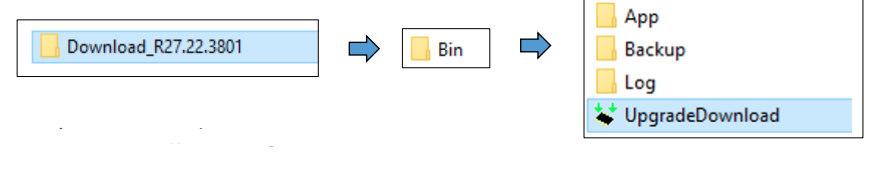
- JIO_LF061W_000_02_17_051023 (File Password Prortected: 99 rs )
- JIO_LF061W_000_02_13_270723
Whatsapp for password - Flashing Tool: Download | Mirror
- Driver
How to Flash Jio Bharat V2 LF061W 4G:
- Download and unzip File and Flashing tool.
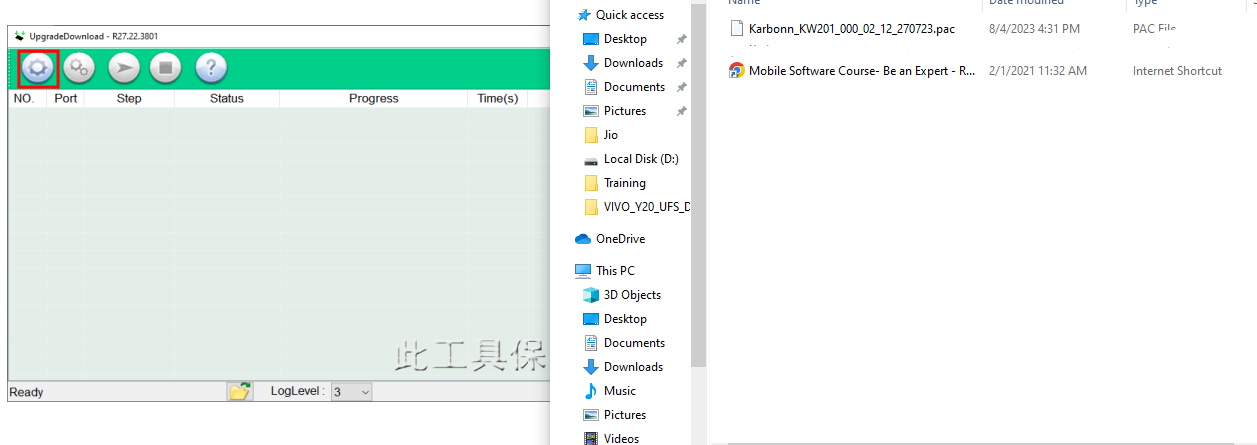
- Open Software Download Tool and load the packet (.pac) file from flash file.

- Select packet file from flash file

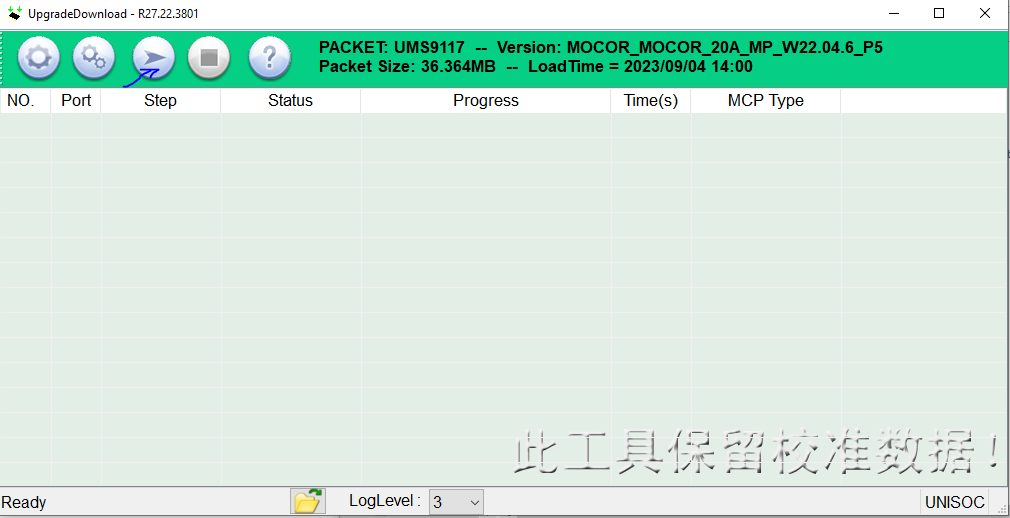
- When packet file succesfully load on the tool, then click Start downloading button on tool.

- Now switched off your phone and press * key then connect usb cable to the phone and PC.
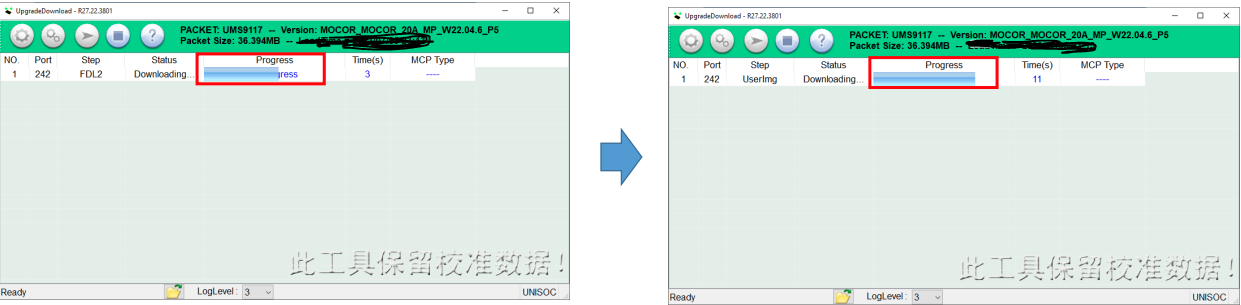
- On Succcessful connection the tool will show “Progress“.

- The tool will show progress during the software upgrade process.
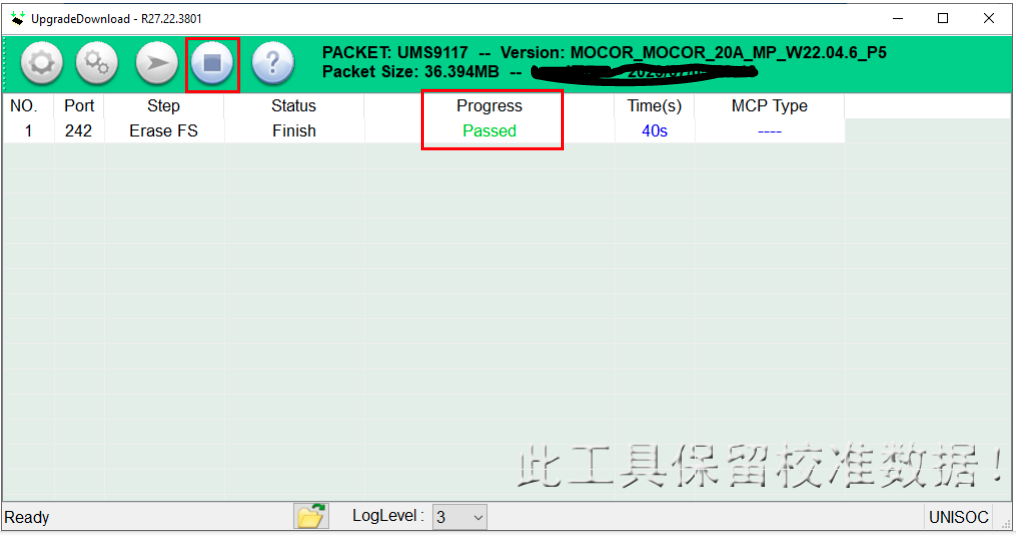
- On Successfull completion of the software upgarde, Passed message will be displayed in the tool.
- Click on stop downloading icon and disconnect the phone.