Lava Agni 5G LXX501 Flash File (Stock ROM)
Lava Agni 5G LXX501 FRP File
Download Lava Agni 5G LXX501 FRP File :
How to Flash Lava Agni 5G LXX501 FRP File :
Install MTK Driver.
1- Download & Extract the Lava Agni 5G LXX501 FRP file, MTK bypasstool and SP Flash tool.
2- Out of the icon appearing, Double click on Flash_tool.exe
3- it will launch the tool on your PC, Click on Scatter-Loading appearing on the Right side of the tool.
4- Now, assign the firmware which will be in form “Android_scatter.txt”.
5- If ask Auth Security then you need the Android utility tool or MTK Bypass tool to bypass MTK auth Security.
6- Lauch the Android utility or MTK bypass tool v7 click auth disable and connect phone,
when it done now next
7- Click on Download to start flashing.
8- Switch off your Mobile and Connect it to PC by pressing Volume down and Volume up key.
9- It will lead you to Successful Flashing
Redmi K60 Ultra Flash File (Stock ROM)
Download Redmi K60 Ultra Flash File:
- corot_global_images_OS2.0.204.0.VMLMIXM_20251028.0000.00_15.0_global
- corot_global_images_OS2.0.203.0.VMLMIXM_20251018.0000.00_15.0_global
- corot_global_images_OS2.0.202.0.VMLMIXM_20250918.0000.00_15.0_global_RMM
- corot_global_images_OS2.0.200.0.VMLMIXM_20250623.0000.00_15.0_global_RMM
- corot_global_images_OS2.0.102.0.VMLMIXM_20250313.0000.00_15.0_global_RMM
- corot_global_images_OS2.0.6.0.VMLMIXM_20241224.0000.00_15.0_global_RMM (Android-15)
- corot_global_images_OS1.0.10.0.UMLMIXM_20241208.0000.00_14.0_global_RMM
- corot_global_images_OS1.0.4.0.UMLMIXM_20240617.0000.00_14.0_global
- corot_global_images_OS1.0.3.0.UMLMIXM_20240312.0000.00_14.0_global
- corot_global_images_OS1.0.1.0.UMLMIXM_20231227.0000.00_14.0_global (Android-14)
- corot_global_images_V14.0.12.0.TMLMIXM_20231123.0000.00_13.0_global
- corot_global_images_V14.0.8.0.TMLMIXM_20230919.0000.00_13.0_global
- corot_global_images_V14.0.6.0.TMLMIXM_20230828.0000.00_13.0_global
- SP Flash Tool
WhatsApp for Mi Account: 893-593-9022
Note: You will need Authorized tool to Flash and Remove Mi Account from Redmi Pad.
How to Flash Redmi K60 Ultra:
Install MTK Driver.
1- Download the package & Extract SP Flash tool.
2- Out of the icon appearing, Double click on Flash_tool.exe
3- it will launch the tool on your PC, Click on Scatter-Loading appearing on the Right side of the tool.
4- Now, assign the firmware which will be in form “Android_scatter.txt”.
5- Select Authentication file in SP Flash Tool.
6- Click on Download to start flashing.
7- Switch off your Mobile and Connect it to PC by pressing Volume down or Volume up key.
8- It will lead you to Successful Flashing.
Jio Bharat V2 LF061W 4G Flash File (Stock ROM)
Download Jio Bharat V2 LF061W 4G Flash File:
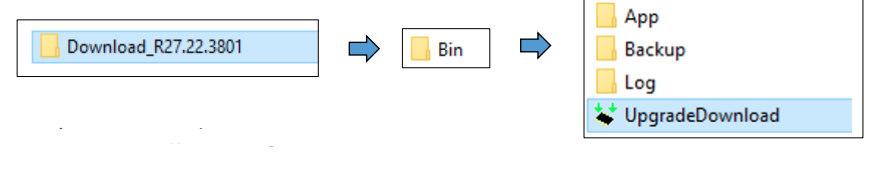
- JIO_LF061W_000_02_17_051023 (File Password Prortected: 99 rs )
- JIO_LF061W_000_02_13_270723
Whatsapp for password - Flashing Tool: Download | Mirror
- Driver
How to Flash Jio Bharat V2 LF061W 4G:
- Download and unzip File and Flashing tool.
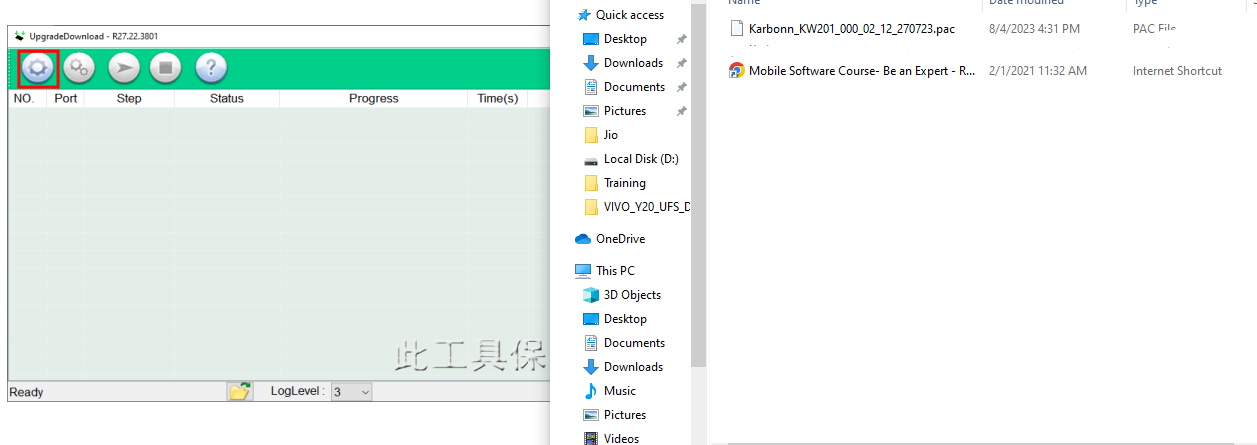
- Open Software Download Tool and load the packet (.pac) file from flash file.

- Select packet file from flash file

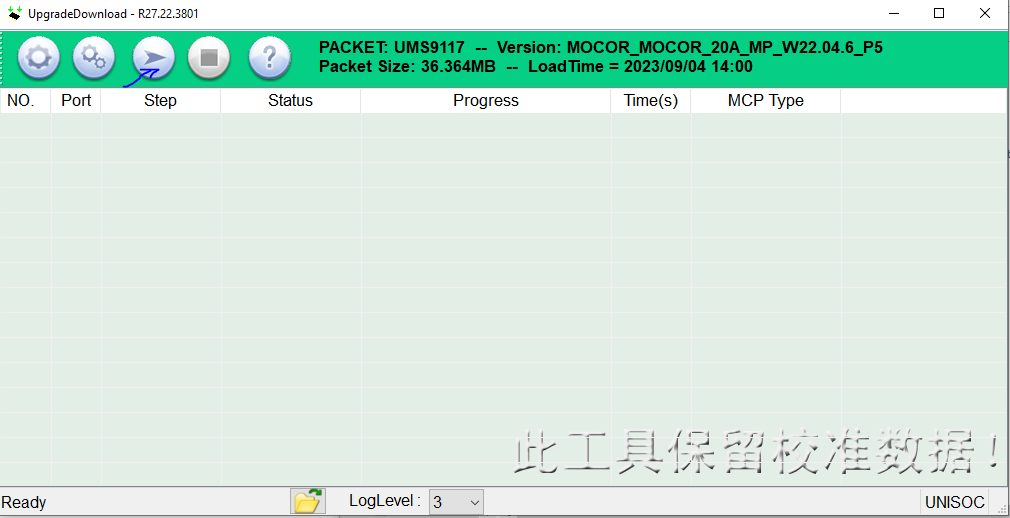
- When packet file succesfully load on the tool, then click Start downloading button on tool.

- Now switched off your phone and press * key then connect usb cable to the phone and PC.
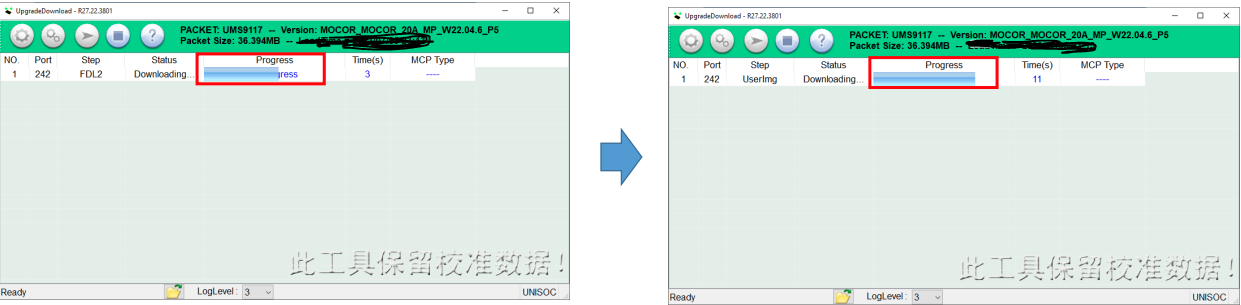
- On Succcessful connection the tool will show “Progress“.

- The tool will show progress during the software upgrade process.
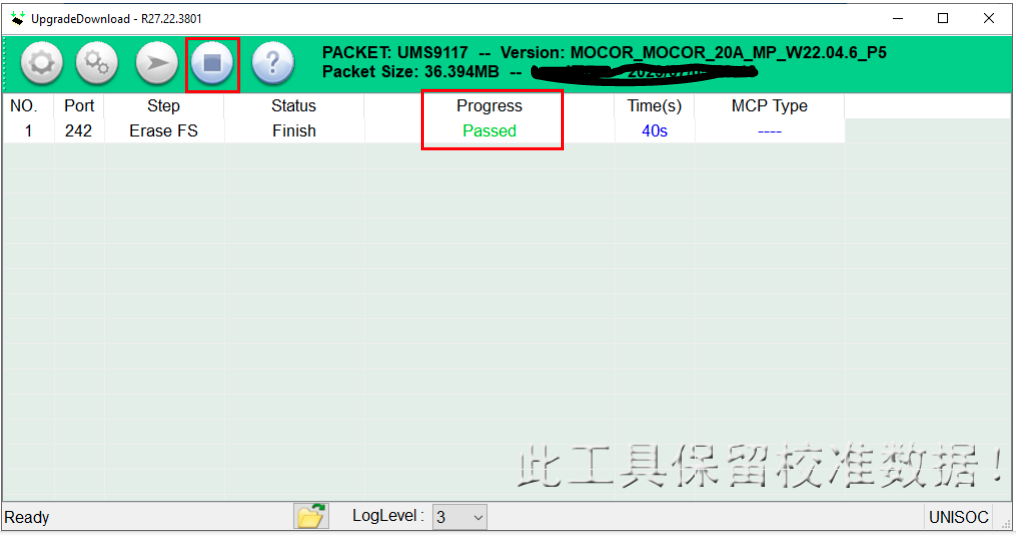
- On Successfull completion of the software upgarde, Passed message will be displayed in the tool.
- Click on stop downloading icon and disconnect the phone.

Redmi 12 Flash File (Stock ROM)
Download Redmi 12 Flash File:
- fire_global_images_OS2.0.205.0.VMXMIXM_20251021.0000.00_15.0_global
- fire_in_global_images_OS2.0.202.0.VMXINXM_20250904.0000.00_15.0_in_RMM
- fire_global_images_OS2.0.204.0.VMXMIXM_20250822.0000.00_15.0_global_RMM
- fire_global_images_OS2.0.202.0.VMXMIXM_20250702.0000.00_15.0_global_RMM
- fire_in_global_images_OS2.0.4.0.VMXINXM_20250416.0000.00_15.0_in_RMM
- fire_global_images_OS2.0.5.0.VMXMIXM_20250331.0000.00_15.0_global_RMM
- fire_in_global_images_OS2.0.3.0.VMXINXM_20250219.0000.00_15.0_in_RMM
- fire_global_images_OS2.0.4.0.VMXMIXM_20250206.0000.00_15.0_global_RMM (Android-15)
- fire_in_global_images_OS1.0.8.0.UMXINXM_20241218.0000.00_14.0_in_RMM
- fire_in_global_images_OS1.0.5.0.UMXINXM_20241014.0000.00_14.0_in__RMM
- fire_global_images_OS1.0.8.0.UMXMIXM_20241008.0000.00_14.0_global_RMM
- fire_in_global_images_OS1.0.4.0.UMXINXM_20240820.0000.00_14.0_in_RMM
- fire_global_images_OS1.0.7.0.UMXMIXM_20240813.0000.00_14.0_global
- fire_in_global_images_OS1.0.3.0.UMXINXM_20240624.0000.00_14.0_in
- fire_global_images_OS1.0.6.0.UMXMIXM_20240606.0000.00_14.0_global
- fire_in_global_images_OS1.0.2.0.UMXINXM_20240418.0000.00_14.0_in
- fire_global_images_OS1.0.4.0.UMXMIXM_20240416.0000.00_14.0_global
- fire_in_global_images_OS1.0.1.0.UMXINXM_20240305.0000.00_14.0_in
- fire_global_images_OS1.0.3.0.UMXMIXM_20240227.0000.00_14.0_global
- fire_global_images_OS1.0.1.0.UMXMIXM_20240102.0000.00_14.0_global (Android-14)
- fire_in_global_images_V14.0.6.0.TMXINXM_20231212.0000.00_13.0_in
- ire_in_global_images_V14.0.5.0.TMXINXM_20231019.0000.00_13.0_in
- fire_global_images_V14.0.13.0.TMXMIXM_20231207.0000.00_13.0_global
- fire_global_images_V14.0.12.0.TMXMIXM_20231019.0000.00_13.0_global
- fire_in_global_images_V14.0.4.0.TMXINXM_20230830.0000.00_13.0_in
- fire_global_images_V14.0.9.0.TMXMIXM_20230822.0000.00_13.0_global
- fire_global_images_V14.0.7.0.TMXMIXM_20230615.0000.00_13.0_global
- fire_global_images_V14.0.6.0.TMXMIXM_20230601.0000.00_13.0_global
- fire_global_images_V14.0.4.0.TMXMIXM_20230512.0000.00_13.0_global (Global)
- SP Flash Tool
WhatsApp for Mi Account: 893-593-9022
Note: You will need Authorized tool to Flash and Remove Mi Account from Redmi Pad.
How to Flash Redmi 12:
Install MTK Driver.
1- Download the package & Extract SP Flash tool.
2- Out of the icon appearing, Double click on Flash_tool.exe
3- it will launch the tool on your PC, Click on Scatter-Loading appearing on the Right side of the tool.
4- Now, assign the firmware which will be in form “Android_scatter.txt”.
5- Select Authentication file in SP Flash Tool.
6- Click on Download to start flashing.
7- Switch off your Mobile and Connect it to PC by pressing Volume down or Volume up key.
8- It will lead you to Successful Flashing.
Samsung Galaxy F12 SM-F127G Flash Fish (Stock ROM)
Download Samsung Glaxy F12 SM-F127G Flash File:
- F127GXXU6DWI3
- F127GXXU5DWF2
- F127GXXU4DWD1
- F127GXXU3CWA2
- F127GDDU2AUH2
- F127GDDU1AUD3
- Odin tool
- Samsung Kies
How to Flash Samsung Glaxy F12 SM-F127G:
Make sure your device is atleast 30 percent charged to perform flashing.
• Switch off the mobile
• Press the Power + volume down + home button
• Android symbol will appear, now press volume up to enter into the download mode
• Now open the Odin flash tool and follow the steps as shown in the video
• Select Samsung Glaxy F12 SM-F127G
• Select the Odin tool and open it
• Select BL file
• Click AP or PDA then select AP File
• Click CP and select Modem File.
• Click CSC and select CSC File.
• After selection mobile will get detected automatically
• Now click start on system & installation is in process
• After installation mobile switch ON of its own.