• Skip to primary navigation
  • Skip to main content
  • Skip to primary sidebar
RMM logo 2
Get All Flash File
Menu
  • Home
  • Training
    • Offline Training
      • Kolkata
      • Kolhapur
      • Patna
    • L1: Basic Software & Hardware
    • L2: Advanced Software & Hardware
    • L3: Super Advanced UFS
    • iPhone Training
  • Solution
    • Flash File
    • Flash Tool
    • Driver
    • Combination
    • FRP
    • Root
    • Hard Reset
    • Hardware
  • Premium Flash File
    • Premium Flash File
    • Fast Download Server
    • Android Dump Files
  • Join Demo Classes
  • Log In
  • Home
  • Training
    • Offline Training
      • Kolkata
      • Kolhapur
      • Patna
    • L1: Basic Software & Hardware
    • L2: Advanced Software & Hardware
    • L3: Super Advanced UFS
    • iPhone Training
  • Solution
    • Flash File
    • Flash Tool
    • Driver
    • Combination
    • FRP
    • Root
    • Hard Reset
    • Hardware
  • Premium Flash File
    • Premium Flash File
    • Fast Download Server
    • Android Dump Files
  • Join Demo Classes
  • Log In
You are here: Home / Android Flash File Database / Oppo A37 (A37F) Flash File (Stock ROM)

Oppo A37 (A37F) Flash File (Stock ROM)

March 23, 2018 Leave a Comment

Download Oppo A37F Flash File:

  • Oppo_A37fEX_11_A.07_160614
  • Oppo_A37fEX_11_A.14_161014
  • A37f & A37FW_170522

If Phone is Dead After Flashing and only Vibrate, then use this file to Flash.

Oppo A37 will be alive again

  • A37fEX_11_A.23_170701
  • A37fwEX_11_A.27_170919
  • A37fEX_11_A.34_180814
  • A37fEX_11_A.36_190227
  • A37fEX_11_A.38_190711

Always Prefer A36 version file of Oppo A37F to Flash. It is the latest update available for Oppo A37F.

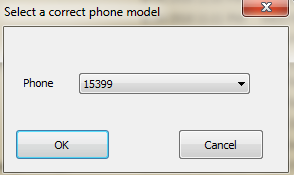
For File with version A34, select 15399 as model no to run the tool.
Oppo-a37f Flash Tool

How to Flash Oppo A37F:

1- Install Qualcomm Driver.
2- Make sure your device getting identified in device manager as Qualcomm HS-USB Diagnostic 9006.
3- Use Power or Volume up or combination of both as boot key.
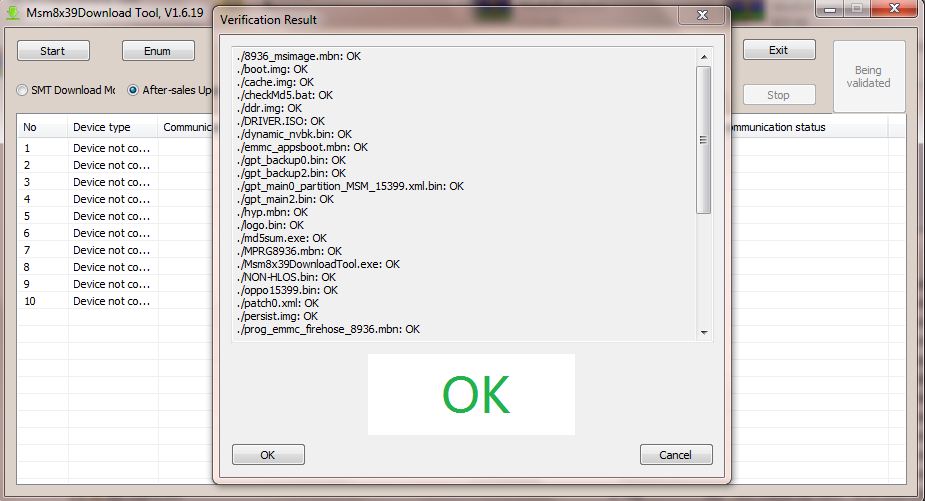
4- Run msm8x39 Download tool.
5- Click on verify, if it display message ok then you are ready to go.
6- Click on start to Flash.
7- Download Progress will be displayed.
8- When completed, Download complete will be displayed.

Filed Under: Android Flash File Database

Reader Interactions

Leave a Reply

You must be logged in to post a comment.

Primary Sidebar

Join Free Demo Classes!!!

Free demo classes
demo group

Recent Posts

  • Samsung S25 5G SM-S931B Flash File (Stock ROM)
  • Infinix Hot 60i X6728B Flash File (Stock ROM)
  • Infinix Hot 50 5G X6720 Flash File (Stock ROM)
  • Infinix HOT 30i X669D Dead Boot Repair File
  • Samsung S25 FE 5G SM-S731B Flash File (Stock ROM)

RMM Other website & App

training.repairmymobile.co

RMM Android App

Join Telegram Group

Repair My Mobile

Our Services

Privacy Policy

Term & Condition

Contact us

About us

Sitemap

Join Our Community

Facebook Youtube Instagram Linkedin Twitter Whatsapp

Contact

sidhartha@repairmymobile.co

+91-9060 2999 19

Mon-Sat:10:00am to 6.00pm

Official QR Code

Official Payment no.

Course: 8935939022

Call/WhatsApp: 91-893-593-9022

Paypal: vijaytech89@gmail.com


Note: Repair My Mobile
Official Payment no.

Bakarganj, Patna, Bihar 800004

Payment Partner

Copyright © 2025 RMM. Designed by RMM All rights reserved.

Click to Chat