Download Moto G7 XT1962-6 Flash File:
How to Flash Moto G7 XT1962-6:
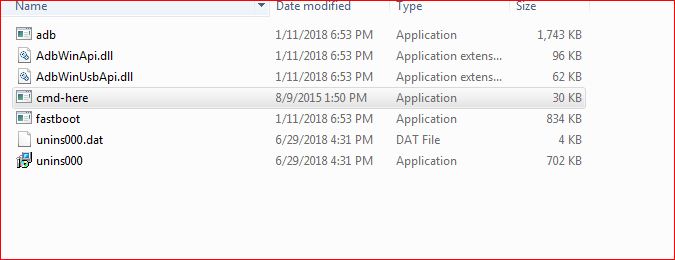
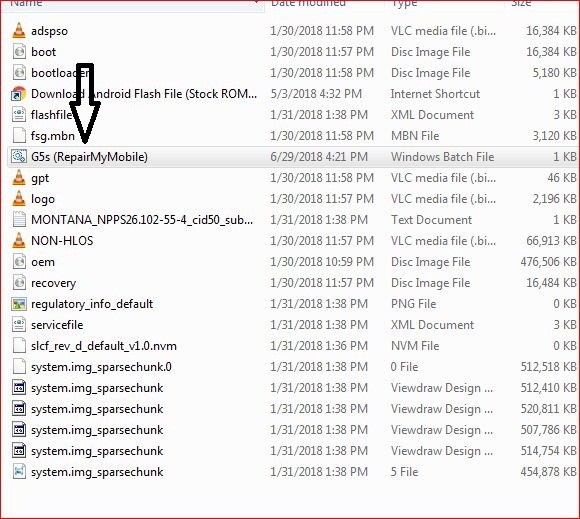
1- Download Moto G7 XT1962-6 Flash File & Extract, Place Moto G7 XT1962-6 Bat file in Firmware folder. 


![]()
![]()


Download Moto G7 XT1962-6 Flash File:
1- Download Moto G7 XT1962-6 Flash File & Extract, Place Moto G7 XT1962-6 Bat file in Firmware folder. 


![]()
![]()


Download Vivo S1 PD1913F Flash File:
Install MTK Driver.
1- Download the package & Extract SP Flash tool.
2- Out of the icon appearing, Double click on Flash_tool.exe
3- it will launch the tool on your PC, Click on Scatter-Loading appearing on the Right side of the tool.
4- Now, assign the firmware which will be in form “Android_scatter.txt”.
5- Click on Download to start flashing.
6- Switch off your Mobile and Connect it to PC by pressing Volume down or Volume up key if it fails then connect without pressing any key in off mode.
7- It will lead you to Successful Flashing
Download Moto G6 Play Flash File:
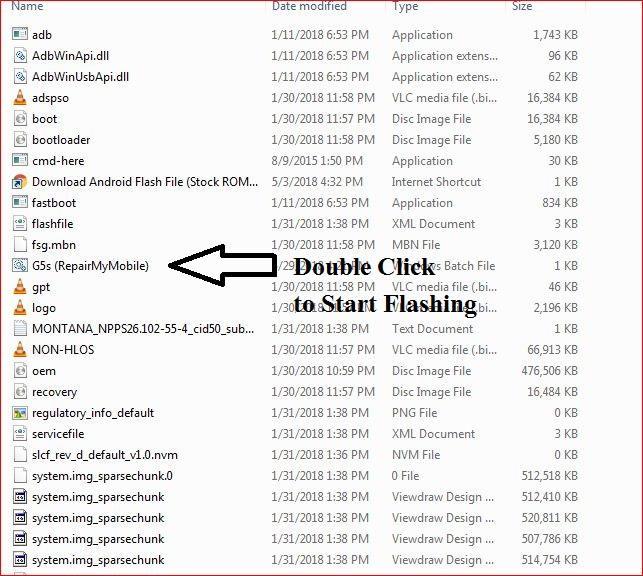
1- Download Moto G6 Play Flash File & Extract, Place Moto G6 Play Bat file in Firmware folder.


2- Install Moto Adb Tool.


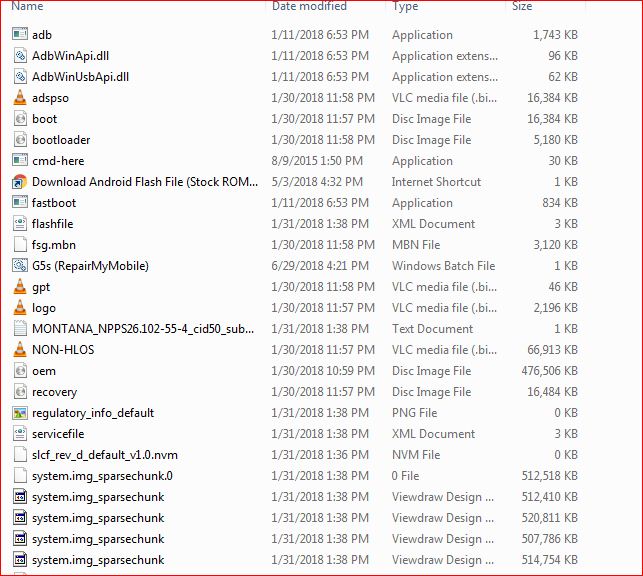
3- Now, Cut the file From Firmware Folder & Place it in Moto ADB Tool.

4- Switch off Phone & Hold Power + Volume Down. Then, connect phone to PC using USB cable, it will make Android Port in device manager.

![]()
![]()
5- Now, Double Click on Moto G6 Play RepairMyMobile bat file to start flashing.

Download Vivo Y12 PD1901BF Flash File:
Note:PD1901BF are same in Vivo Y12 & Y15.
Install MTK Driver.
1- Download the package & Extract SP Flash tool.
2- Out of the icon appearing, Double click on Flash_tool.exe
3- it will launch the tool on your PC, Click on Scatter-Loading appearing on the Right side of the tool.
4- Now, assign the firmware which will be in form “Android_scatter.txt”.
5- Click on Download to start flashing.
6- Switch off your Mobile and Connect it to PC by pressing Volume down or Volume up key if it fails then connect without pressing any key in off mode.
7- It will lead you to Successful Flashing
Infinity CM2 Dongle latest setup can be downloaded here.
The list gets updated, whenever new setup are rolled out.
While unzip, If any of the File ask for Password then enter the password mentioned below:
Password: 12345678 or 1111
1- CM2_AST_v1.06: Download
2- CM2_MT2_v3.19: Download
* CM2_MT2_v3.18: Download
*CM2_MT2_v3.16: Download
3- CM2_MTK_v1.58a: Download
4- CM2_QLM_v1.16: Download
5- CM2_RDA_v1.06: Download
6- CM2_RKT_v2.04: Download
* CM2_RKT_v2.03: Download
7- CM2_SCR_v1.07 : Download
8- CM2_SP2_v2.14 : Download
*CM2_SP3_v2.23 : Download
9- CM2_SPD_v1.27: Download
10- CM2_LGS_v1.03: Download
11- CM2MT2_boot-pack_2026-04_Setup_RMM: Download
* CM2MT2_boot-pack_v2.95: Download
12-CM2MT2_boot-pack_v2.47: Download
13- InfinityBox_update_pinout_v2.10: Download
14- InfinityBox_install_Updater_v1.05: Download
15- CM2SP2_boot-pack_v1.24: Download
16-CM2MT2_helper_v1.05: Download
17-CM2SP2_helper_v1.14: Download
18-CM2SP3_boot-pack_2026-04_Setup_RMM: Download
*CM2SP3_boot-pack_v2.45_2025_12_09_Setup_RMM:Download
*CM2SP3_boot-pack_v2.40_Setup_RMM: Download
19-CM2SP3_V2.49: Download
20-CM2SP3_V2.48: Download
21-CMSP3_V2.47: Download
22-PlatformDetector_V1.03: Download
23-Kleister_PDT_DumpTool_v1.14_Setup_RMM: Download
24-Kleister_PDT_DumpTool_v1.11_NoDongle_Setup_RMM: Download
Download Lava Z51 Flash File:
Install SPD Driver
1- Download the package & Extract Flash tool.
2- Out of the icon appearing, Double click on UpgradeDownload.exe.
3- It will Launch the tool on PC.
4- Click on Load Packed button & Select the Firmware with extension .pac at end.
5- Click on Downloading button which is at third position.
6- Switch off your Mobile & connect it to PC using Volume down key.
7- It will lead you to Successful flashing.