
• Skip to primary navigation
  • Skip to main content
  • Skip to primary sidebar
RMM logo 2
Get All Flash File
Menu
  • Home
  • Training
    • Offline Training
      • Kolkata
      • Kolhapur
      • Patna
    • L1: Basic Software & Hardware
    • L2: Advanced Software & Hardware
    • L3: Super Advanced UFS
    • iPhone Training
  • Solution
    • Flash File
    • Flash Tool
    • Driver
    • Combination
    • FRP
    • Root
    • Hard Reset
    • Hardware
  • Premium Flash File
    • Premium Flash File
    • Fast Download Server
    • Android Dump Files
  • Join Demo Classes
  • Log In
  • Home
  • Training
    • Offline Training
      • Kolkata
      • Kolhapur
      • Patna
    • L1: Basic Software & Hardware
    • L2: Advanced Software & Hardware
    • L3: Super Advanced UFS
    • iPhone Training
  • Solution
    • Flash File
    • Flash Tool
    • Driver
    • Combination
    • FRP
    • Root
    • Hard Reset
    • Hardware
  • Premium Flash File
    • Premium Flash File
    • Fast Download Server
    • Android Dump Files
  • Join Demo Classes
  • Log In
You are here: Home / Root / How to Root Samsung M30 using Odin tool

How to Root Samsung M30 using Odin tool

March 15, 2019

Samsung M30 can be rooted using odin tool.

Phone running on Binary 1 i.e. Android Oreo can be rooted.

How to check Binary in Samsung M30?

To check Binary Turn the phone into recovery mode by holding Power + Volume UP.

It will display like this in recovery mode M305FXXU1ASB2.

Here U1 represent Binary 1.

This process works only on Binary 1.

Tools & Software Required:

1- Samsung M30 Root File

2- Odin tool

3- Samsung USB Driver

Steps to Root Samsung M30 using Odin tool:

1- Install Samsung usb driver.

2- Run odin tool and select Root File in PDA under Odin tool.
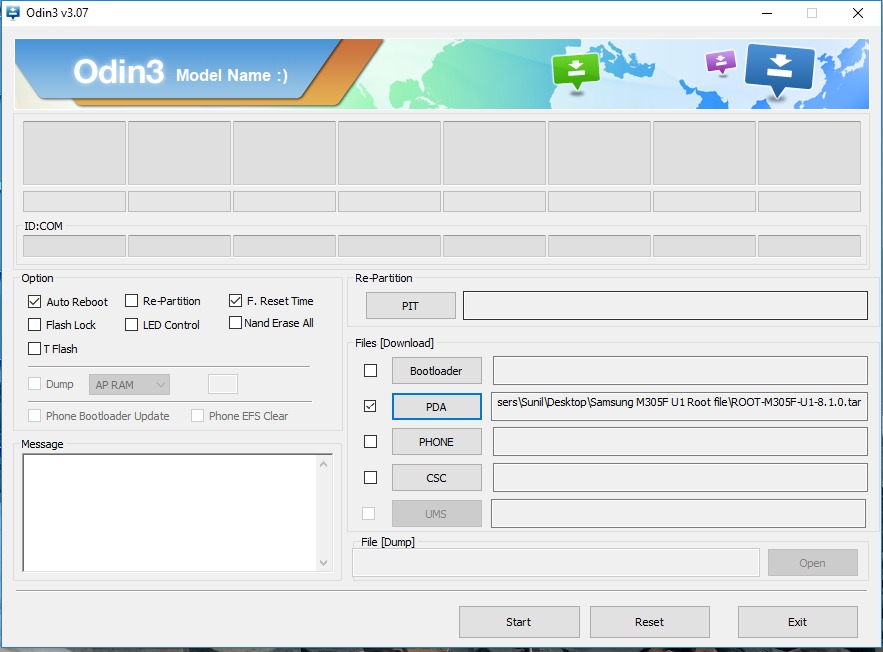
Samsung M30 Root

3- Connect phone in Download Mode. Press & Hold Power + Volume Up, Recovery mode will appear. Then using Volume Key, Select Reboot to Bootloader by pressing Power key.

4- Connect the phone to PC.

5- Flashing will start and the rooting will be done.

 

Filed Under: Root

Primary Sidebar

Join Free Demo Classes!!!

Free demo classes
demo group

Recent Posts

  • Infinix HOT 30i X669D Dead Boot Repair File
  • Samsung S25 FE 5G SM-S731B Flash File (Stock ROM)
  • Samsung Galaxy A17 5G SM-A176b Flash File (Stock ROM)
  • Samsung Galaxy F17 5G SM-E176b Flash File (Stock ROM)
  • Tecno Spark Go 2024 BG6m Flash File (Stock ROM)

RMM Other website & App

training.repairmymobile.co

RMM Android App

Join Telegram Group

Repair My Mobile

Our Services

Privacy Policy

Term & Condition

Contact us

About us

Sitemap

Join Our Community

Facebook Youtube Instagram Linkedin Twitter Whatsapp

Contact

sidhartha@repairmymobile.co

+91-9060 2999 19

Mon-Sat:10:00am to 6.00pm

Official QR Code

Official Payment no.

Course: 8935939022

Call/WhatsApp: 91-893-593-9022

Paypal: vijaytech89@gmail.com


Note: Repair My Mobile
Official Payment no.

Bakarganj, Patna, Bihar 800004

Payment Partner

Copyright © 2025 RMM. Designed by RMM All rights reserved.

Click to Chat