
• Skip to primary navigation
  • Skip to main content
  • Skip to primary sidebar
RMM logo 2
Get All Flash File
Menu
  • Home
  • Training
    • Offline Training
      • Kolkata
      • Kolhapur
      • Patna
    • L1: Basic Software & Hardware
    • L2: Advanced Software & Hardware
    • L3: Super Advanced UFS
    • iPhone Training
  • Solution
    • Flash File
    • Flash Tool
    • Driver
    • Combination
    • FRP
    • Root
    • Hard Reset
    • Hardware
  • Premium Flash File
    • Premium Flash File
    • Fast Download Server
    • Android Dump Files
  • Join Demo Classes
  • Log In
  • Home
  • Training
    • Offline Training
      • Kolkata
      • Kolhapur
      • Patna
    • L1: Basic Software & Hardware
    • L2: Advanced Software & Hardware
    • L3: Super Advanced UFS
    • iPhone Training
  • Solution
    • Flash File
    • Flash Tool
    • Driver
    • Combination
    • FRP
    • Root
    • Hard Reset
    • Hardware
  • Premium Flash File
    • Premium Flash File
    • Fast Download Server
    • Android Dump Files
  • Join Demo Classes
  • Log In
You are here: Home / Archives for Hard Reset

Hard Reset

Micromax Canvas Nitro 2 (E311) Hard Reset

April 6, 2018

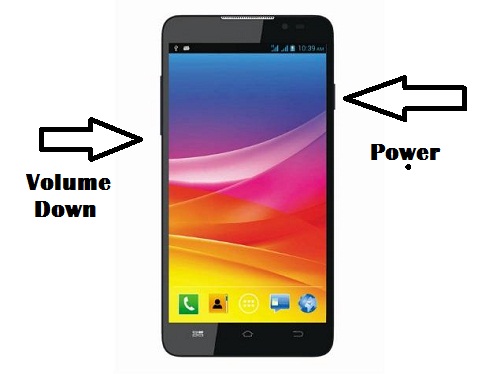
Micromax-Canvas-nitro-2

Hard Reset Steps
1- Charge your device upto 70 percent.
2- Switch off Mobile.
3- Press & Hold Power + Volume down + Volume up.
4- Select Recovery menu by pressing Volume up key.
5- Choose Wipe data/Factory Reset.
6- Select Yes-delete all user data.
7- Mobile will reboot and will be free from pattern.

About Mobile:-

• 5-inch Display
• 1.4 GHz Octacore Processor
• 2 GB RAM
• 16 GB ROM
• 13 MP Rear Camera
• Android Kitkat
Filed Under: Hard Reset

Micromax X1i Xtra Unlock using Miracle Box

April 6, 2018

Micromax X1i Xtra Hard Reset

1- Run Miracle box.
2- Switch off Mobile & Connect it to box by pressing power key.
3- Click on USB Scan to detect CPU of mobile.
4- or Manually select SPD TAb.
5- Click on Rd Unlock.
6- Select Choose type SPD600L.
7- Click on Start to generate password.

Filed Under: Hard Reset

ZTE MTS S100 Unlock by Infinity CDMA

April 6, 2018

Unlock Steps:-
1- Connect the Mobile to Infinity CDMA box.
2- Run the CDMA tool.
3- Select Model no i.e. ZTE S100.
4- Select port no as in Device Manager.
5- Select Services tab.
6- Click on SP-unlock.
7- It password will be reset.

Filed Under: Hard Reset

Lenovo A6000: Hang & White Display Solved

April 5, 2018

Steps to Remove Pattern:-

Issue which can be resolved through Hard Reset:-
a- Hang/ Stuck at Logo
b- White Screen Issue
c- Forget Password/ Unlock or Pattern
d- Working Slow

Lenovo A6000 Hard Reset using key Combination
1- Charge your Lenovo A6000 upto 70 percent, so that it accept the command of key combination.
2- Switch off the device
3- Press & hold Power and Volume up until screen changes to recovery mode.
4- Out of the option appearing, Select Recovery mode.
5- Using Volume up & down for navigation. Select Wipe Data/Factory Reset and enter it through Power key.
6- Now, Select Yes- delete all user data.
7- Your mobile will get reset and now it will be from pattern.

Filed Under: Hard Reset

Freedom 251 Hard reset/Pattern unlock

April 4, 2018

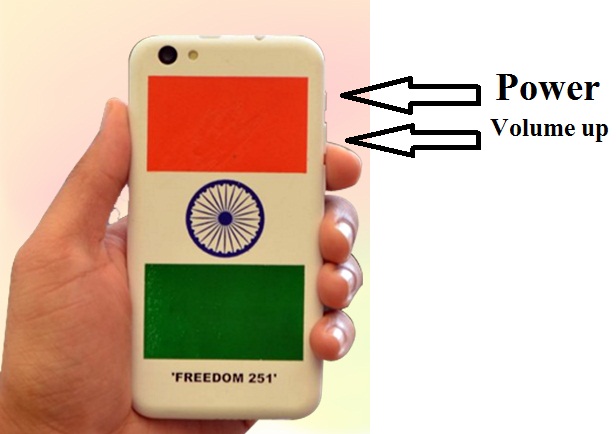
Freedom-251-hard-reset
If you had forget the pattern/password of freedom 251 or it has got Stuck/Hang on logo or forget GMAIL password, then hard reset is the optimal solution.
1- Freedom 251 must be 70 percent charged to perform reset.
2- Switch off your device.
3- Press & hold Power + volume up key until recovery menu appears.
4- Now, using volume keys select Wipe Data/Factory reset.
5- Now, choose Yes-delete all user data.
6- Your mobile will reboot and will be free from pattern.

Filed Under: Hard Reset

Micromax D320 Hard Reset Solution

April 4, 2018

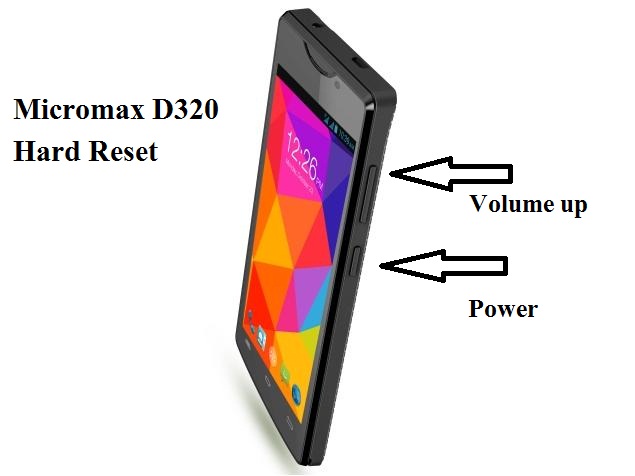
Micromax-D320-hard-reset
If you had forget the password/pattern of Micromax D320 or it has been stuck/hang on logo or White screen appears on booting. Then with the help of combination of keys you can Hard Reset your android device. Follow the steps:
1- Charge your device upto 70 percent.
2- Switch off device.
3- Press & hold Power + volume up until boot mode appears.
4- With the help of Volume up select Recovery mode and to enter press Volume down key.
5- Wait till Recovery menu appears.
6- Select Wipe Data/Factory reset using Volume keys and Power button for OK.
7- Using the set of keys as stated earlier in step 6, Select Yes-delete all user data.
8- Now, Mobile will be reset and After the reset has completed. Select Reboot System now.
9- Now, your mobile is free from pattern.

Filed Under: Hard Reset

  • « Go to Previous Page
  • Page 1
  • Interim pages omitted …
  • Page 14
  • Page 15
  • Page 16
  • Page 17
  • Page 18
  • Interim pages omitted …
  • Page 22
  • Go to Next Page »

Primary Sidebar

Join Free Demo Classes!!!

Free demo classes
demo group

Recent Posts

  • Infinix HOT 30i X669D Dead Boot Repair File
  • Samsung S25 FE 5G SM-S731B Flash File (Stock ROM)
  • Samsung Galaxy A17 5G SM-A176b Flash File (Stock ROM)
  • Samsung Galaxy F17 5G SM-E176b Flash File (Stock ROM)
  • Tecno Spark Go 2024 BG6m Flash File (Stock ROM)

RMM Other website & App

training.repairmymobile.co

RMM Android App

Join Telegram Group

Repair My Mobile

Our Services

Privacy Policy

Term & Condition

Contact us

About us

Sitemap

Join Our Community

Facebook Youtube Instagram Linkedin Twitter Whatsapp

Contact

sidhartha@repairmymobile.co

+91-9060 2999 19

Mon-Sat:10:00am to 6.00pm

Official QR Code

Official Payment no.

Course: 8935939022

Call/WhatsApp: 91-893-593-9022

Paypal: vijaytech89@gmail.com


Note: Repair My Mobile
Official Payment no.

Bakarganj, Patna, Bihar 800004

Payment Partner

Copyright © 2025 RMM. Designed by RMM All rights reserved.

Click to Chat
