• Skip to primary navigation
  • Skip to main content
  • Skip to primary sidebar
RMM logo 2
Get All Flash File
Menu
  • Home
  • Training
    • Offline Training
      • Kolkata
      • Kolhapur
      • Patna
    • L1: Basic Software & Hardware
    • L2: Advanced Software & Hardware
    • L3: Super Advanced UFS
    • iPhone Training
  • Solution
    • Flash File
    • Flash Tool
    • Driver
    • Combination
    • FRP
    • Root
    • Hard Reset
    • Hardware
  • Premium Flash File
    • Premium Flash File
    • Fast Download Server
    • Android Dump Files
  • Join Demo Classes
  • Log In
  • Home
  • Training
    • Offline Training
      • Kolkata
      • Kolhapur
      • Patna
    • L1: Basic Software & Hardware
    • L2: Advanced Software & Hardware
    • L3: Super Advanced UFS
    • iPhone Training
  • Solution
    • Flash File
    • Flash Tool
    • Driver
    • Combination
    • FRP
    • Root
    • Hard Reset
    • Hardware
  • Premium Flash File
    • Premium Flash File
    • Fast Download Server
    • Android Dump Files
  • Join Demo Classes
  • Log In
You are here: Home / Archives for Android Flash File Database

Android Flash File Database

LYF Jio LF-2401 Flash File (Stock ROM)

March 15, 2018


This content is for Premium Files Membership Plan: 1 Month , Premium Files Membership Plan: 6 Month , Premium Files Membership Plan: 1 Year; Unlock Tool & FRP Training, and Fast Download Server: 1 Month members only.

Filed Under: Android Flash File Database, Premium Flash Files

LYF Jio LF 2402 Flash File (Stock ROM)

March 15, 2018

Download LYF Jio LF 2402 Flash File:

  • LYF-LF2402S-000-02-06-310120
  • LYF LF 2402
  • LYF LF 2402 Mirror
  • SPD Flash tool.

How to Flash LYF Jio LF 2402:

Install SPD Driver
1- Download the package & Extract Flash tool.
2- Out of the icon appearing, Double click on UpgradeDownload.exe.
3- It will Launch the tool on PC.
4- Click on Load Packed button & Select the Firmware with extension .pac at end.
5- Click on Downloading button which is at third position.
6- Switch off your Mobile & connect it to PC using Volume down key.
7- It will lead you to Successful flashing.

Filed Under: Android Flash File Database

LYF Jio F30c Working Flash File (Stock ROM)

March 15, 2018

Download LYF JIO F30c Flash File to install KAIOS OS on your phone.

  • LYF_F30C-001-10-40-020322
  • LYF_F30C-001-10-38-291121   (Password Protected: Buy Now)
  • LYF_F30C-001-10-23-261119  (Latest 2020 Flash File)
  • QPST Tool

Note: Steps to Enable Diag Port in Jio Phones

Boot Key: Volume UP + Down

How to Flash LYF Jio F30c:

1- Download LYF F30c Flash file
2- Download QPST tool.
3- Install Qualcomm driver.
4- Run QPST tool.

5- Add new port. Connect phone holding boot key.  (Check device manager)
6- Click browse & select Stock ROM file.


7- Select Download and wait for the flashing to finish.

If flashing Fails or does not start, then there must be a gap between the words while choosing flash file. Rename the folder.

As in Qualcomm Flashing, there must be no gap in between the words.

jio new should be replaced by jio_new or jionew.


Filed Under: Android Flash File Database

LYF Jio LF2403 Working Flash File (Stock ROM)

March 15, 2018

Download LYF JIO LF2403 Flash File to install KAIOS OS on your phone.

  • LYF-LF2403-001-02-10-221019 (Latest 2020 Flash File)
  • Qflash Tool

Note: Steps to Enable Diag Port in Jio Phones

Boot Key: “*#”


LYF-LF-2403-Flash-File

How to Flash LYF Jio LF2403:

1- Download LYF LF2403 Flash file which consist of File, tool & Driver.
2- Install Driver
3- Connect Phone in Off mode holding boot key *# to cross check driver installation. It will make port named “Qualcomm HS-USB Diagnostics 9008”
4- It means driver has been installed successfully.
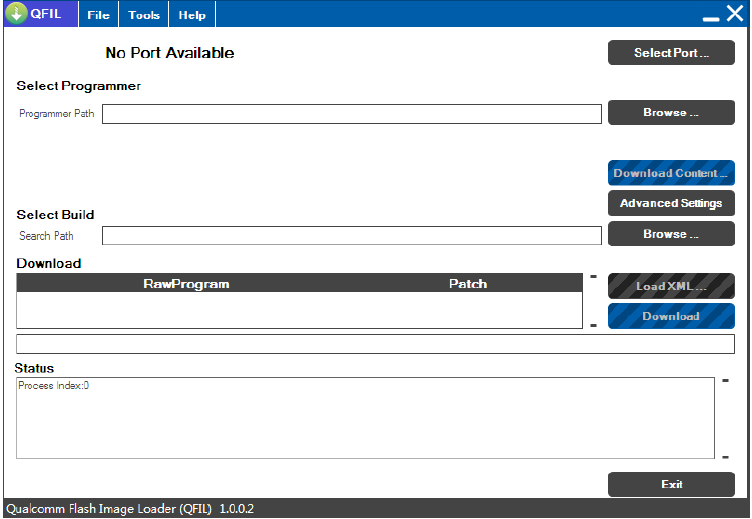
5- Install Flash Tool, which will install shortcut on Desktop named QFLASH Tool.


6- Connect phone & Click on Load Content and from Flash File Folder select Content.xml


7- It will show Port in tool.
8- Click on Download Content to start Upgrading.
9- Wait till done appears.
10- After upgradation, device will shift to download mode.
11- Disconnect Phone & reinsert battery.

If flashing Fails or does not start, then there must be a gap between the words while choosing flash file. Rename the folder.

As in Qualcomm Flashing, there must be no gap in between the words.

jio new should be replaced by jio_new or jionew.

Filed Under: Android Flash File Database

LYF Jio LF2403n Flash File (Stock ROM)

March 15, 2018

Download LYF Jio LF2403n Flash File to install KAIOS OS on your phone.

  • LYF-LF2403N-001-02-45-240221
  • LYF-LF2403N-001-02-27-180919 (Latest 2020 Flash File)
  • Qfil Tool

Note: Steps to Enable Diag Port in Jio Phones

Boot Key: “* & #”

LYF-LF-2403n-Flash-File

How to Flash LYF Jio LF2403n:

1- Download LYF LF2403n Flash file which consist of File, tool & Driver.
2- Install Driver
3- Connect Phone in OFF mode to cross check driver installation & Press Boot key * & # while connecting. It will make port named “Qualcomm HS-USB Diagnostics 9008”
4- It means driver has been installed successfully.
5- Install Flash Tool, which will install shortcut on Desktop named QFLASH Tool.


6- Connect phone & Click on Load Content and from Flash File Folder select Content.xml


7- It will show Port in tool.
8- Click on Download Content to start Upgrading.
9- Wait till done appears.
10- After upgradation, device will shift to download mode.
11- Disconnect Phone & reinsert battery.

If flashing Fails or does not start, then there must be a gap between the words while choosing flash file. Rename the folder.

As in Qualcomm Flashing, there must be no gap in between the words.

jio new should be replaced by jio_new or jionew.

Filed Under: Android Flash File Database

LYF Jio F50Y Working Flash File (Stock ROM)

March 15, 2018

Download LYF JIO F50y Flash File to install KAIOS OS on your phone.

  • LYF-F50Y-001-03-28-280322
  • LYF-F50Y-001-03-26-201221  (Password Protected: Buy Now)
  • LYF-F50Y-001-03-20-010421 (Password Protected : Buy Now)
  • LYF-F50Y-000-03-05-231019  (Latest 2020 Flash File)
  • Huiye Flash Tool

Note: Steps to Enable Diag Port in Jio Phones

Boot Key: Center Key or Volume Up+ Down + Power


LYF-F50y-Flash-File

How to Flash LYF Jio F50Y:

1- Download LYF F50Y Flash file which consist of File, tool & Driver.
2- Install Driver
3- Connect Phone in Off mode and Press Boot key Up Dpad+ Down Dpad or center key to cross check driver installation. It will make port named “Qualcomm HS-USB Diagnostics 9091”
4- It means driver has been installed successfully.
5- Install Flash Tool named Huiye Download Tool for Reliance (After Sales).

6- Click on Select and assign path of firmware
7- It will show 6 file in it, select Get_backup0 (You can select any of them).

8- it will then display the Flash File folder path
9- Connect phone which will enable Download button.

10- Software Upgrade starts.
11- On its completion, Violet area will turn into green and will display a message “Pass” .

If flashing Fails or does not start, then there must be a gap between the words while choosing flash file. Rename the folder.

As in Qualcomm Flashing, there must be no gap in between the words.

jio new should be replaced by jio_new or jionew.

Filed Under: Android Flash File Database

  • « Go to Previous Page
  • Page 1
  • Interim pages omitted …
  • Page 558
  • Page 559
  • Page 560
  • Page 561
  • Page 562
  • Interim pages omitted …
  • Page 580
  • Go to Next Page »

Primary Sidebar

Join Free Demo Classes!!!

Free demo classes
demo group

Recent Posts

  • Infinix Hot 60i X6728B Flash File (Stock ROM)
  • Infinix Hot 50 5G X6720 Flash File (Stock ROM)
  • Infinix HOT 30i X669D Dead Boot Repair File
  • Samsung S25 FE 5G SM-S731B Flash File (Stock ROM)
  • Samsung Galaxy A17 5G SM-A176b Flash File (Stock ROM)

RMM Other website & App

training.repairmymobile.co

RMM Android App

Join Telegram Group

Repair My Mobile

Our Services

Privacy Policy

Term & Condition

Contact us

About us

Sitemap

Join Our Community

Facebook Youtube Instagram Linkedin Twitter Whatsapp

Contact

sidhartha@repairmymobile.co

+91-9060 2999 19

Mon-Sat:10:00am to 6.00pm

Official QR Code

Official Payment no.

Course: 8935939022

Call/WhatsApp: 91-893-593-9022

Paypal: vijaytech89@gmail.com


Note: Repair My Mobile
Official Payment no.

Bakarganj, Patna, Bihar 800004

Payment Partner

Copyright © 2025 RMM. Designed by RMM All rights reserved.

Click to Chat