
SP Flash tool is used to flash MTK phones.
It can be used to unlock FRP in android phones using Manual Address and Tool DL image Failed can also be solved.
1- SP Flash tool with AUTH
2- SP Flash Tool for Keypad & Android Phones
1- SP Flash tool with AUTH: Download | Mirror
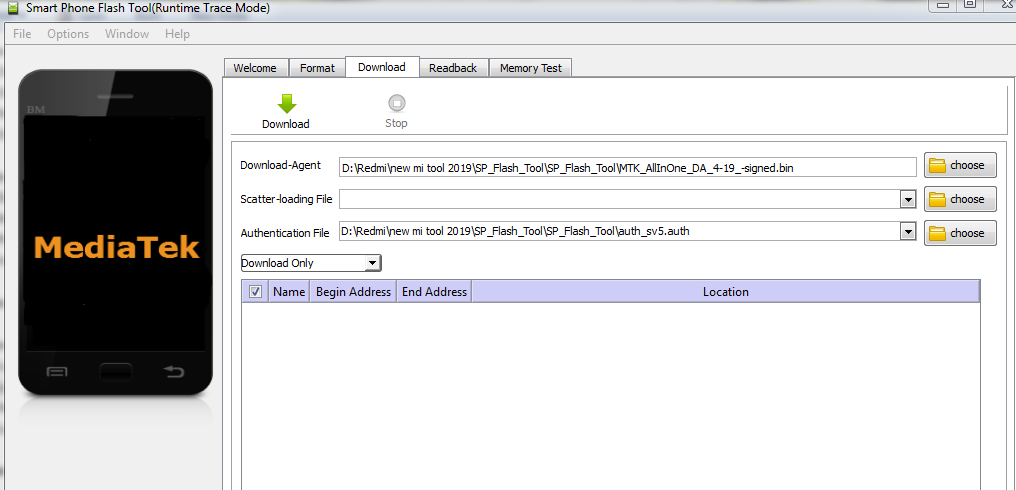
2- SP Flash Tool for Keypad & Android Phones:
Latest version of SP Flash tool is v5.2404 for V5
Latest version of SP Flash tool is v6.2404 for V6
- SP_Flash_Tool_v3.1024: Download
- SP_Flash_Tool_v3.1222: Download | Mirror
- SP_Flash_Tool_v3.1238: Download | Mirror
- SP_Flash_Tool_v3.1304: Download | Mirror
- SP_Flash_Tool_v3.1312: Download | Mirror
- SP_Flash_Tool_v3.1316: Download | Mirror
- SP_Flash_Tool_v3.1328: Download | Mirror
- SP_Flash_Tool_v3.1332: Download | Mirror
- SP_Flash_Tool_v5.1343: Download
- SP_Flash_Tool_v3.1344: Download | Mirror
- SP_Flash_Tool_v5.1352: Download
- SP_Flash_Tool_v5.1436: Download
- SP_Flash_Tool_v5.1452: Download
- SP_Flash_Tool_v5.1504: Download
- SP_Flash_Tool_v5.1512: Download
- SP_Flash_Tool_v5.1516: Download
- SP_Flash_Tool_v5.1520: Download
- SP_Flash_Tool_v5.1524: Download
- SP_Flash_Tool_v5.1528: Download
- SP_Flash_Tool_v5.1532: Download
- SP_Flash_Tool_v5.1548: Download
- SP_Flash_Tool_v5.1552: Download
- SP_Flash_Tool_v5.1604: Download
- SP_Flash_Tool_v5.1612: Download
- SP_Flash_Tool_v5.1616: Download
- SP_Flash_Tool_v5.1620: Download
- SP_Flash_Tool_v5.1624: Download
- SP_Flash_Tool_v5.1628: Download
- SP_Flash_Tool_v5.1628_M2: Download | Mirror
- SP_Flash_Tool_v5.1632: Download
- SP_Flash_Tool_v5.1636: Download
- SP_Flash_Tool_v5.1640: Download
- SP_Flash_Tool_v5.1644: Download
- SP_Flash_Tool_v5.1648: Download
- SP_Flash_Tool_v5.1708: Download
- SP_Flash_Tool_v5.1712: Download
- SP_Flash_Tool_v5.1716: Download
- SP_Flash_Tool_v5.1720: Download
- SP_Flash_Tool_v5.1724: Download
- SP_Flash_Tool_v5.1728: Download
- SP_Flash_Tool_v5.1736: Download
- SP_Flash_Tool_v5.1744: Download
- SP_Flash_Tool_v5.1752: Download
- SP_Flash_Tool_v5.1804: Download
- SP_Flash_Tool_v5.1812: Download
- SP_Flash_Tool_v5.1816: Download
- SP_Flash_Tool_v5.1820: Download
- SP_Flash_Tool_v5.1824: Download
- SP_Flash_Tool_v5.1828: Download
- SP_Flash_Tool_v5.1836: Download
- SP_Flash_Tool_v5.1844: Download
- SP_Flash_Tool_v5.1904: Download
- SP_Flash_Tool_v5.1912: Download
- SP_Flash_Tool_v5.1916: Download
- SP_Flash_Tool_v5.1924: Download
- SP_Flash_Tool_v5.1936: Download
- SP_Flash_Tool_v5.1944: Download | Mirror
- SP_Flash_Tool_v5.1952: Download
- SP_Flash_Tool_v5.2028: Download
- SP_Flash_Tool_v5.2032: Download | Mirror
- SP_Flash_Tool_v5.2104: Download | Mirror
- SP_Flash_Tool_v5.2208: Download | Mirror
- SP_Flash_Tool_v5.2316: Download | Mirror
- SP_Flash_Tool_v5.2404: Download | Mirror (V5: Latest)
SP flash tool Version-6
SP Tool Usage:-
SP Flash Tool is used to Flash MTK cpu based Mobile & Tablet.
1- Download the package & Extract SP flash tool.
2- Out of the icon appearing, Double click on Flash_tool.exe
3- it will launch the tool on your PC, Click on Scatter-Loading appearing on the Right side of the tool.
4- Now, assign the firmware which will be in form “Android_scatter.txt”.
5- Click on Download to start flashing.
6- Switch off your Mobile and Connect it to PC by pressing Volume down or Volume up key.
7- It will lead you to Successful Flashing.
