
This content is for Premium Files Membership Plan: 1 Year; Unlock Tool & FRP Training and Fast Download Server: 1 Month members only.

The system has been destroyed error getting always on Redmi A-Series model like (Redmi 7A, Redmi 6A, Redmi 9A, POCO M2 etc.).
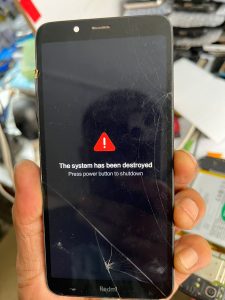
Lets see the step by step process that is mentioned below :
Step 1 : If you are getting the error mentioned above on xiaomi model, which is “The system has been destroted” firstly, You have to try to flash with Eng. file or EMMC change file that you can download it from our website
Eng file or EMMC change file
Step 2: If you are still facing the same issue after flashing, open back panel of the phone and check CPU number which would be mentioned like this SDM439-AB 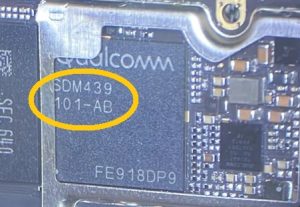
Step 3: Now, you need to replace the CPU but SDM 439 number should be same but alphabet letter need to be differ for example : if there is AB mentioned we need AA
Step 4: If you don’t know about the CPU, so you need to search on google or can take help from schematic diagram.
Step 5: After you replaced the CPU of the phone ,it will automatically start.
congratulations your problem is solved sucessfully.
Now, you can use it.
If you need more help watch this video mentioned below :
Download Nokia C01 Plus TA-1396 Flash File:
Note: You can flash only UMT and UFI Box
Boot Key: Volume Down
Download Nokia C01 Plus TA-1396 Flash file
1- Download the Firmware package & Extract file.
2- Open your UMT Unisoc or Avenger Spreadtrum tool.
3- After launching tool selelct XML Tab on tool.
4- Now select spreadtrum XML file under the flash file.
5- Switch off your Mobile and Connect it to PC by pressing Volume down key.
6- It will lead you to Successful Flashing.
Download Xiaomi 12S Ultra (China) Flash File:
WhatsApp for Mi Account: 893-593-9022
Download Xiaomi 12S Ultra (China) Flash File
1- Connect phone through USB cable to PC and unplug battery.
2- Short Test Point and connect battery.
3- Under Device Manger, port of Qualcomm HS USB QLoader 9008 port will appear.
4- Download & run MI Flash Tool
5- Place the Flash File on Desktop.
6- Assign the Folder path.
7- Click on refresh & then tap Flash button.
